Full Release Notes
BACKLOG
|
Apply detail layout on item create form |
Provide ability to set which detail layout to apply on module item create/edit forms
Logic
|
|||||||||||||||||||||||||
|
Secure to CartID and crm member cookies |
Set Secure attribute on the following cookies
|
|||||||||||||||||||||||||
|
Site Information (Site Globals) Enhancements/Fixes |
https://webinone.com/public-backlog-state/in-process/site-information-enhancements-fixes A few minor adjustment requests for Site Information module: dateTime field is still just a Date field. Is it possible to update this to select Time as well (as per dateTime field update throughout the rest of the admin) When setting an Alias (particularly a ‘Short Alias’) there is a validation that runs to check for conflicting names. However, this seems to look at ALL properties in ALL groups, not just the group you are in, which starts to make it harder to set up short aliases. For example: In a group called ‘Company Info’ with a property of ‘Licence’ you might have Short Alias of {{si.ci.l}} Then in another group called ‘Company Branding’ with a property of ‘Logo’ you might want Short Alias of {{si.cb.l}} . But the validation only checks against the last Liquid reference of l (which conflicts) rather than the whole path (which is unique). The textarea field type is labeled as Text (Multiple), but I think it should be Text (Multiline). Liquid: It would be great to recursively nest site information items. To do so they would need to render liquid, which they currently don’t. For example if I have a site information company name and I want to nest that in a copyright notice so the client can just embed the copyright notice at the end of their blog posts. Please make liquid work inside site information fields. Other: 1. Ability to shuffle items once added. 2. Add a checkbox in the Group level determining whether that group’s properties are added to the Component toolbox or not.
3. HTML Layouts for formatted output. |
|||||||||||||||||||||||||
|
Analytics Dashboard - Google Data Studio (now Looker Studio) Option |
https://webinone.com/public-backlog-state/in-process/analytics-dashboard-google-data-studio-option Added Looker Studio Embeded |
|||||||||||||||||||||||||
|
Create Default JS Validation |
https://webinone.com/public-backlog-state/in-process/create-default-js-validation Default validation for mandatory fields Add the option on the Settings tab "Enable Default JS Validation". If this option is enabled, `data-cms_validation` will be added on the form tag and add a validation js script in the head. If a form element is not valid it will add class "validation-error" on the element and if valid "validation-success" will be added. |
|||||||||||||||||||||||||
|
File Manager: Show Date + List View in "Slide-In" |
https://webinone.com/public-backlog-state/in-process/file-manager-show-date-list-view-in-slide-in The list view in file manager should include the date of the upload like in BC to make it easier to handle e.g. media files, which are updated on a regular basis. The slide-in file manager (when selecting media or other files from within module item) should have an option for list view. It makes it hard to select files with similar long file names in thumbnail view. |
|||||||||||||||||||||||||
|
Custom Reports (further refinement) |
https://webinone.com/public-backlog-state/in-process/custom-reports-further-refinement "Select/Deselect All" option for these areas to expand our custom report filtering results |
|||||||||||||||||||||||||
|
File Upload On Mobile Devices |
https://webinone.com/public-backlog-state/in-process/file-upload-on-mobile-devices The ability to upload files to the file manager from mobile devices. |
|||||||||||||||||||||||||
|
Custom Module: Remove Downloadable Media Checkbox |
When adding a ‘Media’ field type in a Custom Module the “Downloadable file” option is automatically added under the field. I like to see this removed as it would surely not be used all that often and creates confusion and clutter in the interface. Instead, could it be added as an option when setting up the Media property? So we can control whether or not it’s displayed: |
|||||||||||||||||||||||||
|
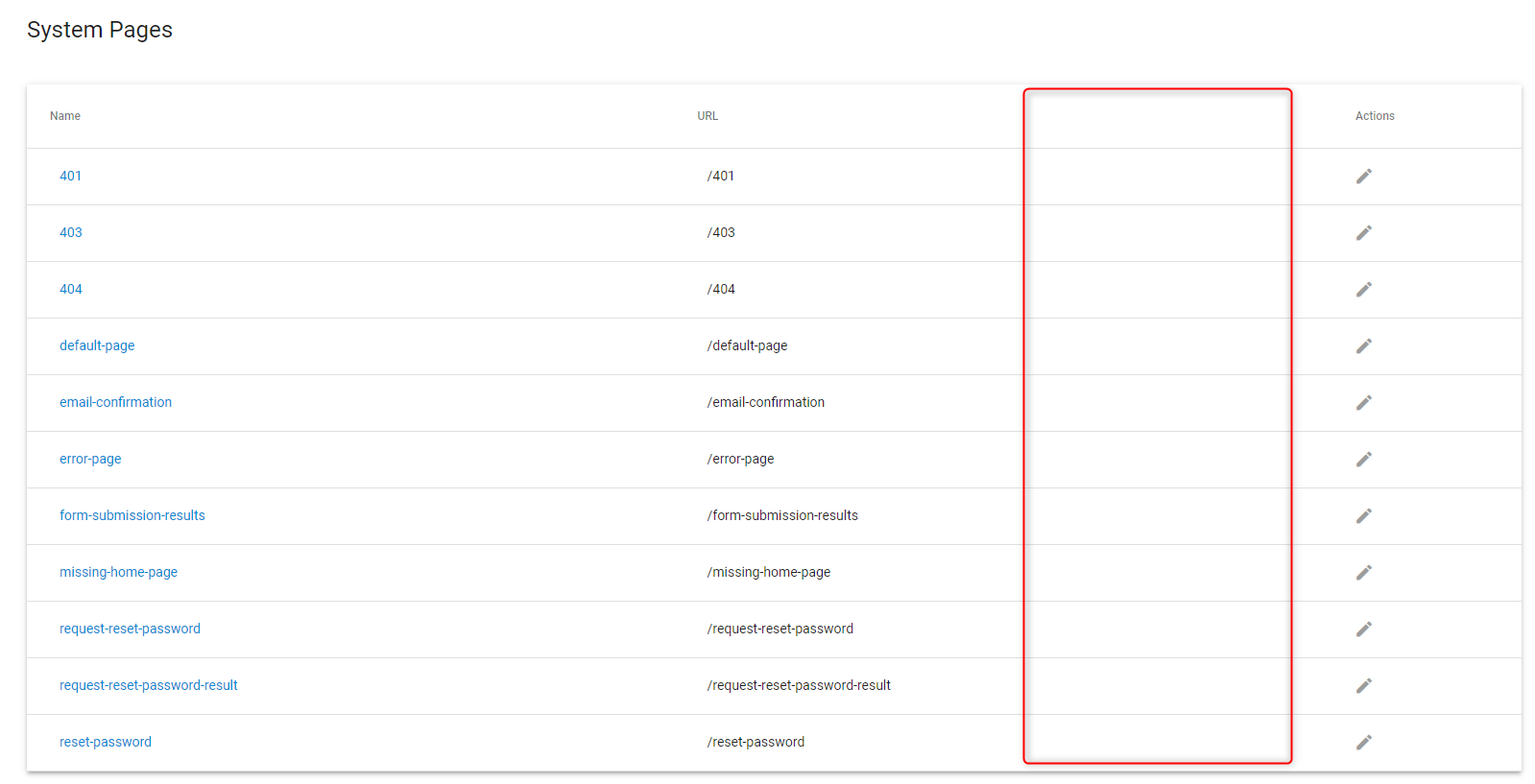
UX/UI Request: List Template Used Against System Pages + enable/disable system pages |
Would be nice to see at a glance the template that is applied to system page. I’d image this would be a simple fix too. System pages can now be disabled via an 'Enable' checkbox. Disabled pages will resolve to the 404 page. If the 404 page is disabled, a blank page will resolve (with a 404 document status) |
|||||||||||||||||||||||||
|
Google Analytics Global Time Selector |
https://webinone.com/public-backlog-state/in-process/google-analytics-global-time-selector The ability to change all time periods at once in the analytics overview |
|||||||||||||||||||||||||
|
UX Improvement - “Global Component Builder” and “Global File Manager” |
1) https://webinone.com/public-backlog-state/in-process/ux-improvement-global-component-builder Anywhere in the admin console I press something like ‘Shift + Control + C’ on Windows (Shift + Command + C on Mac). A modal appears with the same functionality as the component draw you get it various modules. I always find myself needing to build a component in my IDE, but I have to go to the admin console, then to something like pages to be able to pull to create a component. Would be nice if we could just access a builder anywhere in the admin console. 2) Likewise, also add ‘Shift + Control + F’ on Windows (Shift + Command + F on Mac) to open the File Manager anywhere in the admin. |
|||||||||||||||||||||||||
|
Fields/columns Added To The E-commerce/Gift Vouchers Module |
Please add the following fields/columns to the gift voucher module:
|
|||||||||||||||||||||||||
|
Add “Delete All Items” toggle for Admin User Roles |
Case: To stop the ability for Admin Users to be able to accidently delete all module items. Can we get an extra flag added in the Admin User Roles that gets generated for each custom module or anywhere this appears Have it unchecked by default. Else, everyone will forget to configure it until it’s too late. So, essentially, ‘Delete All’ function is for Partner/Reseller admins only, unless configured otherwise. |
|||||||||||||||||||||||||
|
Custom Modules Properties: Making Mandatory Items More Visible |
When you check the custom properties of any custom module and want to know which ones are defined as mandatory, you need to click each one into edit mode. It would be nice if we could see which ones are mandatory right in the properties list. |
|||||||||||||||||||||||||
|
Module Item Notes: Option To Display Notes More Prominently |
Module item notes are great! But they are a bit small and users can miss them. Sometimes I want to add big bold notes that will give users instructions that they can’t miss. Issues: Currently module field notes are displayed in a small icon that needs to be hovered to see them. Clients may miss this subtle icon. Solution: Add a check box that will allow notes for a module field to be displayed inline: |
|||||||||||||||||||||||||
|
Add Release And Expiry Dates/Time To Menu Items |
https://webinone.com/public-backlog-state/in-process/add-release-and-expiry-dates-time-to-menu-items When sites are being updated, it is common to have a release time for updates. This release time may be at an inconvenient time for the developer. Frequently site updates will mean new sections of the site are being added or removed. To add and remove sections of the website it would be great to have the ability for new sections of the menu to be automatically released, and old sections of the menu to expire and be hidden. I propose adding the ability to enable release and expirty date/times to menu items. Similar to custom modules, we would have the ability to enable release and expiry under settings for the menu. |
|||||||||||||||||||||||||
|
Admin UI/UX Adjustments |
https://webinone.com/public-backlog-state/in-process/admin-ui-ux-adjustments 1) Add the item preview icon at the top of item edit pages so it’s readily accessible (the current Preview link is often out of reach when you want it). 2) Add a new sticky box with the Components and File Manager buttons on the create/edit module item page and also to places where it’s not currently available, such as; ‘System Pages’, ‘System Emails’ and anywhere an editor region is present like; Form layouts, email/autoresponder/workflow contents. 3) This new sticky box will also include the ‘Properties’ icon along with the ‘File Manager’ and ‘Component Manager’ icons in the editor pages for module Layouts. |
|||||||||||||||||||||||||
|
Create Folder Within Image/Media Manager |
https://webinone.com/public-backlog-state/in-process/create-folder-within-image-media-manager The ability to add a folder within Media/Image Manager |
|||||||||||||||||||||||||
|
Custom Module: Custom Properties. Rename "Text (String)" To "Single Line Text" Or "String (Text)". |
When creating lots of fields it's time consuming to click on the dropdown and scroll to the correct property. It would be nice if you could just push "s" to jump to string. Ideally every type of field would have a name with a unique starting letter so you could use keys to jump to them. Also recommend having string as the default field type when creating a field. |
|||||||||||||||||||||||||
|
1 hour refresh issue fix |
Fix losing updated data on saving operations when the actual token is expired. 1) Presave to session storage flow
|
|||||||||||||||||||||||||
|
Feature flags changes (v6.10) |
Apply the following changes to feature flags:
This feature flag switches the logic of saving module items, pages, etc. New logic will take less time to load any page after saving if you have many module items. The opposite part of this logic is the increasing time of any import module item process for sites that have many module items. It is applicable to the sites with a lot of module items created. |
|||||||||||||||||||||||||
|
Internet connection checker (UI) |
Add internet connection monitoring in the admin panel. If internet connection is lost - show message: "No Internet Connection" |
|||||||||||||||||||||||||
|
Liquid Date Formatting Issue fix |
Liquid Date Formatting Issue An issue with the Liquid date formatting filter (`| date`) has been identified. Below is a description of the issue, possible conflicts with existing implementations, and our proposed fix. ISSUE: When using the date filter syntax of `%I` for outputting the hour in 12-hour time with a leading zero (eg: `{{ "now" | date: "%I" }}`) the output will be incorrect for the hour of 12 (am or pm), in that it will output `00` instead of `12`. This is purely a formatting issue for this particular filter syntax and does not affect Liquid date calculations. CONFLICTS: We don't anticipate this fix will negatively impact any current implementations of this feature - on the contrary, any date-related Liquid implementations using the 12-hour filter output would currently be breaking under the conditions described in this issue and therefore, the fix will correct those implementations. In the rare case that you have an implementation relying on the hour of 12, in 12-hour time, with leading zero output, being "00" (which is incorrect), you will need to adjust your code to allow for this correction. PROPOSED FIX: As there is a small chance of this change affecting existing implementations and due to the issue's low criticality, we will add the feature flag "Apply fix to liquid date filter". The fix itself will then be rolled out as a hotfix to all sites during their data center non-business hours. No downtime is expected for the admin or site front-ends during this hotfix and a notification will be posted once it has been fully completed across all data centers. FEEDBACK: If you have any questions, feedback, or concerns regarding this fix, please reach out to support via a support ticket before the proposed fix date is reached. NOTES: The similar `| format_date` Liquid filter does not suffer from the described issue and is therefore unaffected by this fix and continues working normally. |
|||||||||||||||||||||||||
|
Improve workflow sending logic based on plan restrictions |
1) Fix the ability to send custom workflows if the site plan is lower than Pro. When the site plan is Business or Essential (lower then Pro):
2) Improve displaying of the workflows with forbidden emails applied on workflow listing Show label for workflows with custom email applied Pattern
Label
Color
Example
3) Show inactive email field on workflows on plans lower than pro
|
|||||||||||||||||||||||||
|
Empty tables UI improvements - Admin |
Empty tables logic/UI Show message "Nothing here yet" instead of empty table if no searching-filtering is applied Show empty table if any search or filtering is applied to the list view |
|||||||||||||||||||||||||
|
Case sensitivity FTP improvement |
1) Pages and folders case change on migration Description: On migration we would collect all url slugs of "Page" and "Folders" module items that has at least one uppercase letter and convert them to lowercase. Then we will rename the files and folders for the following items accordingly in the "/Content/Pages" folder 2) Liquid incorrect paths change on migration Places to be operated:
Liquid tags to be fixed (example regexp: https://dotnetfiddle.net/t8939t ):
Description: On migration we would scan page content, templates, snippets, module layouts, etc for using liquid include and component with custom layout path tags and replace paths to match case-sensitive actual path (for example if we found {% include "/Content/Pages/testfolder/TestIncludeFile.inc" %} we will fix it to match actual path - /Content/Pages/TestFolder/TestIncludeFile.inc and it will become {% include "/Content/Pages/TestFolder/TestIncludeFile.inc" %}) 3) JS, CSS, and image URLs change on migration Places to be operated:
HTML tags to be worked with (example regexp: https://dotnetfiddle.net/t8939t ):
Description: Same as in previous but working with html tags insted of liquid 4) Improve the logic of operation files and folders in the "/Content/Pages" folder Description: Any files that would be created in the "/Content/Pages" folder should be lowercase from now on. If they would be created not fully lowercased - they would be ignored. So if you create a file Test.html in the folder /Content/Pages/ - it WOULD NOT create a page with slug Test. But if you create a file test.html in the folder /Content/Pages/ - it WOULD create a page with slug test. Also renaming test.html to Test.html would unlink the Test.html file from the "/test" page. If you save the "/test" page from the admin UI it will create a test.html file and it will be linked with the page (the main rule is that the page slug is fully equal to the file name (case sensitive)). Any operations with the Test.html would not be reflected in any way on the pages at all. However, if you rename it back to the test.html - it will be linked back to the page "/test" but without content sync (it means that if you rename test.html to Test.html, change content in Test.html and rename it back to test.html - the content of the page "/test" would not be the same as in the test.html file. The first save of the file or page would determine - what content would be saved to opposite entity in that case - if the save file - page content would be updated. If the save page - the file content would be updated). 5) System and custom email file name fix Description: On migration we would change all file names that reflect all system and custom (workflow, followup, abandoned cart) emails so it is the same as the email Name (right now if you have a workflow email with the name "My Custom Email" - it has a file on FTP with the name "my-custom-email.html". This step will rename the file to become "My Custom Email.html"). NOTE: So if you already have the backup version of the site you are working with then just make a fresh copy right after your site would be updated to the v6.10 More documentation on this change can be found here. |
|||||||||||||||||||||||||
|
Angular 15 refactoring |
|
|||||||||||||||||||||||||
|
Event calendar month by URL accessibility |
Add month-year accessibility via URL to the event calendar URL parameters names:
If page requested via URL like
Calendar should open the appropriate year and month view |
|||||||||||||||||||||||||
|
File Manager - move file |
Ability to move files in file manager via context menu and drag and drop. DESIGN: |
|||||||||||||||||||||||||
|
File Manager - move folder |
Ability to move folders in file manager via context menu and drag and drop. DESIGN: |
|||||||||||||||||||||||||
|
Pagination refactoring |
Rework all paginations on all admin UI layouts to work through server side. This would allow optimizing a list load speed on all layouts that previously used client-side pagination.
Added pagination to the following list layouts:
|
|||||||||||||||||||||||||
|
System emails a-z sorting by name |
All system emails now sorted alphabetically |
|||||||||||||||||||||||||
|
"New Item" button name standardization |
"New Item" button text was changed from ADD to CREATE throughout the admin. |
|||||||||||||||||||||||||
|
Case insensitive search in admin UI |
Search in admin UI now works in case insensitive manner |
|||||||||||||||||||||||||
|
Email data widget improvement |
Now Email data widget would show only data that corresponds to current type of email (workflow email, follow-up email or abandoned cart notification email) |
BUGFIX
|
Custom module - filter by Author |
SLACK: Go to Components -> Choose custom module with Author -> Filter by Author -> ONLY In code should be display ID, not name https://prnt.sc/fShwUL0TmW8a Should be |
|
Secured Content - twice click on one page |
Go to some Secure Zone -> Secure Content -> click on several page and use ctr/command and click twice on one page -> after that move pages from left window in right window - not all pages moved https://drive.google.com/file/d/17O5OyXaUY9yQTp-k1BBBi-mQ293lYaoa/view?usp=sharing https://treepl.slack.com/archives/C023SU50YQP/p1656082426131989 |
|
Categories - Missing parent Category names |
BUG: Missing parent Category names https://the-second-site-owner.trialsite.co/admin/module/1827/item/2053/settings?view=list-view&pageIndex=0&moduleId=1827&parentId=1827 SLACK: |
|
custom module - delete item with custom redirect |
SLACK:
|
|
Custom module - broken list |
|
|
Products - InStock value doesn't show in frontend after import |
|
|
Custom module - import with invalid parent URL |
|
|
Custom reports - results don't show the CMR group values |
|
|
System email - Restore Admin User Password |
When resetting the user admin password, the {{this.User}} model from which the “FIrst Name” is taken in the letter is not available https://prnt.sc/L0ELMfsrWu21 https://prnt.sc/iLDD43t9vqu7 |
|
Using Cases component you can not filter "equally" by form name |
|
|
Orders - discount prices |
|
Internal infrastructure overhaul
-
Internal infrastructure overhaul which presumes servers, storage, FTP upgrade and source code transition from .NET 5 to .NET 6.
Overall CMS performance and secuirty enhancements are expected with this release.
Analytics Dashboard - Google Data Studio Option
-
DESCRIPTION:
Ability to replace the current analytics dashboard with a client’s own Google Data Studio embed. Allowing vastly customisable analytics and other reporting views directly in the Treepl website admin.What is Google Data Studio:
Transform your raw data into the metrics and dimensions needed to create easy-to-follow reports and dashboards. You can create meaningful, shareable charts and graphs with...
- Admin Panel
- Analytics
Google Analytics Global Time Selector
- The ability to change all time periods at once in the analytics overview
- Analytics
- WebinOne Portal
UX Improvement - “Global Component Builder”
-
Anywhere in the admin console I press something like Shift + alt + c .
A modal appears with the same functionality as the component draw you get it various modules.
Why???
I always find myself needing to build a component in my IDE, but I have to go to the admin console, then to something like...
- Admin Panel
- UI/UX
Add “Delete All Items” toggle for Admin User Roles
-
Case: To stop the ability for Admin Users to be able to accidently delete all module items.
Can we get an extra flag added in the Admin User Roles that gets generated for each custom module or anywhere this appears
Have it unchecked by default. Else, everyone will forget to configure it until it’s too late. So, essentially, ‘Delete...
- Admin Panel
- UI/UX
Add Release And Expiry Dates/Time To Menu Items
- When sites are being updated, it is common to have a release time for updates. This release time may be at an inconvenient time for the developer. Frequently site updates will mean new sections of the site are being added or removed. To add and remove sections of the website it would be great to have the ability for new...
- Admin Panel
- Menus
Admin UI/UX Adjustments
-
For most modules when adding an item there is a “Save” or “Save and New” button. I would like the “Save and New” button to be there even when editing an item not just when creating a new item.
In regards to the “Save” or “Save and New” buttons I’ve been wondering if it might also be...
- UI/UX
Create Folder Within Image/Media Manager
-
The ability to add a folder within Media/Image Manager
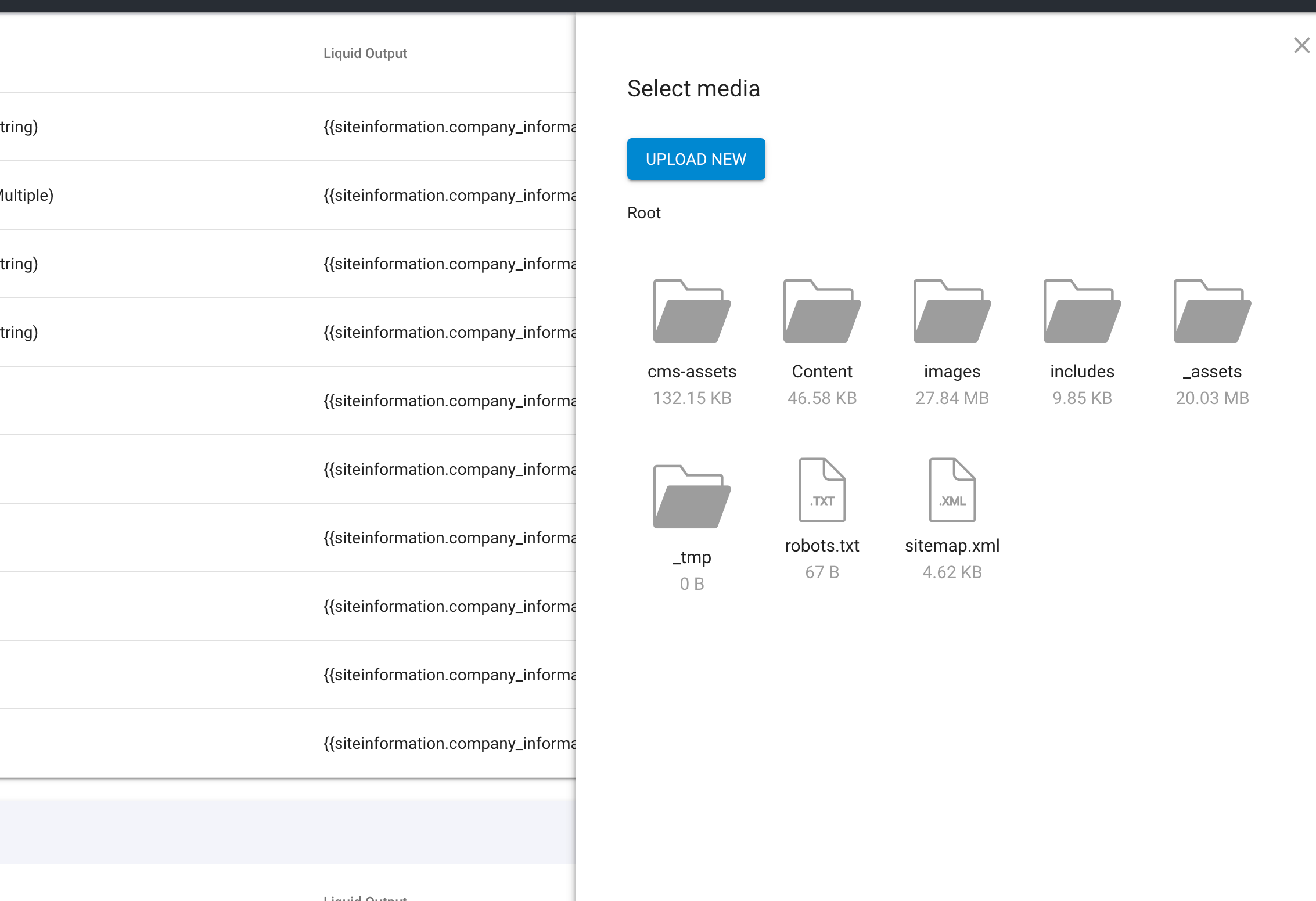
- File Manager
Custom Module: Custom Properties. Rename "Text (String)" To "Single Line Text" Or "String (Text)".
- When creating lots of fields it's time consuming to click on the dropdown and scroll to the correct property. It would be nice if you could just push "s" to jump to string. Ideally every type of field would have a name with a unique starting letter so you could use keys to jump to them. Also recommend having string...
- Custom Modules
Custom Module: Remove Downloadable Media Checkbox
-
When adding a ‘Media’ field type in a Custom Module the “Downloadable file” option is automatically added under the field.
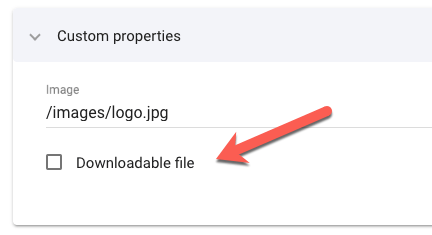
I like to see this removed as it would surely not be used all that often and creates confusion and clutter in the interface.
Instead, could it be added as an option when...
- Custom Modules
Custom Modules Properties: Making Mandatory Items More Visible
-
When you check the custom properties of any custom module and want to know which ones are defined as mandatory, you need to click each one into edit mode:
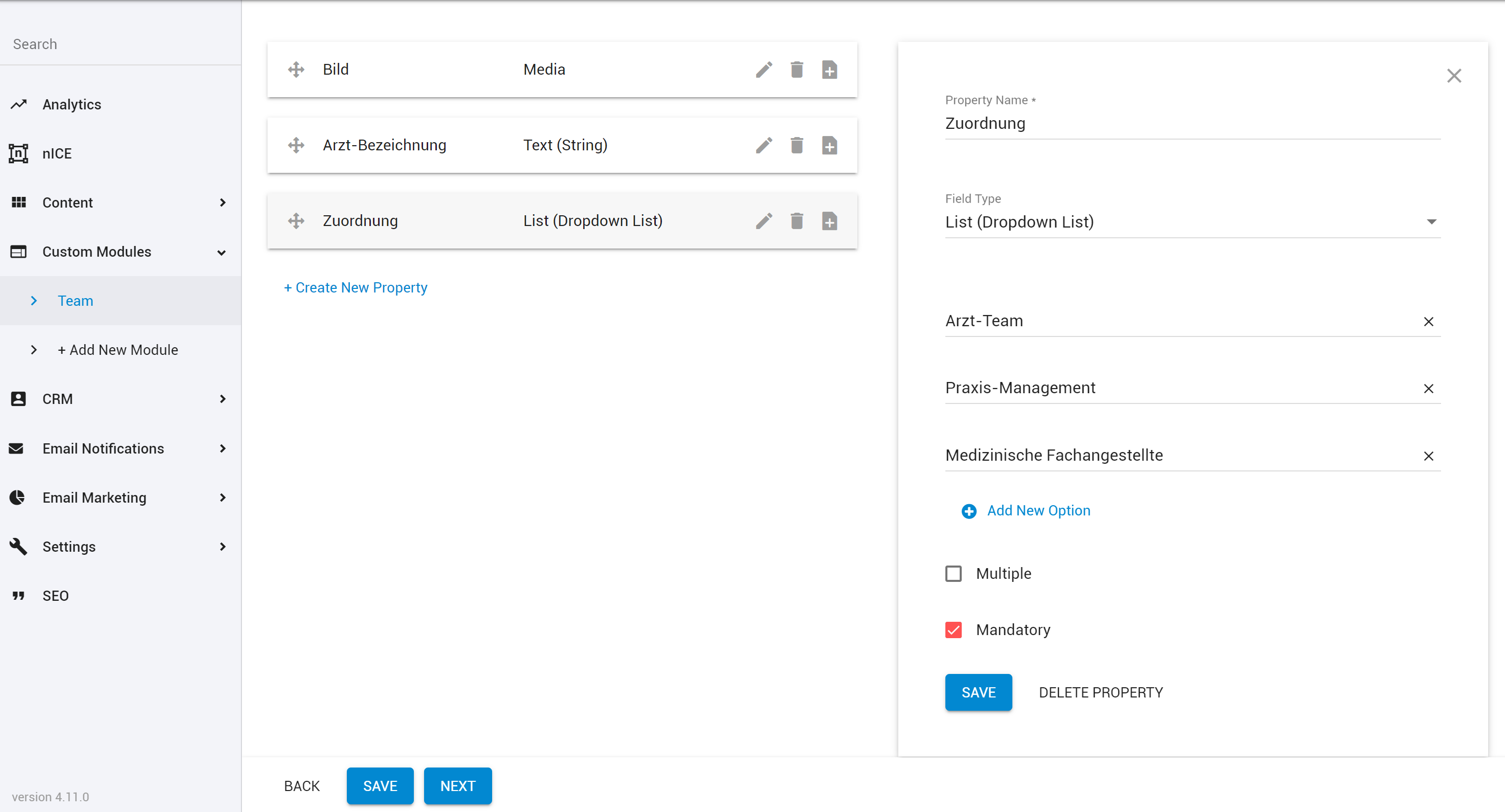
It would be nice if we could see which ones are mandatory right in the properties list.
- Custom Modules
Custom Reports (further refinement)
-
Select/Deselect All option for these areas to expand our custom report filtering results
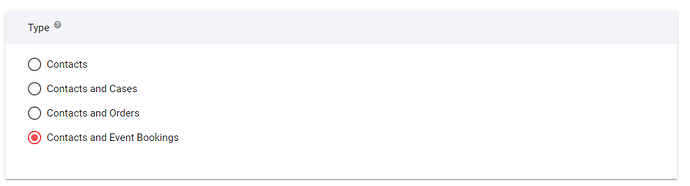
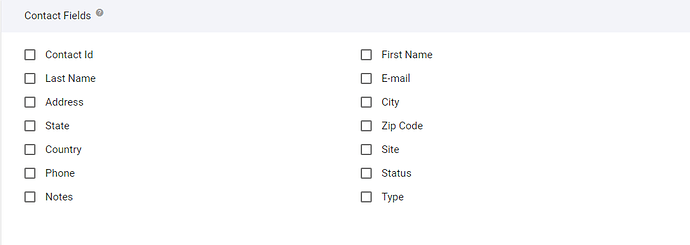
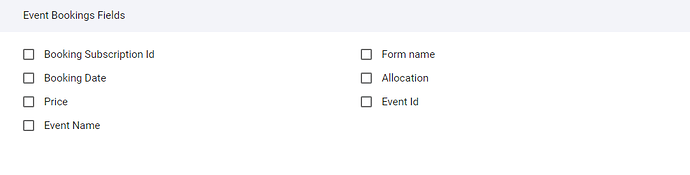
- UI/UX
Fields/columns Added To The E-commerce/Gift Vouchers Module
-
Please add the following fields/columns to the gift voucher module:
- Date Purchased
- Purchasers Name
- Order Number
- Link to order on list view
- Ecommerce
File Manager: Show Date + List View in "Slide-In"
-
The list view in file manager should include the date of the upload like in BC to make it easier to handle e.g. media files, which are updated on a regular basis.
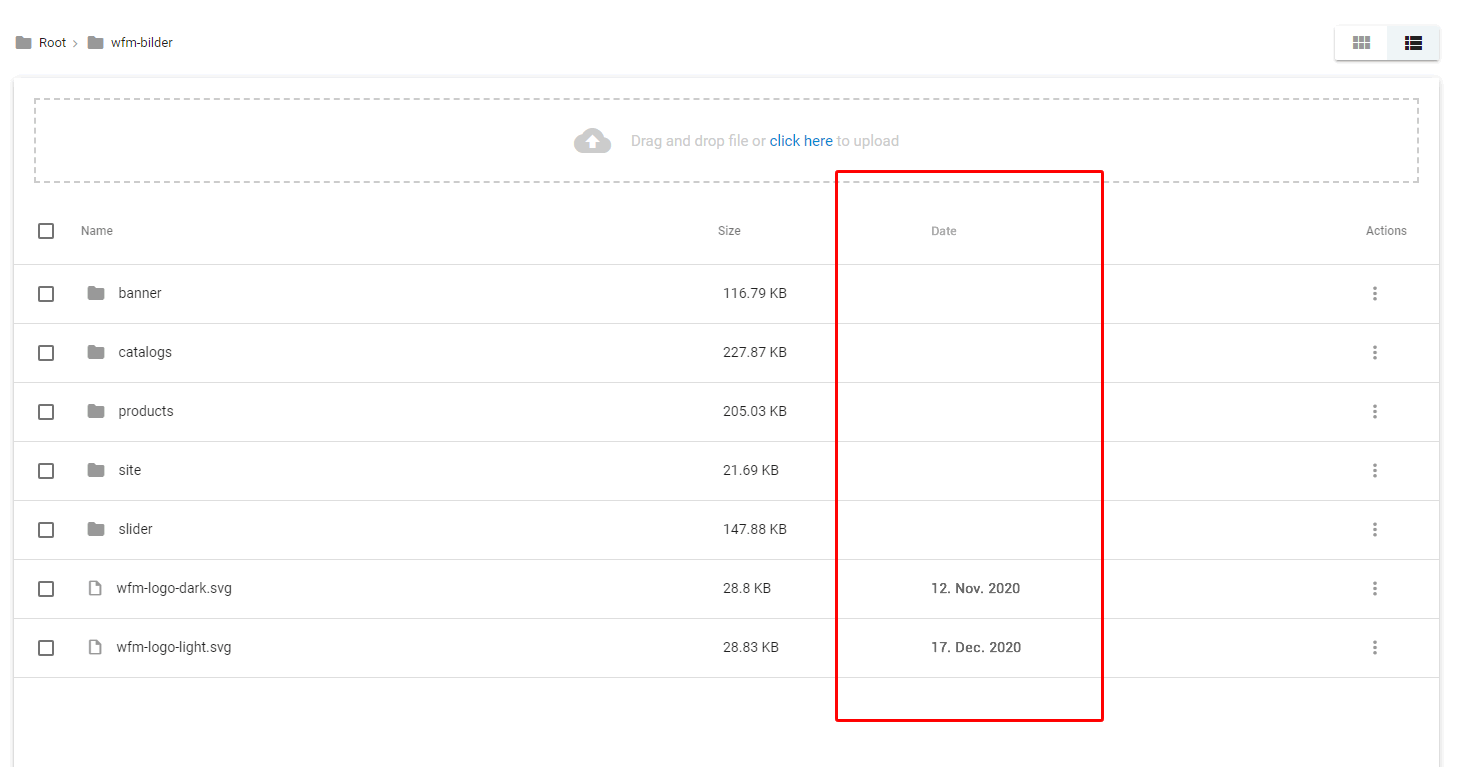
The slide-in file manager (when selecting media or other files from within module item) should have an option for list view. It makes...
- File Manager
File Manager to better display images with transparent backgrounds
-
DESCRIPTION:
Enhancement for the File Manager (and Media fields) to better cater for, and display, transparency in image files (such as PNGs and SVGs) so that the thumbnails of transparent images with white areas don’t become invisible.DETAIL:
I’ve often come across the issue of not being able to properly see some images files in the File Manager when they...
- File Manager
File Upload On Mobile Devices
-
The ability to upload files to the file manager from mobile devices.
- Admin Panel
- File Manager
- UI/UX
Module Item Notes: Option To Display Notes More Prominently
-
Module item notes are great!
But they are a bit small and users can miss them. Sometimes I want to add big bold notes that will give users instructions that they can’t miss.
Issues: Currently module field notes are displayed in a small icon that needs to be hovered to see them. Clients may miss this subtle icon.
...
- Admin Panel
- Custom Modules
Site Information Enhancements/Fixes
-
A few minor adjustment requests for Site Information module:
dateTime field is still just a Date field. Is it possible to update this to select Time as well (as per dateTime field update throughout the rest of the admin)
When setting an Alias (particularly a ‘Short Alias’) there is a validation that runs to check for conflicting names....
- Admin Panel
UX/UI Request: List Template Used Against System Pages
-
Would be nice to see at a glance the template that is applied to system page.
I’d image this would be a simple fix too.
- Pages and Templates
- UI/UX