White Label CRM Platform: What to Check Before You Sign

Most advice on choosing a white label CRM platform starts with the logo. That's backwards. Branding takes an afternoon. The decisions that cost money happen later, when a sync duplicates 2,000 contacts, an API key reads the wrong client's records, an automated change can't be undone, or exit terms make a client book expensive to move. Agencies and systems integrators should judge the platform by tenant isolation, integration controls, migration accountability, and written evidence. A pretty login page proves almost nothing about any of those.
Table of Contents
- Why Agencies and Multi-Site Teams Resell a White Label CRM
- Eight Criteria to Score Any White Label CRM Platform
- What a White Label CRM Holds for Your Clients
- How the CRM Connects to Your CMS and Ecommerce
- Keeping One Client's Records Away From Another
- Keeping AI Changes Bounded and Reversible
- Migration and Exit Terms to Settle Before Launch
- Test Your Shortlist Through the Reseller Program
Why Agencies and Multi-Site Teams Resell a White Label CRM
A white-label CRM turns client management into a service the agency can deliver and bill under its own brand. In WebinOne's reseller program, agencies offer clients a fully branded platform. Their logo and branding appear on the admin and login page of every site they create for customers, while the Agency Portal brings site and client operations into one dashboard.
The CRM is a retainer line item, not a separate feature purchase. With pricing from $10/month per site and zero ecommerce transaction fees, an agency can include CRM and commerce in its service without per-order charges cutting into its margin. A brochure site can grow into a shop with member areas and campaigns while staying on the same platform.
Where the demand sits
Eurostat figures summarized in CRM adoption statistics by company size show 28.51% of European Union enterprises with at least 10 employees used CRM software in 2025, compared with 65.43% of large firms and 24.69% of small firms. That gap gives agencies a practical opening: help clients adopt a managed CRM without asking them to run a separate system.
Three benefits follow:
- Managed setup: The agency configures fields, permissions and campaigns for clients who need support administering the platform.
- Broader retainers: Contacts, forms, orders and campaigns can sit within a platform the agency already manages.
- Multi-site operations: The Agency Portal manages templates, sites, development, staff, branding and billing from one dashboard.
The model fits agencies expanding beyond brochure sites and systems integrators supporting multi-site organizations. Both can deliver client-facing services under their own brand while managing the work through a shared agency platform.
Eight Criteria to Score Any White Label CRM Platform
A white label CRM platform is safe to resell when it passes the eight checks below, and WebinOne can answer several of them with written evidence rather than sales claims. Score each row against documents, live tests, and contract wording. Anything answered verbally scores zero.
| Criterion | What to Require | Evidence to Request | Red Flag |
|---|---|---|---|
| Brand separation | Logo, login page and portal under your brand on every client site | Live login page for a test tenant | Vendor name visible to the end client |
| Tenant isolation | Separate reseller, agency, client and site scopes | Documented authorization model and cross-tenant test results | One shared admin role across clients |
| CRM depth | Contacts, cases, custom fields and member activity tracking | Field list and record limits per plan | Contacts only, with no case history |
| Integration surface | Webhooks, API, CMS and ecommerce sync | API documentation and webhook retry behaviour | Sync by CSV export only |
| Hosting evidence | AWS-hosted workload with partner validation | FTR status and a current review report | AWS hosting claimed with no review |
| Availability | Published SLA with a defined commitment | Signed SLA naming the commitment percentage and remedies | Uptime figure with no commitment |
| Exit terms | Data export and continued hosting if the service ends | Written exit clause naming export format | No export format named |
| Support model | Named escalation path and response windows | Support tiers written into the contract | Ticket queue only |
Rows that disqualify
Brand separation and CRM depth are easy to test in a trial tenant. Create a custom field, open a case, check member activity. If the vendor's name reaches the end client anywhere, the white label promise fails on its own terms.
Hosting evidence needs documents. The AWS Foundational Technical Review requires partners to submit either a current SOC 2 Type II report or an AWS Well-Architected Framework Review report, the report must be less than one year old, and the review must identify zero high-risk issues in the security, operational-excellence, and reliability pillars. Ask for FTR status and report currency, not a partner logo. WebinOne is an AWS Partner that has passed the AWS Foundational Technical Review, which is the standard to hold any candidate to.
For availability, score the written commitment. A past uptime figure isn't a promise. WebinOne reports 99.99% uptime and publishes a 99.95% availability commitment in its SLA, and the SLA number is the one that belongs in the scorecard. Teams planning automated actions against CRM records should also study how approval-gated CRM operations for agencies structure permission checks before any change reaches production data, and apply that thinking to the integration row.
Any criterion without written evidence scores zero. A gap on tenant isolation or exit terms disqualifies the platform for client work, whatever the total score.
What a White Label CRM Holds for Your Clients
The branding is the easy part. Before reselling a white-label CRM, check what client records contain and which features the platform provides. WebinOne's built-in CRM includes contacts, custom fields, cases, and member activity tracking.
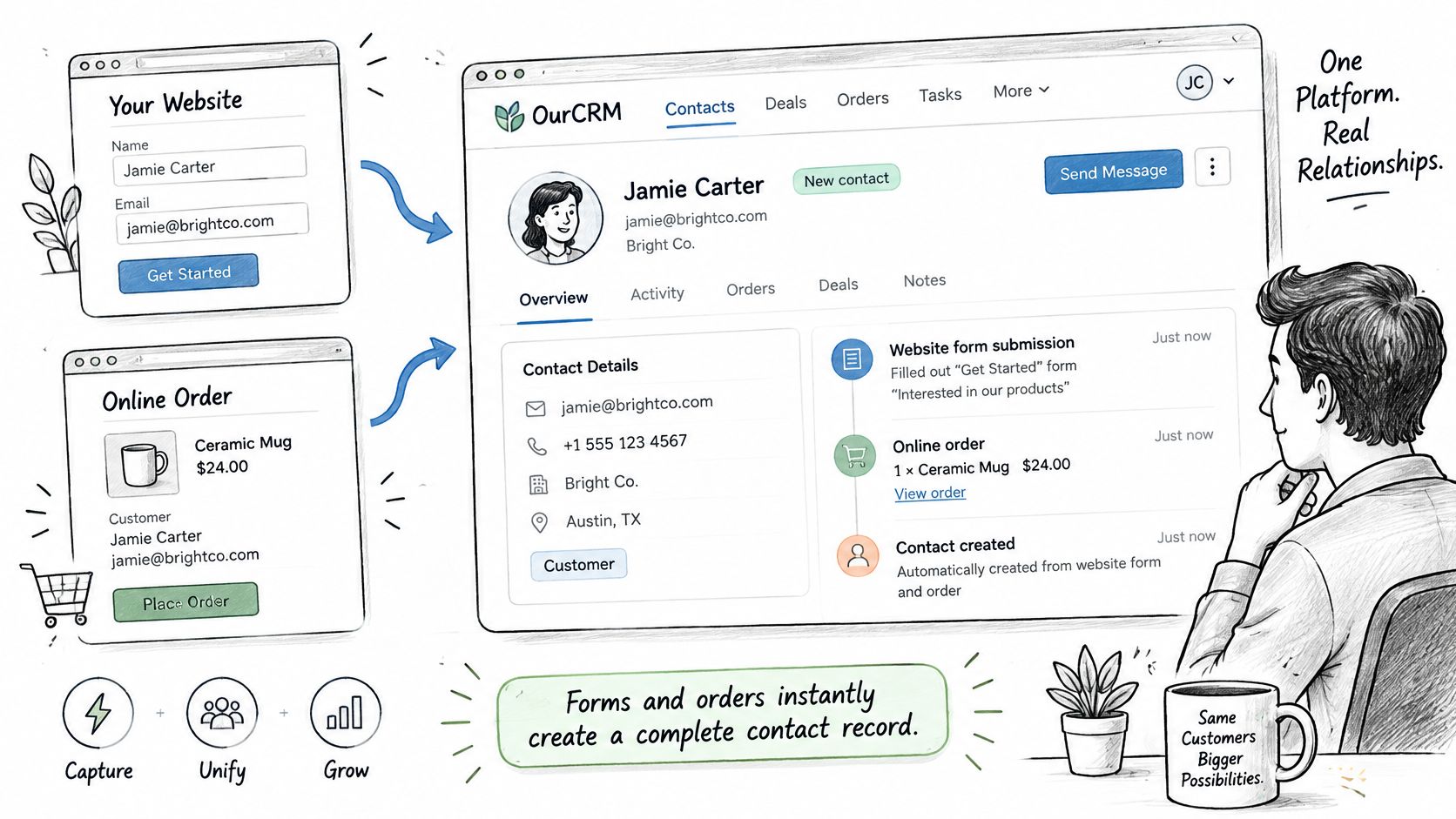
A contact stores information such as a name and custom fields. A training provider collecting course preferences on an enquiry form, for example, can assess whether those preferences are available as contact fields and can be filtered by the client's team. Confirm how consent status is recorded before relying on it for client processes.
A case gives a team a way to manage a customer issue or request. A refund query or quote follow-up may need an assignee, status history, or a link to a particular site. Check which of those details the CRM supports in your trial rather than assuming they are included.
Member activity tracking can help a client understand activity associated with a member. The specific events captured, and how they appear in the record, should be confirmed before promising a particular timeline or workflow.
What to test before reselling
Use a test tenant to check the details your clients will depend on:
- Custom fields: Add a field, enter a value, and confirm whether the team can find or filter contacts by it.
- Duplicate handling: Create two records with the same email and check the platform's available options for identifying or resolving duplicates.
- Case handling: Check whether cases support assignment, status changes, and a history of updates.
- Export quality: Export contact data and inspect which fields and consent details are included.
- Member activity: Review what activity is recorded and whether the client can identify the relevant member and site.
For an agency managing many client sites, write down which CRM objects each client uses, which fields or workflows may change after launch, and what data needs to move during migration. That inventory gives the migration scope a clear basis and helps surface gaps before launch.
How the CRM Connects to Your CMS and Ecommerce
WebinOne keeps CRM, CMS, and ecommerce in one system, so the internal sync that breaks in stacked tools is absent, but every link to an outside system still needs controls. Treat each connection as a production data pipeline. The practical background on choosing a CMS with CRM built in covers why consolidation helps. It doesn't remove the need to verify failure behaviour at the edges.
| Integration Point | Data Moved | Failure Mode | Control to Verify |
|---|---|---|---|
| Site forms | Form submissions to contact records | Resubmission creates a duplicate contact | Idempotency key on each submission |
| Ecommerce orders | Customer, order and status updates | Order recorded without a matching contact | Reconciliation job comparing order and CRM counts |
| Webhooks | Contact and case events to outside systems | Retry delivers the same event twice | Immutable event IDs and deduplication |
| Headless API | Content and commerce to external front ends | Schema change breaks a front end | Versioned API contracts |
| Email marketing | Subscriber status and campaign activity | Opt-out ignored by another tool | One source of truth for consent status |
| Third-party tools | Records to an outside CRM or ERP | Silent failure with no alert | Dashboard on webhook latency and retry rate |
Why each control exists
Site forms fail through impatience. A visitor double-clicks submit, or a browser retries, and two contacts appear. An idempotency key on each submission lets the platform recognize the retry and write once. Ecommerce orders fail through gaps. An order lands without a matching contact and support staff can't see the purchase history. A reconciliation job comparing order counts, CRM counts, and updated timestamps catches the gap before a customer reports it.
Webhooks fail through retries doing their job. The receiving system times out, the event sends again, and a downstream tool processes it twice. Immutable event IDs let the receiver discard the duplicate. Headless API integrations fail through change. A renamed field breaks an external front end at deploy time. Versioned API contracts keep the old shape available until the front end migrates.
Email marketing fails through consent drift. A contact opts out in one tool and receives a campaign from another. One source of truth for consent status ends that argument. Third-party tools fail, which is worse. Failed events need dead-letter handling and alerts, not a log nobody opens. Contact-center teams make the same point for service desks when reducing agent friction through CRM integration, since staff lose trust in records that diverge from what customers did.
Before launch: request a dashboard covering webhook latency, retry rate, authorization failures, duplicate-contact rate, and reconciliation variance. No dashboard means failures surface through client complaints.
Keeping One Client's Records Away From Another
Branding and portal separation are presentation features, and the control that stops one client's records reaching another is tenant-aware authorization, which WebinOne's documented model must show before an agency resells it. A branded portal proves the logo changed. It proves nothing about who can read what through the API.
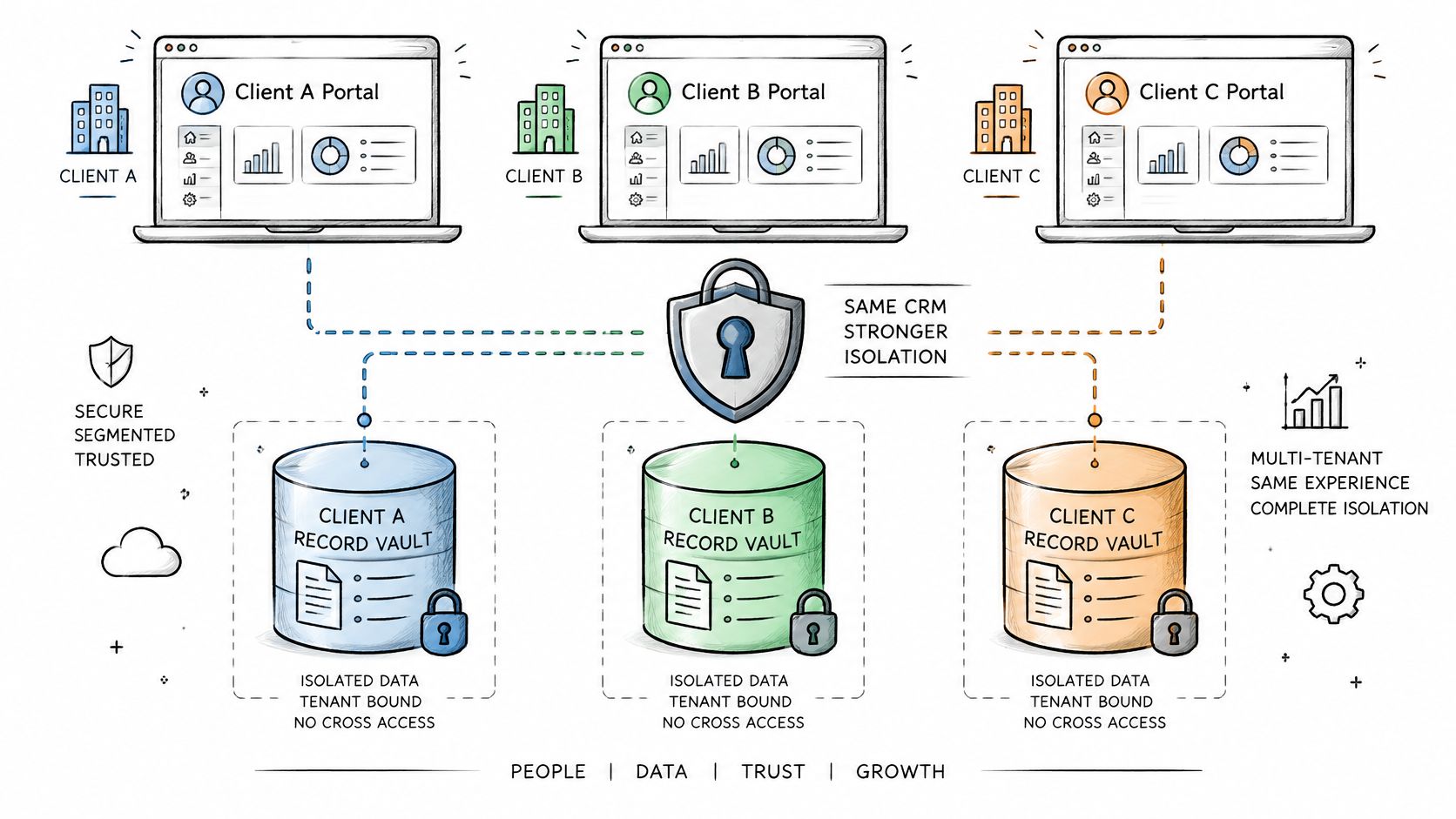
The NIST cloud-native zero-trust guidance recommends combining network-tier and identity-tier policies, with application and service identities enforced through API gateways, service identities, and authorization tokens. Applied to a reseller platform, that means five separated scopes. Reseller, agency, client, site, and end user. Every API request carries tenant and role claims, and permissions must be enforced server-side for contacts, cases, member activity, exports, webhooks, and billing. Interface-only restrictions don't count, because integrations never touch the interface. Where records physically sit matters alongside access control, and the distinction explained in data sovereignty versus data residency shapes which region and legal questions to ask next.
The two-tenant test
Run this before signing:
- Create two tenants: set up client A and client B under one reseller account, each with contacts and cases.
- Scope a key to A: generate an API key limited to client A, the way a real integration would receive one.
- Attack B with it: attempt to read B's contacts, export B's records, and subscribe to B's webhook events.
- Read the audit log: every attempt should fail and appear with actor, tenant, object, action, and timestamp.
Then test automated revocation. Delete the key, remove a staff member, disable a client user. Access should stop in the same session, not at next login. Short-lived credentials with regular reauthentication limit the damage from a leaked key, and keys should be issued per integration rather than per account, so revoking one connection doesn't break the rest.
Close the evaluation with a written request list. Documented tenant isolation, OAuth 2.0 or equivalent token controls, granular RBAC or ABAC, scoped API keys, audit logs, and revocation evidence. A vendor that can't produce those documents is asking the agency to carry the cross-client risk personally.
Keeping AI Changes Bounded and Reversible
AI changes to CRM records and sites are only worth trusting when every change is scoped, reviewable, and reversible, and AgentOne inside WebinOne's Managed Vibe Coding should be tested against those three conditions before it touches client data. AgentOne is WebinOne's managed AI that designs, builds, and manages sites inside the platform. Managed doesn't mean unsupervised. It means the controls exist to verify.
The readiness gap is wide. Cross-market research covering marketing professionals, discussed in research on data readiness for AI adoption, found 91% consider data readiness critical for AI adoption, yet only 21% say their CRM data is very well prepared for AI. The differentiator isn't whether a platform has AI. It's whether a wrong automated change gets caught, attributed, and undone.
A scenario worth testing
Say an agent holds campaign rights for one client and gets pointed at a re-engagement send. The test questions are specific. Does the permission scope block it from using another client's list? Does an approval step fire before any send touching contacts or campaigns? Does the audit log show which agent acted, on which tenant, at what time? Can the send be stopped and the list state restored through rollback? And does a human get escalated to when the agent hits a boundary it can't resolve?
Accountability needs contract language, not assumptions. The Platform User is solely responsible for its Custom Agents, their configurations, and any output they generate, including results delivered to its clients and end users. An agency importing a shared agent configuration owns what that configuration does to its clients. Confirm that responsibility in writing before importing anything.
Four questions settle the evaluation:
- Write scope: what exactly can an agent create, change, or delete, per tenant?
- Approval: who approves changes to contacts and campaigns before they run?
- Evidence: where is the log kept, and how long does it survive?
- Reversal: how is a change undone, and who can trigger the rollback?
Don't ask whether the CRM has AI. Ask what happens when AI changes the wrong customer, site, or campaign, and require a demonstrated answer.
Migration and Exit Terms to Settle Before Launch
WebinOne's team helps set up the white-label portal and migrate existing sites, and exit terms belong in the written contract, but the operational tasks after cutover still need named owners. The cheapest licence rarely produces the lowest total cost. Migration work is where that assumption breaks.
Industry reporting summarized in research on CRM deployment and migration outcomes found 55% of CRM deployments failed to achieve their planned objectives, only 36% met budget and 41% met timeline expectations, and 83% of data-migration projects either fail or exceed budgets and schedules, with average schedule overruns of about 41%. Consolidation only saves money when migration and ongoing operations are treated as part of the product.
| Post-Cutover Task | Owner to Agree | Evidence at Handover |
|---|---|---|
| Record validation | Agency or systems integrator with the platform team | Reconciled counts and sample checks for each object |
| Redirect testing | Agency | Crawl report with every old URL mapped |
| Permissions and roles | Client administrator | Signed-off role matrix |
| Integration monitoring | Platform operations | Dashboard access and alert routing |
| Analytics continuity | Agency | Tracking tags verified on live pages |
| Rollback | Platform operations | Tested restore point and written steps |
| Runbooks and handover | Agency | Documented process that survives staff turnover |
Agree each owner in writing before cutover and check the evidence at handover. Record validation means reconciled counts per object plus sample checks on relationships, because contacts without their cases aren't a successful import. Anyone planning the move should follow proven practice to protect customer data during CRM migration, starting with backups and validation before the old system is switched off. Ask the proposal to cover staged migration, parallel testing, a planned zero-downtime cutover, reconciliation of records and relationships, and documented handover. A simple CSV import promise covers none of that.
Key-person risk needs a direct question. Who runs the cutover if the named consultant leaves mid-project, and can the client operate the system without that person? Runbooks, logs, and an escalation path are the answer, and they must exist before launch, not after the first incident.
Exit terms
Get the export format, export duration, and data hand-back terms into the contract before any client data moves. One clause deserves attention. If the Service is closed or discontinued, WebinOne commits to open-source the WebinOne platform so every Reseller can host its trial and live sites, WebinOne Portal, and SSO service without WebinOne's support. That converts exit from a negotiation into a documented commitment. Demand equivalent specificity from any candidate.
Test Your Shortlist Through the Reseller Program
A reseller trial should prove that the platform works under your brand and supports a real client workflow. WebinOne's Reseller Program for agencies lets agencies resell its services to third parties as Platform Users. The Partner tier includes white-labeling for the WebinOne admin and login page, with your own logo and background.
Use one representative client site to check the operational details:
- Set up the branding: Confirm how the branded admin and login pages appear to staff and clients.
- Choose a live site: Include a form, an order flow, or a genuine CRM use case.
- Score the platform: Run the site against your eight criteria and record written evidence, including the SLA and hosting documents.
- Test the boundaries: Run the two-tenant authorization test and work through the post-cutover task table before moving any client records.
- Keep the evidence: Store scores, audit-log output, and handover documents in a file the agency controls.
A demo with an existing Partner can clarify how tenant setup, migration sequencing, and support escalation work in practice. Use it to check the process, not as a substitute for written evidence.
One fully tested site gives you more useful evidence than a stack of vendor calls. Move the client book only when the evidence file closes every row.