Full Release Notes
v5.9.1
|
BACKLOG |
Favorites |
1) Add/remove from favorites actions Add two GET URLS (public api), one for “add” and one for “remove”, for logged in users with `itemId` as parameter (id of module item that should be added to favorites) 2) Add component type:"favorites": {% component type:"favorites", source:"[[moduleIdentifier]]", itemId:"[[itemId]]", includeItemData:"[[includeItemData]]", limit:"[[limit]]", collectionVariable:"", layout:"" %}
Default sorting by `CreatedDateTime` DESC. Single item context is:
(If `includeItemData` == true, the modules typical data will be included along with the above “Favorites” data. 3) Add component to toolbox, under: “CRM” > “Favorites” 4) Add default JS and styles for favorites: Once added to favorites - change favorite icon appearance and switch URL from ’add to favorites’ to ’remove from favorites’. Once removed from favorites - change favorite icon appearance and switch URL from ’remove from favorites’ to ’add to favorites’. If user is not logged in and clicks Add or Remove from favorites - redirect them to system error page with the following data:
Apply ability to request add and remove from favorites API urls with GET param `jsonResponse=true`. If `true` - return JSON response with error details (status code 401). Otherwise - redirect to error page with the above described type and message. DESIGN: https://invis.io/VEZ0HS6A8YF |
|
BACKLOG |
eWAY and Stripe improvements |
1) Add to data passed to eWay:
2) Change ”Invoice Description” to <form name> 3) Add data passed to Stripe (only for one-time payment):
4) Change ”Description” to <form name> |
|
BACKLOG |
Show Product URL based on current catalog |
On product detail show URL based on catalog that it’s contained in. Modify component type module logic: If filtered by `parentId` add `this.url` value based on the parent determined by `parentId`, eg:
|
v5.9.2
|
BACKLOG |
Customize Analytics |
1) Analytics Customization
2) Single Chart customization
3) Add Chart to analytics
4) Restrictions Feature available on PRO Plan and higher. |
|
BACKLOG |
Copy File URL to clipboard |
Add ability to get file’s URL in file manager and file manager toolbox.
DESIGN: https://invis.io/VTYEHO7Z6NJ |
|
BACKLOG |
Wording change on event bookings |
Rename following wording in the CMS:
|
|
BACKLOG |
Drop shipping feature improvement |
Feedback description: When a visitor makes an order for several different items on one and the same order the system will create one purchase-order for each item even if they all are supplied by one and the same supplier. This obviously causes a lot of extra work for the suppliers. BC consolidated several items to one and the same purchase-order and only split the order if there were multiple suppliers to supply the items on the order. Solution: Consolidate several items to one supplier email for the same order instead of sending supplier email for each product. |
Bonus: Add Ability To Get File’s URL In File Manager
-
Problem:
It’s hard for users to get file URLs from the file manager.
Proposed solution:
Add a new menu item, “Copy URL”, under file actions dropdown that allows a user to copy the file’s url.
Here:
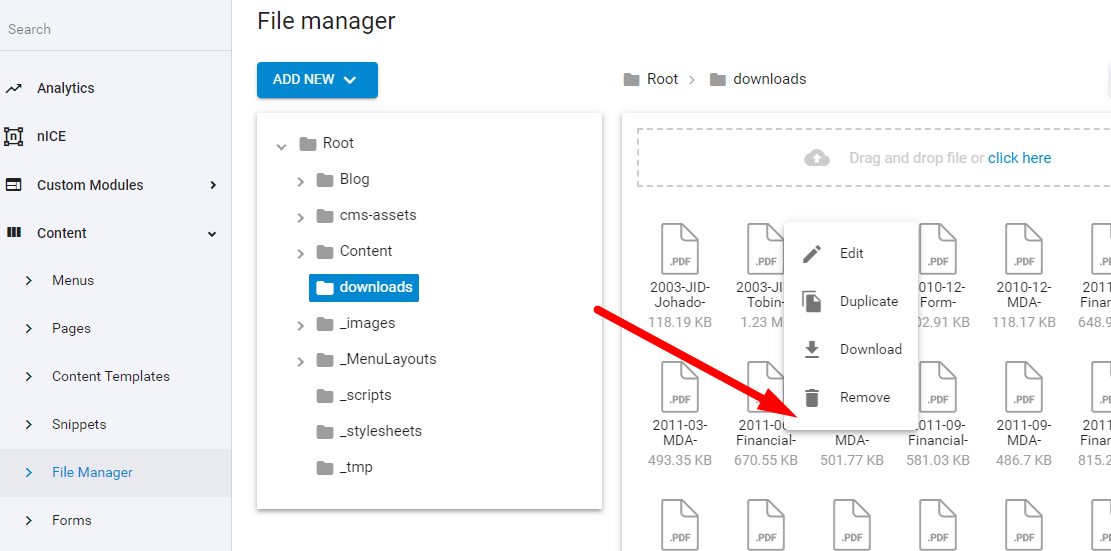
It would also be nice if the file name was linked to the file location in list (non-tree)...
- File Manager
Customize Analytics
-
Ability to edit admin's "Analytics" page:.
- Rename page and blocks
- Rearrange and resize blocks
- Change or hide data inside blocks
- Set data range
- Add extra analytics
Available starting "Pro" plan.
- Analytics