Full Release Notes
|
BACKLOG |
Module Duplication |
Function restriction upgrade: Allow copying module starting from Pro plan |
|
BACKLOG |
`ProductDataJsonHTML` to product detail layout |
Exclusively for Product Module: Automatically add {{this.ProductDataJsonHTML}} to the product detail if there is no manual output inside the layout |
|
BACKLOG |
Parent Child module links in module settings |
Add ability to switch between parent and child module via links. Useful if you want to go to Blog post settings from blog settings. Design - https://prnt.sc/skhen8 |
|
BACKLOG |
Search keywords field |
Added search keywords field to import/export |
|
BACKLOG |
Downloadable products: System Properties |
Add following fields to the system properties for Products module:
Design https://prnt.sc/skhijv |
|
BACKLOG |
Downloadable products: Processing Logic |
1) Add api to retrieve downloadable file
2) If product has been deleted - delete file as well. On delete - show popup: “You have downloadable file attached to the item and it will be deleted with the item. Are you sure you want to delete this item?” |
|
BACKLOG |
Downloadable products: Shipping Options logic upgrade |
HIDE shipping options only if ALL products in shopping cart has:
Return an undefined `Enable Shipping` value as `true` if:
OR
Otherwise it's `false` |
|
BACKLOG |
Downloadable products: Downloadable link for the order line liquid scope |
Add property `downloadableFileURL` to `order` line liquid object.
Modify thank you page and invoice email (default layouts) to show download link if order line is downloadable product Design https://prnt.sc/skhlt9 |
|
BACKLOG |
Downloadable products: Count downloads logic |
Add `Max Downloads Allowed` system field to product module:
If value is > 0
Else (value is 0 or empty)
|
|
BACKLOG |
Downloadable products: Downloadable link in admin |
Wrap the product name in `order -> products` tab with a link to downloadable file if it is a downloadable product. |
|
BACKLOG |
Stripe customers in advanced payment logic |
Modify payment via stripe logic.
As a result if same customer submits several payments - it will always be as one single record in vendor's stripe account. And they will have attached list of non-repeated credit cards that is based on tokens provided while payment. |
|
BACKLOG |
Attribute and attribute options ordering |
Provide ability to change order of the attributes and options for products via drag-and-drop functionality, which applies the ordering to:
|
|
BACKLOG |
Show number of products in all shopping carts |
Ecommerce -> Product -> inventory: Show number of items added to all shopping cart sessions under the label of: `Added to shopping cart` Add to general product and product with variations screens: |
|
BACKLOG |
Link to order on gift voucher |
Ecommerce -> Gift voucher edit page:
|
|
BACKLOG |
Add link to order from Case, booking |
Add link to order from:
|
|
BACKLOG |
Daily recurring subscriptions |
Add daily recurring subscriptions option to the secure zone.
|
|
BACKLOG |
Order Management Upgrade |
Split form submissions and booking subscriptions in orders detail page |
|
BACKLOG |
Grouped products form improvement |
Remove description field from the grouped product object. Leave display name only |
|
BACKLOG |
Add tax in product order line + extended tags |
Details here: Equivalents:
1) Add following properties to the order line liquid object:
Example of missing properties and its values: https://prnt.sc/rwvj2f
2) Add following properties to order (see above Example Spreadsheet for calculation definition)
|
|
BACKLOG |
Out of stock - hide product |
If product in inventory tab has Out of stock property value equals to `hide product` (https://prnt.sc/rseiyi) |
|
BACKLOG |
Instock logic review |
Change the logic to NOT storing reserved for shopping cart items in In Stock property:
|
|
BACKLOG |
Orders submission flow rework |
Save form submission data to stripe metadata when performing a payment. Once stripe sends success callback - create form submission record based on data in metadata field |
|
BACKLOG |
Add Shop settings page and Format settings update |
1) Create groups on the `Settings -> Misc` page Admin Panel Settings
Recaptcha settings
Shop settings
2) Extend `Currency and Format` settings panel (Settings > Domains > Currency and Formatting) Add `Use Custom Number/Currency Format` checkbox (https://prnt.sc/rrnzsp)
Params to be listed in user friendly way:
|
|
BACKLOG |
Country list management for shopping cart |
1) Add ability to choose what countries to show on the shopping cart. Add `allowedCountries` option to the {% component type:"countries" %} Value:
Example: {% component type:"countries", collectionVariable:"", allowedCountries:"US,AU" %} 2) Add ability to select countries via multiselect dropdown in the component toolbox |
|
BACKLOG |
nICE color picker z index issue |
Would it be possible for the algorithm to have a minimum z index of at least 100. It seems like it's calculating it at 5 on any complex website, there are going to be items that are over that z-index. |
|
BACKLOG |
Offline Credit Card Payment System page |
NOTE: To be renamed “Deferred Order Payment” Create new system page
Liquid scope of the page should include the `order` object (same as is accessible on checkout thank you page) Page should contain a new system form with:
Add to component toolbox ability to retrieve offline payment HTML form code
|
|
BACKLOG |
Offline Credit Card Payment Email |
NOTE: To be renamed “Deferred Order Payment” Add new System email
Liquid scope
|
|
BACKLOG |
Offline Payments flow |
NOTE: To be renamed “Deferred Order Payment” Provide ability to send Offline Credit Card Payment Email from the `Order -> Payments` tab (https://prnt.sc/rvjj8g)
Alternatively, provide ability to go directly to `Offline Credit Card Payment` system page URL (front-end) from this tab
When submitting a form from the Offline Credit Card Payment system page
Provide ability to set `redirectURL` param. Same as for general forms (form input field) Provide ability to use `jsonResponse=1` param. Same as for general forms |
|
BACKLOG |
Password change in CRM |
1) Add ability to change password for the CRM contact record. When admin changing password - send `Password Changed` system email 2) Add new system email `Password Changed`
|
|
BACKLOG |
Bulk delete booking subscriptions |
On `Event -> subscription` tab (https://prnt.sc/rq7cff) provide ability to
|
|
BACKLOG |
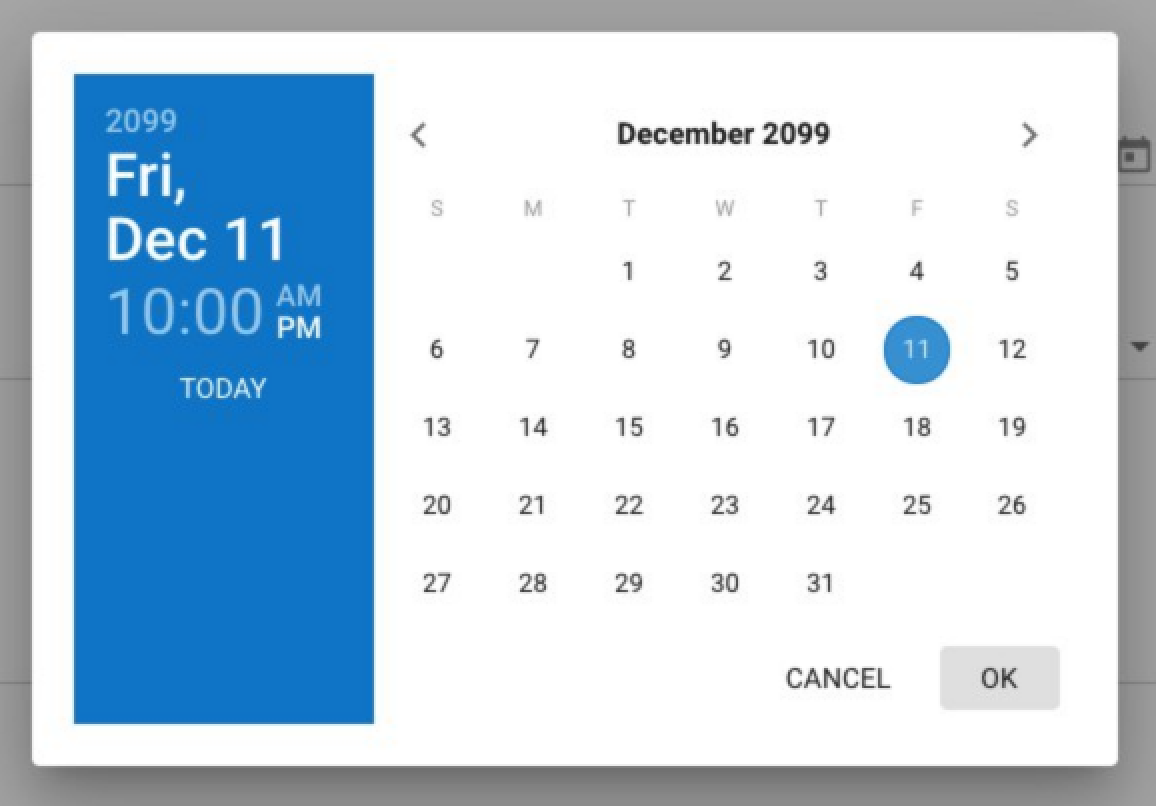
"Today" Button For Release/Expiry Date Functionality |
Add a "Today" button on Release/Expiry Date fields for making inputting date easier, as in BC. |
|
BACKLOG |
Payment Fields Appearance Management |
1) Add ability to manage layout that is generated by payment systems (https://prnt.sc/rsfhq7): Added two tabs:
Create list of fields based on the documentation below: 2) Apply chosen appearance settings to the payment fields within all payment forms' layouts Modify {% component type:"payment_form_fields", formAlias:"{{this.alias}}" %} layout or payment script JS GET params for this task. |
|
BACKLOG |
Case Insensitive URL redirect param |
1) Add additional checkbox field to specify if url redirect is case sensitive or not.
logic:
2) Add column to list layout for Is Case Insensitive property
|
|
BACKLOG |
Control default styles and scripts |
Provide ability to disable auto-added default CMS assets to the head section of pages. Under `Settings -> Misc => CMS Assets Management` 1) Global Settings Fields (and show which resources not to add to the head):
2) For the Content Template Provide same list of fields on the `Content Template` add/edit layout to override global defaults (ie: use global setting by default) 3) Implement logic to check CMS Assets Management settings in the Content Template (or in the Global Settings if Use global setting option is selected for the template). |
|
BACKLOG |
Re-apply folder detail instead of page detail layout for folders |
Check if there are Page Folder items that have applied detail layout with ID 1525 (Page Detail) If found - attach to them Folder Detail layout (ID 1519 ) and save item. |
|
BACKLOG |
| set_money_format And | set_number_format upgrade |
Modify liquid filters
Parse argument the following way
|
|
BACKLOG |
Add URL to order line |
Add URL to order line liquid object. Redo `shopping cart` system page and `invoice` layouts to wrap product name with the link to the product. |
|
BACKLOG |
Add .dwg format to the staticContent section |
Add “.dwg” extension to the list of allowed to be accessed via URL (Static content list) |
|
Misc |
Order migration (old data to new) |
Migrate order that was created not by Advanced Payment Flow to the latest version of the orders logic. Apply main order param for the orders that was created for recurring payments (secure zone subscriptions) according to the latest version of the orders logic . |
|
BACKLOG |
this.order in workflow emails scope |
Add this.order object (same as added in invoice email) to the workflow email liquid context if form has "Accept Payment" option enabled. If no order was created during form submission - set this.order to null |
|
BACKLOG |
Add to cart - param for button text |
Add buttonName param to: {% component type: "ecommerce_add_to_cart" %} {% component type: "ecommerce_buy_now" %} Example: {% component type: "ecommerce_add_to_cart", buttonName: "Add Me!!!" %} Default value is empty Replace in default layout: `Add to cart` text to `{{this.buttonName | default:"Add to cart"}}` Replace in default layout: `Buy now` text to `{{this.buttonName | default:"Buy now "}}` |
|
BACKLOG |
Type Media module item property UX upgrade |
Change the algorithm of opening file manager when clicking icon for Type Media module item property https://prnt.sc/sjsoxe:
|
|
BACKLOG |
Modify shopping cart object |
1) Add `eCommerceItemId` to the shopping_cart order-line object 2) Add attribute images to the order `options` object SOURCE: Use-case for having access to this data: Not directly having the product ID meant I had to look up the product via SKUCode instead which isn't as stable. |
|
BACKLOG |
Remove Product from cart data attribute selector instead of <tr> (ecommerce.js) |
Modify the functionality, when removing product from cart, so it will try to find parent HTML element by data attribute `data-cms_cart_order_line_holder`. Add autoFix of the shopping cart layout on our template and sites created based on ecommerce template (for the backward compatibility.) |
|
BACKLOG |
Rebuild module after import module items |
Set to queue entire module rebuild when import module items process is finished |
|
BACKLOG |
Priced ...HTML properties decimals after dot fix |
PriceHTML and other ...HTML properties render to 4 decimals. Should render such number of decimals as configured in Format Settings attached to the current domain |
|
BACKLOG |
Add Paginate items parameter for component type module, module_of_member |
Add new parameter to the {% component type:"module" %} and {% component type:"module_of_member" %}
|
|
BACKLOG |
Order -> Payment tab UX improvement |
View Total cost and pending cost on the page. When click pay by cash - automatically preset amount equal to pending cost Design: https://prnt.sc/skioca |
|
BACKLOG |
12-24 hrs format switcher for admin datepickers |
Add switcher between 12 and 24 hrs formats on datepickers on `Settings -> Misc` page. Datepickers hrs time format (select) (options): - 12 - 24 Applied to datepickers throughout admin. |
|
Bug |
Duplicating Event |
When duplicating an event item Expected: Actual: Duplicated item has same subscribers counter as original item has https://prnt.sc/rv91k4. |
|
Bug |
Parent Child module links in module settings - disappear icon "Folder" |
Go to Settings Blog and select Items List View http://prntscr.com/sbq62x After saving Folders icons are disappear as well as path to Blog Post settings http://prntscr.com/sbq6ms When showing settings tab CMS should return system modules parent-child linkage in order to not override it when saving other settings of the blog http://prntscr.com/sbqbz1 |
|
Bug |
Bug from forum - not correct import URLs |
https://forum.treepl.co/t/url-slug-changes-not-updated-on-item-import-bug/1002 |
|
Bug |
Tax deleting error |
When deleting a tax sometimes we get Internal error: |
|
Bug |
Inventory - When Out of Stock hide button |
|
|
Bug |
Bugs from forum - Secure Zone Question |
|
|
Bug |
Bugs from slack - disappear product on Thank you page |
Products on the Thank you page are disappeared http://prntscr.com/r7ukr9 |
|
Bug |
Bugs from slack - error when related item disable |
|
|
Bug |
Bugs from slack - import/export |
A product export file re-imported presents ‘Internal Error’. |
|
Bug |
Bugs from slack - error when apply discount with currency DKK |
|
|
Bug |
Choose different shipping info |
|
|
Bug |
Bug from forum - Liquid code to list files from a particular directory |
https://forum.treepl.co/t/liquid-code-to-list-files-from-a-particular-directory/928/2 |
|
Bug |
Products - add check on Minimum Units and Maximum |
Add validation of these fields: Minimum Units and Maximum Units https://prnt.sc/riulyw when adding products to cart |
|
Bug |
Bug from client - import/export CRM |
Add ability to edit Type SOURCE: I am seeing an "Excel row number: 2. Detail: Invalid member type." on all 20 lines I try to import to the CRM, but there is no "type" in the file? The only row that works is the first and they all look similar? The first line is exported from the CRM to have something to work from. |
|
Bug |
[UI] Unruly link manager in WYSIWYG editor |
https://forum.treepl.co/t/unruly-link-manager-in-wysiwyg-editor/1003 |
|
Bug |
Bugs from slack - payment unsuccessful |
Fix the workflow sending when eWAY payment is unsuccessful http://prntscr.com/rre3lp |
|
Bug |
Bug from client - change logic Exclude from Catalogs |
|
|
Bug |
Bug from forum - Mandatory Custom Module Fields Reflect in User form |
https://forum.treepl.co/t/mandatory-custom-module-fields-reflect-in-user-form/1054 |
|
Bug |
Bug from client - not correct time in invoice |
|
|
Bug |
Portal Bug from slack - doesn't duplicate Feature flag |
|
|
Bug |
Popup with shopping cart - doesn't display total price |
|
|
Bug |
Workflow - doesn't changes name of workflow |
|
|
Bug |
Search forms - doesn't display SKU Code, Seo title and Meta description |
|
|
Bug |
Bug from Adam - not correct show price when set up 2 prices |
|
|
Bug |
URL output {{request.request_url.href}} is fixed (was broken and accessible via incorrect alias: {{request.request_url.ref}}) |
“href” param is broken and outputs via “ref” instead. |
|
Bug |
Bug from Peter - edit name Catalogs |
Change catalog name and click save Go to the list of the catalogs Catalog name is not changed http://prntscr.com/sh8xf5 |
Misc Improvements (5.3)
-
This list of improvements is gathered from Treepl users' feedback from forum and support:
- Ability to copy existing custom module "Pro" plan
- Parent child module links in module settings
- search keywords field to import/export
- nICE color picker z index issue
- Case Insensitive URL redirect param
- Add option to disable default styles and scripts in Misc settings
- Re-apply folder detail...
- Ecommerce
Ecommerce Improvements (5.3)
-
This list of improvements is gathered from Treepl users' feedback:
- Auto add this.ProductDataJsonHTML to product detail layout
- Stripe customers in advanced payment logic
- Attribute and attribute options ordering
- Show number of products in shopping cart in the product
- Link to order on gift voucher
- Add link to order from Case, booking
- Daily recurring subscriptions
- Order Management Upgrade - final...
- Ecommerce
Deferred Order Payment
-
Ability to manually pay for order through a dedicated system page (link is available through admin).
- Ecommerce
Downloadable Products
-
Ability to create downloadable products (files).
It will operate similar way it did in BC.
- Ecommerce
"Today" Button For Release/Expiry Date Functionality
-
Add a "Today" button on Release/Expiry Date fields for making inputting date easier, as in BC.
- Custom Modules
- UI/UX
Tags
- ALL 111
- Admin Panel 14
- Analytics 1
- BC Equivalent 4
- Blogs 2
- CRM 8
- Custom Modules 11
- Custom Reports 1
- Ecommerce 12
- Emails 7
- Events 4
- Extensions 1
- File Manager 5
- Forms 11
- FTP 1
- Galleries/Sliders 1
- General 12
- Liquid 12
- Member Area 10
- Menus 1
- Open API 2
- Pages and Templates 4
- SEO 2
- UI/UX 13
- WebinOne Portal 10
- Workflow 6
- WYSIWYG Editor 4