Full Release Notes
|
Bug |
Double forward slash in URL when adding an item |
Fixed double forward slash appending to the preview URL when creating new page/module item: http://prntscr.com/lue4cl |
|
Bug |
{{FormSubmissionData}} in autoresponders when creating a new item is not consistent |
Submission data in autoresponders when creating new item now works correctly:
|
|
Bug |
Custom Modules Search by categories, tags and checklists doesn't work properly. |
Search by multiple categories, tags or checklist property values now works correctly and no longer results in a Liquid Error: Invalid cast from 'System.String' to 'System.String[]' |
|
Bug |
Opening custom module items in new tab goes to admin dashboard. |
Opening custom module items in new tab now works as expected rather than redirecting to the admin dashboard. |
|
Bug |
Canonical link empty causing liquid error. |
Fixed page crash if canonicalLink is empty (http://prntscr.com/lqz9vv) causing Liquid Error: This operation is not supported for a relative URI. Now no <link rel="canonical"> tag displayed on the page if value of the canonicalLink property is empty or not a valid URL. |
|
Bug |
Can't add www. to domain in 'SEO' -> 'Primary Domain' |
This field for setting the primary site domain now allows any subdomain to be entered, including www. |
|
Bug |
Disabled page renders blank document. |
When attempting to load a disabled page a completely blank document was rendered. Now system renders a 404 page. |
|
Bug |
Date comparison via module components not working. |
Date fields can now be filtered in {% component type: "module" ... %} via 'filterBy' and 'filterValue' attributes, including:
If 'filterBy' is set to a date type field:
|
|
Bug |
Nice editor - $[number] text bug |
Texts that contain $ sign and a number next to it (eg: $2) no longer brakes text after saving. |
|
Bug |
Item without a detail layout shows completely blank document. |
404 page is now displayed when an item’s detail layout has type “List” (or no layouts with type "Detail" are present or the default "Detail" layout has been saved as a "List" type). |
|
Bug |
Bug with rendering SEO Title. |
SEO/meta title now renders by the system under the following conditions:
|
|
Bug |
Item URL preview not updating correctly. |
Item’s preview URL (shown under item’s URL field) is now displaying correctly when creating a new item and when editing existing and updating it's parent folder (resulting in URL change). |
|
Backlog |
Alternative Domain For Trial Sites |
Added ability to choose an alternative domain for new trial sites (trialsite.co) rather than the current "treepl.co" domain. |
|
Backlog |
Mailchimp API integration. |
Added new section: 'Email marketing' > 'API provider'. This allows you to setup Mailchimp API credentials (API key) that are required for integrated email marketing functions. API key can be retrieved on this page from the mailchimp account https://us19.admin.mailchimp.com/account/api/ (us19 in the url is datacenter that can be different for your account, so may need to replace this with your account’s datacenter) |
|
Backlog |
Mailchimp API integration: Mailing Lists |
Added new section 'Email Marketing' > 'Mailing Lists'. Section provides the ability to perform Create, Read, Update and Delete actions (CRUD operations). When a Mailing List is added, updated or deleted – it will be automatically added, updated or deleted in the linked mailchimp account (using API credentials in 'Email Marketing' > 'API Provider'). Currently one way push from Treepl CMS to Mailchimp (two way sync will come later). |
|
Backlog |
Mailing Lists subscriptions in Forms. |
In 'Content' > 'Forms':
|
|
Backlog |
Mailchimp API integration: Subscribe/Unsubscribe user event. |
If a user subscribes or unsubscribes from a mailing list via Mailchimp, the event is pushed to Treep CMS to unsubscribe the CRM contact from the appropriate mailing list.
|
|
Backlog |
Mailchimp API integration: CRM Contact mailing lists management. |
Added ability to view subscriptions via the CRM contact record, as well as subscribe and unsubscribe them to/from mailing lists. Also added same ability in the 'Mailing List' > 'Subscribers' section. |
|
Backlog |
More settings on Google Analytics dashboard. |
Added more data from Google Analytics available through the API:
|
|
Backlog |
Refine reCaptcha For Mobiles |
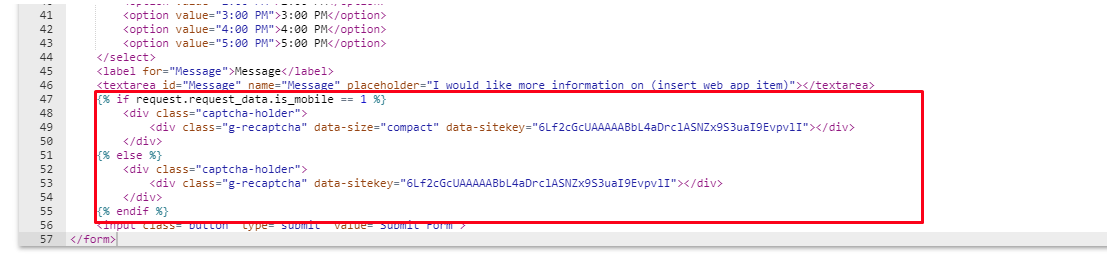
Default form layout generator now generates reCaptcha’s code in compact mode for mobile using liquid conditional statement (utilising the 'data-size="compact"' attribute). |
|
Backlog |
Default Datepicker. |
Date fields will be generated by the system using default datepicker (on content forms when form layout is generating by the system and when generating create/update module item forms). |
|
Backlog |
Settings area available for System Modules. |
System Modules now have settings and properties available to access (found under the gear icon), which include:
Available on Pro+ plans only. |
|
Backlog |
Show correct IP Address for Data Center. |
When activating a site in the Partner Portal, the relevant data center's IP address is displayed for use in your DNS. |
|
Backlog |
Change "Email Notification" To "Auto-response". |
"Email Notification" title, in the forms settings page, is now more correctly changed to "Auto-response". |
|
Backlog |
Global site preview button. |
Added "Home" button to admin header bar (next to the partner logo) that opens the home page in a new tab. |
|
Backlog |
{{request.device_type}} property. |
Added 'device_type' property to request object {{request.device_type}}. Returns device type:
|
|
Backlog |
SEO OG image tag improvement. |
System will automatically prepend "https://[current Domain]" to the path of the selected image when setting the OG tag properties under the SEO tab for various items. |
|
Backlog |
nICE - "Webpage Spell Check" compatibility. |
Provided compatibility with Webpage Spell-Check (https://chrome.google.com/webstore/detail/webpage-spell-check/mgdhaoimpabdhmacaclbbjddhngchjik). |
|
Backlog |
Add 'Author' field in Import/Export. |
Author system property field now added to Import/Export process for Custom Module items. |
|
Backlog |
Home page indicator in list view. |
Added a home icon, in the item list view, that helps to more easily see which page/module item is set as the home page. |
|
Backlog |
Extend meta description max value. |
Meta description, under the SEO tab, maximum character value extended to 400 characters. |
|
Backlog |
{% component type:"module" ... %} - pagination improvement. |
Pagination for Custom Module items was slightly reworked:
|
|
Backlog |
Redirect to 'Unauthorized' system page if login failed. |
On login process if the user failed to login, the system will redirect them to the 'Unauthorized' system page instead of redirecting to the home page with "/?login=failure" appended to the URL. |
Global Preview Button
-
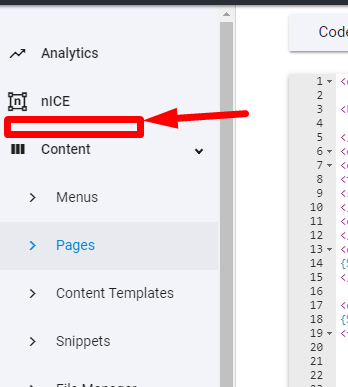
Add "Preview" button to admin header that will lead to the home page in a new tab.
It'll be somewhere here:
- Admin Panel
Mailchimp API Integration Stage 1
-
Connect your Mailchimp account to Treepl CMS (same way you setup Google Analytics feed integration). Create mailing lists in Mailchimp through API from Treepl CMS submitted forms:
- Ability to create, update and delete mailing lists via mailchimp API
- Ability to setup mailchimp api integration
- Ability to add subscription functionality to the form
- Marketing
Change "Email Notification" To "Auto-response"
-
Change "Email Notification" to "Auto-response" on the "Settings" tab under "Forms"
- Emails
Default Datepicker
- Use browser's default datepicker for datetime fields on content forms and create/update module item forms.
- UI/UX
Module Settings On System Modules
-
Allow using module settings on system modules:
- Blogs
- Blog posts
- Banners
- FAQ's
- Galleries
- Authors
(all except of Pages).
Available on Pro+ plans only.
*This feature would cover the following request: "Enable multiple detail layouts for blogs and blog posts."
- Blogs
More Settings On Google Analytics Page
- Add more data from Google Analytics available through API.
- Analytics