White Label Website Maintenance: What Agencies Must Own
The invoice that decides whether an agency makes money on a client is rarely the build. It's the maintenance line you agreed to eleven months ago, priced in a hurry, and never re-costed against the hours it consumes.
Most agencies treat white label website maintenance as a bundle of updates and backups with a number attached. The work isn't the problem. The problem is that nobody wrote down who approves a change, how fast a security patch has to land, when a restore was last tested, and what happens when a site can't be patched at all.
Close those four gaps and maintenance stops being a loss leader. It becomes the most predictable revenue in the portfolio.
Table of Contents
- What White-Label Website Maintenance Covers
- Why Maintenance Carries Most of the Cost
- Who Owns Each Maintenance Task
- How to Build a Maintenance Runbook for a Portfolio
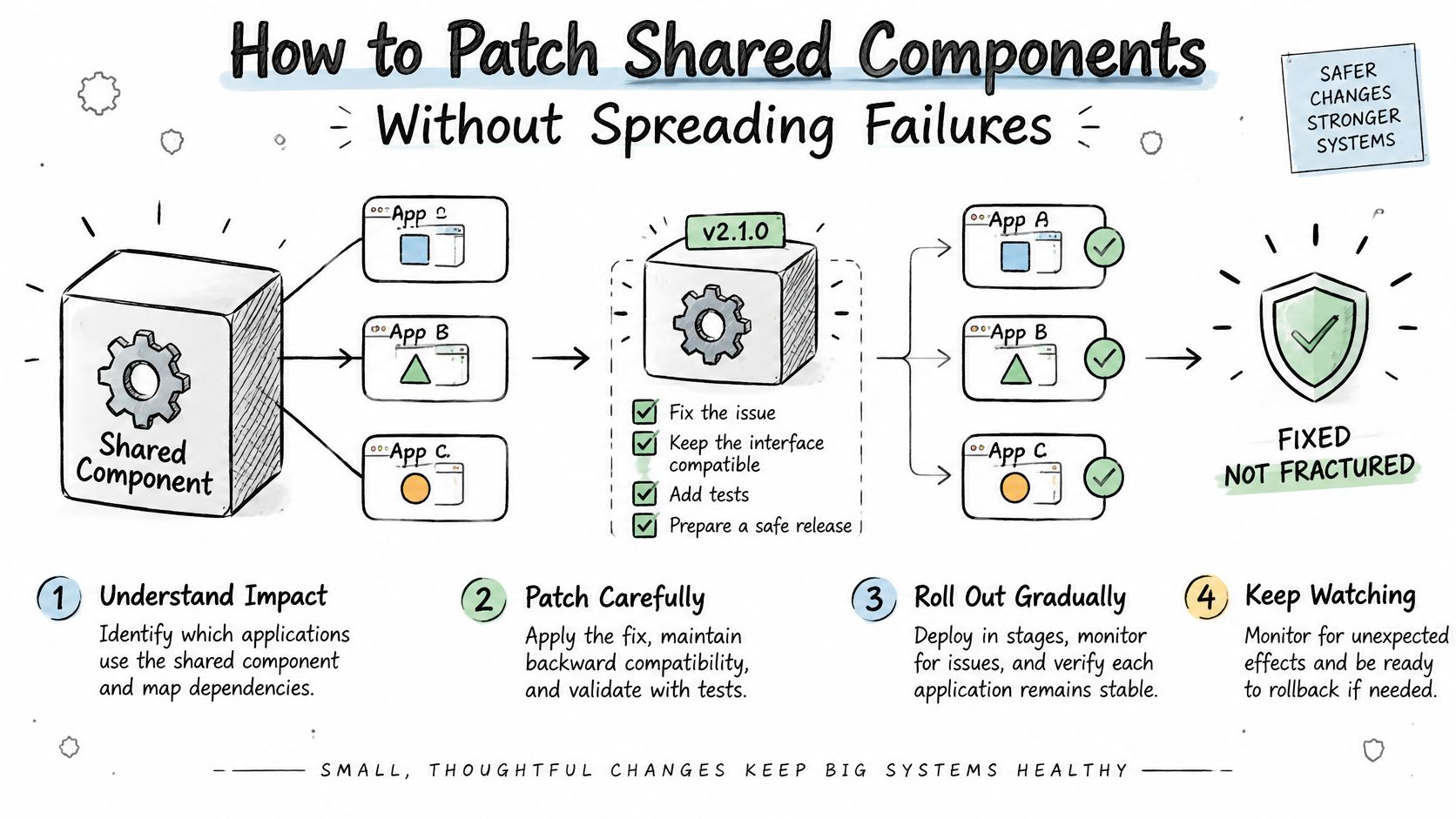
- How to Patch Shared Components Without Spreading Failures
- Where Maintenance Breaks and How to Prevent It
- What Your Clients See Under Your Brand
- Confirm Your Maintenance Model Before You Sign
What White-Label Website Maintenance Covers
White-label website maintenance is the ongoing operation of client sites under your brand, with WebinOne carrying the technical work behind the client relationship you own. The agency keeps the account, the approvals and the price. The platform keeps the site running.
The catalog is longer than most proposals admit. Every row below is a recurring task with a cadence and no end date.
| Maintenance task | What it covers | Recommended cadence |
|---|---|---|
| Core and platform updates | Platform, runtime and CMS version upgrades tested in staging | Monthly, with urgent fixes applied within days |
| Security patching | Vulnerable components, modules and extensions against severity-based deadlines | Continuous monitoring, patched within the severity window |
| Backups and restore tests | Full site and database backups, with periodic test restores | Daily backups, restore test each quarter |
| Uptime and performance monitoring | Availability checks, Core Web Vitals and real-user metrics | Continuous monitoring, monthly report |
| Accessibility checks | Automated scans plus manual checks on key journeys | After each template change, full audit each quarter |
| Content and template changes | Edits, new pages and component updates | On request, logged per change |
| SSL and domain renewals | Certificate and DNS renewal before expiry | Per renewal schedule, never at expiry |
| SEO and redirect upkeep | Redirect maps, sitemaps and metadata checks | Monthly |
Two proposals can list identical services and deliver very different outcomes, because the difference sits in the cadence. Monthly patching and quarterly patching are the same line item with very different risk attached. Treat these cadences as the baseline you write into your own contract, then adjust for the client's tier rather than for the discount you want to offer.
Read the table as an ownership chart rather than a feature list. Each row needs a named owner, an approval gate for changes that touch production, and a rollback path agreed before the first change ships. Then cost every row per site against your margin. Scheduled rows are cheap to price because the hours are predictable. The "on request" row is where retainers die, so give it a defined scope, a response window and a rate for work that falls outside both.
Buyer's test: if a maintenance proposal lists only updates and backups, ask for the update cadence, the frequency of restore tests, and the severity window for a security patch. A proposal that can't answer all three is a promise, not a process.
The same test works on your own service. Whether the technical side of this catalog is operated by your in-house team or a white-label provider, the cadences and the client-facing commitments stay yours to define, price and answer for.
Copy the table into your next client proposal. Mark which rows you include, write the cadence and the owner beside each one, and delete any row you can't deliver on the date you promised.
Why Maintenance Carries Most of the Cost
WebinOne's white-label maintenance carries most of a website's life cost, which is the commercial reason an agency can grow a portfolio without hiring for the run work.
The split between build and run looks roughly like this.
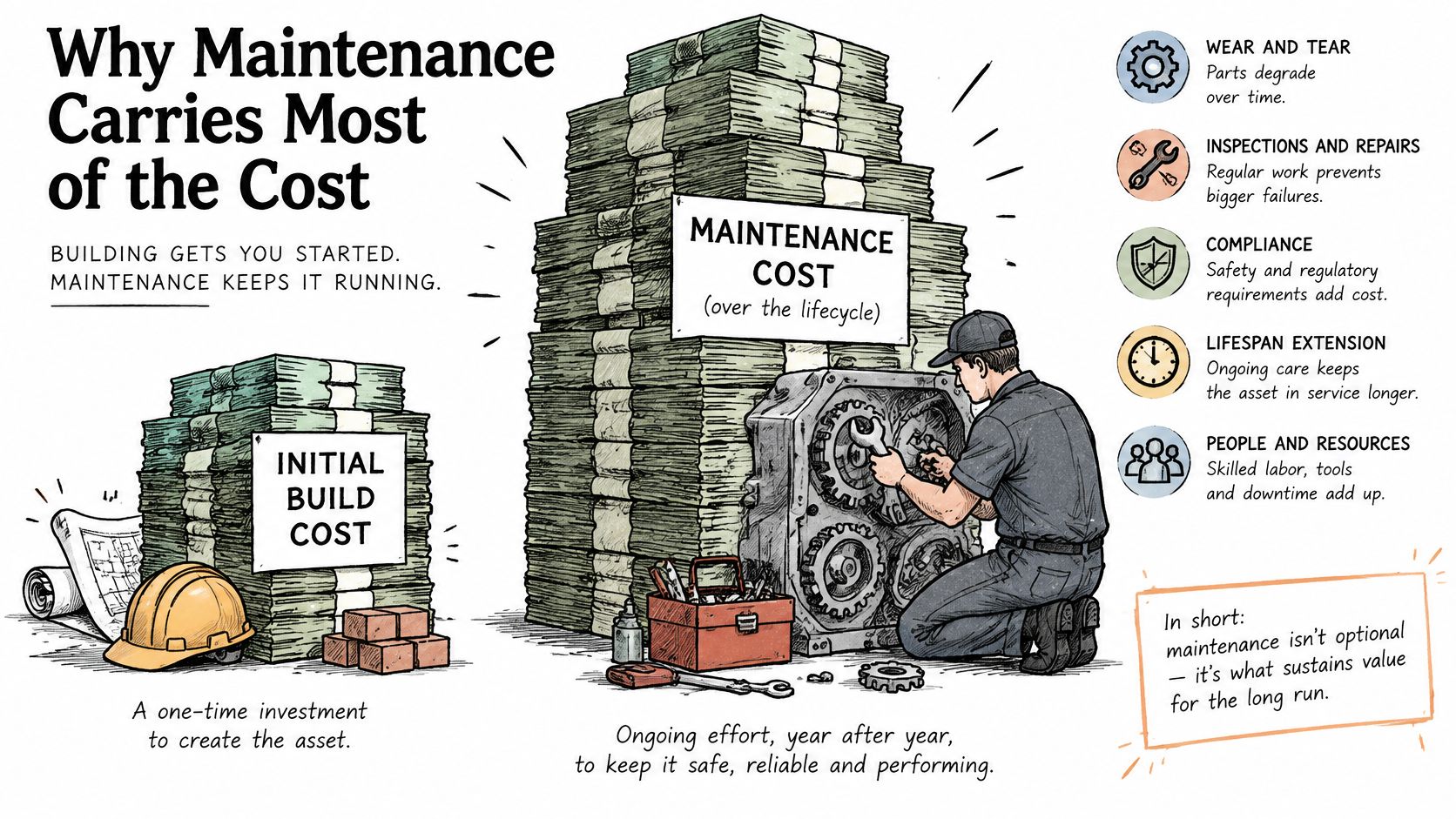
A peer-reviewed study published through the U.S. National Library of Medicine reports that estimates place approximately 90% of software life-cycle cost in the maintenance phase (U.S. National Library of Medicine). The build is one invoice with a delivery date. The run is every month for as long as the site exists.
Three Kinds of Work, One Recurring Fee
Maintenance isn't one activity. It's corrective work after launch, adaptive change when browsers, devices, regulations or business needs move, and preventive work that reduces future failures. Most agency retainers price the first, underprice the second and ignore the third. The third then arrives later as an emergency, at the worst possible rate.
Portfolio math makes that worse. A site that integrates payments, customer data, analytics, APIs and marketing automation has five dependencies that each need retesting after every change. Multiply by forty client sites and the run work stops being an afterthought.
The margin rule: a maintenance fee covers cost only when hours per site stay below the fee divided by your blended hourly cost. Everything else is arithmetic you're avoiding.
Agencies on WebinOne start from a platform cost of $10 per month per site, so the fee you charge above that line and the hours you spend per site decide the margin. The structure behind that number matters before you build a price list, and managed service pricing for agencies sets out how the tiers work.
Then do the calculation on your own book. Take last year's support tickets across the portfolio, convert them into hours, divide by the number of sites, and compare the result with the monthly fee you charge. If the answer embarrasses you, the fee isn't the problem. The process behind it is.
Who Owns Each Maintenance Task
In a WebinOne white-label setup the split is fixed. The agency owns the client relationship and approvals, WebinOne runs the platform and its shared components, and the client signs off material changes and residual risk.
| Task | Agency | Platform provider | Client |
|---|---|---|---|
| Content change approval | Approves and schedules the change | Applies it in staging first | Signs off material changes |
| Security patch deployment | Sets the severity deadlines | Tests and deploys shared components | Informed of any exposure |
| Uptime incident response | Escalates and communicates with the client | Runs monitoring and recovery | Receives status updates |
| Backup and restore testing | Requests restore tests and reviews results | Runs backups and restores | Receives restore-test results |
| Accessibility remediation | Owns the audit schedule and priorities | Maintains semantic templates and components | Reviews exceptions |
| Hosting and SSL renewal | Approves renewal schedule and domain ownership | Runs hosting and renews certificates | Confirms domain and DNS access |
| Custom code exceptions | Owns scope and residual risk | Documents technical limits | Accepts residual risk in writing |
Empty cells in that table are where maintenance fails. Three handoffs break most often.
- A change that touches several sites. Nobody is sure whether the account lead approves it, the client's marketing manager approves it, or it ships because it looks small. Decide by blast radius, not by who asked.
- Custom code excluded from standard patching. A snippet written for one campaign gets frozen in place, then survives three redesigns because removing it feels risky. Name who owns it and when it gets reviewed.
- Incident notices. Status updates go to a shared inbox nobody monitors at the weekend, so the client learns about an outage from their own customer.
Three rules belong in the contract. One named owner per task, written as a role rather than a team. A stated severity window and escalation path, with both the first response time and the update interval specified. And a record of who approved every production change, because an approval you can't produce is an approval you can't defend.
The missing owner has a price. An exception nobody tracks stays unpatched until it fails in a way the client notices first. Recovery then eats the margin from four months of that account, and the conversation shifts from maintenance to trust.
How the support side of this runs day to day is set out in managed services support.
Fill the table in for one real client portfolio this week. Any row where the owner field is empty is a row you're currently covering by hoping.
How to Build a Maintenance Runbook for a Portfolio
A runbook turns the catalog and the ownership table into one sequence any operator can follow at 2am, and WebinOne's managed model is built to run inside that sequence rather than around it.
Eight steps hold up across portfolios of every size.
- Inventory every site. Record platform, version, templates, integrations and a named owner for each. Nothing can be prioritised without it, and the usual slip is skipping sites added after the original launch.
- Group sites by risk. Public-facing ecommerce, lead-generation and regulated sites go in the top tier, brochure sites below. The slip is grouping by client size, which ranks a quiet enterprise brand above a small retailer taking payments.
- Set severity windows for patches. The shortest window belongs to actively exploited vulnerabilities. CISA's Binding Operational Directive 22-01 shows how tight that gets, with default deadlines of six months for vulnerabilities with a CVE assigned before 2021 and two weeks for other listed vulnerabilities, and shorter deadlines when risk is grave (CISA's Known Exploited Vulnerabilities catalog). The slip is one window for everything.
- Stage every shared template or component change. Run checks on checkout, forms, login and lead submission before production. The slip is testing the homepage and calling it coverage.
- Require a named approver per release. Record the approval with the release, not in a chat thread. The slip is a verbal go-ahead from someone who has since changed roles.
- Deploy in waves by site group. Keep rollback ready for each wave and don't start the next until the first is verified. The slip is a portfolio-wide push at 5pm on a Friday.
- Verify after deployment. Check uptime, Core Web Vitals and an accessibility scan of changed pages, then write the log entry. The slip is treating deployment as completion.
- Report monthly. Cover changes made, incidents, open exceptions and uptime measured against the agreement. The slip is a report that lists activity without ever saying what's still broken.
A runbook that lives in a shared document but not in the release process is a wish list with version history.
The monthly report is the artifact that proves the runbook ran. If a client can't see what changed, they assume nothing did, right up to the moment something breaks.
How to Patch Shared Components Without Spreading Failures
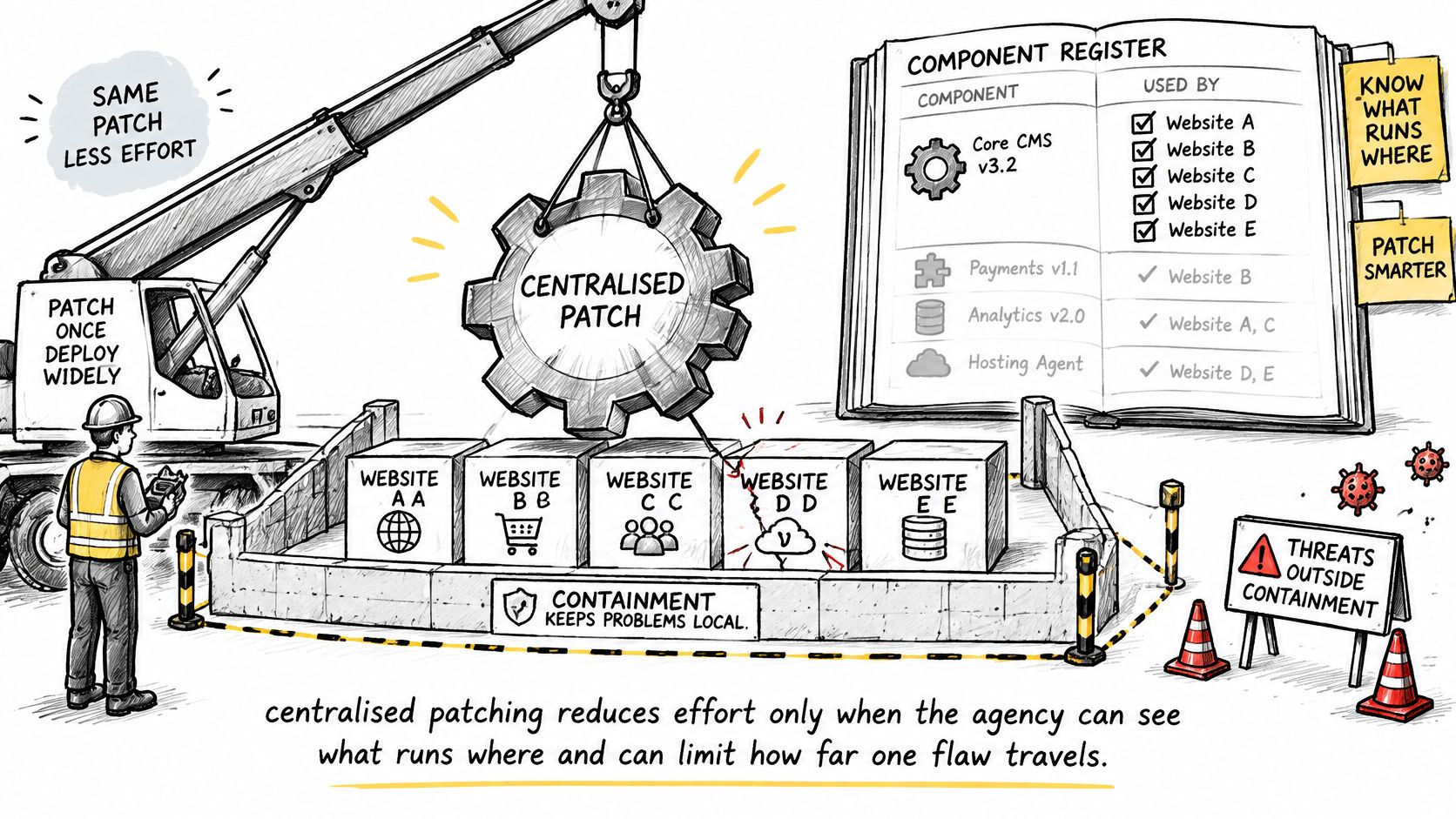
Centralised patching cuts effort only when the agency can see what runs where and can limit how far one flaw travels. That's the difference between a managed platform and a faster way to break forty sites at once.
Start with the register. A component register lists the versions deployed on every site, from runtime and libraries through modules, extensions and nested dependencies. Without it, exposure becomes a manual search conducted under time pressure, and the severity windows you wrote into the runbook turn into aspirations.
OWASP treats vulnerable and outdated components across operating systems, servers, databases, APIs, runtimes, libraries and nested dependencies as a major risk, and recommends continuously inventorying versions, monitoring advisories, using software-composition analysis and applying updates in a timely, compatibility-tested way (OWASP on vulnerable and outdated components). The urgency isn't theoretical. Verizon's 2025 Data Breach Investigations Report found that exploitation of vulnerabilities accounted for 20% of breach initial-access vectors, up 34% from the prior report (Verizon 2025 DBIR executive summary).
Sizing the Release Wave
Say thirty client sites share a library with a published flaw. The register identifies all thirty in minutes rather than over a morning. The release wave then orders them by exposure: sites taking payments first, brochure sites last, each wave verified before the next begins.
Shared native functionality reduces the number of independently maintained components, which shrinks update variance. It also concentrates risk, so release management matters more rather than less. Pair centralised patching with tenant isolation, least-privilege administrative access, immutable logs of who changed production, and restore tests that prove recovery works.
The Exception Register
Some site can't be upgraded this week. A custom integration locks a version, or a regulated client needs a change window that hasn't opened. That site gets a written exception with an owner, a compensating control and a review date, and it stays visible in the monthly client report until it closes.
An exception without an owner isn't an exception. It's an outage with a date attached.
Much of this work exists because of dependencies nobody inventoried, which is why WordPress plugin maintenance becomes a portfolio-wide problem rather than a per-site chore.
List your shared components this week and mark any component that has no exception owner.
Where Maintenance Breaks and How to Prevent It
Breakage usually enters through work that looks finished. An editor swaps a hero image and the page gets slower. A new landing page ships without alt text. A platform update clears staging and breaks a form integration that only runs in production. Each change passed review, and the regression appears because nobody owned the check that would have caught it.
The failure modes repeat across portfolios, and each one has a control you can name in the runbook:
- Accessibility regressions. New content arrives without alt text, styling drops contrast, form fields lose their labels. WebAIM reported 2,794 website-accessibility lawsuits filed in U.S. federal court during 2023, and its 2024 recap noted that nearly 48% of 2024 cases targeted companies that had previously faced accessibility litigation, which is what happens when compliance is treated as a one-time redesign (WebAIM). The control is a scan after each template change plus manual checks on the journeys that matter.
- Performance regressions. A new script or an unoptimised hero image adds weight nobody measures. Deloitte's analysis of 37 brands and approximately 30 million sessions found that a 0.1-second improvement in mobile load time was associated with an average 10.1% increase in conversion rate (Deloitte, Milliseconds Make Millions). The control is a performance threshold written into the agreement and checked after each release.
- Extensions that break after an update. A component updates cleanly on staging and fails on the one live site that pinned an older version. The control is a staging environment that mirrors production plus a rollback path tested before you need it.
- Custom code only one person understands. The developer who wrote it has left, or never documented the integration. The control is the exception register: an owner, a compensating control and a review date.
- Recovery that has never been tested. A backup you haven't restored is a file you're trusting. The control is a scheduled restore test with a named person who runs it and the result written down.
- Unaudited code entering the cycle. Sites arriving from another platform, a departed freelancer or an AI builder carry dependencies nobody inventoried. The control is a code audit before the site joins the maintenance schedule.
Read that list against the contract you're about to sign. If a control has no matching clause, the clause doesn't exist.
Whatever you put in that contract needs a number to measure it against. WebinOne reports 99.99% uptime over the last 12 months against a 99.95% availability commitment in its SLA. Treat the pair as a benchmark for any provider you evaluate: the measured figure tells you what the platform achieved, the committed figure tells you what it will answer for, and a public status page lets you check both without waiting for the monthly report.
What Your Clients See Under Your Brand
The white-label layer puts your name on the portal, the reports and the approvals, so the client experiences one supplier while the platform team runs the work underneath.
Three surfaces carry that experience.
- The branded portal. The client reviews pending changes, approves material releases and sees open exceptions in one place. White-labelling places your logo and branding on the admin and login page of every site you create, so there is no visible seam between your studio and the platform.
- The monthly report. Changes made, incidents, restore-test results and uptime measured against the agreement. A report that only lists activity teaches the client to ignore it.
- The change log. Who approved each production release, and when. This is the document that ends an argument about whether a change was authorised.
What You Add on Top
The platform covers hosting, updates and shared components. The services that carry your margin sit above it: multi-site management for clients running several brands from one console, email marketing and analytics reporting under your name, and migration for the sites they already own. WebinOne's team helps set up the white-label portal and migrates existing sites when needed, and migrated sites are delivered production-ready with design customization where required.
The commercial logic is simple. Platform cost is a fixed line per site, so margin comes from the fee you charge above it and the hours you spend per site. Every hour of shared-component work you don't do yourself is margin you keep, and every approval that reaches you twice is margin you've lost.
The branding only holds when the record behind it does. An approval screen under your logo that shows release contents, staging result and rollback path beside the approve button earns more trust than the logo itself. A report line that reads "restore test completed, written result retained" proves the schedule is real. The portal carries your name credibly when the ownership table behind it names who approves what.
Confirm Your Maintenance Model Before You Sign
Five items in writing decide whether a white-label maintenance agreement is a process or a promise, and WebinOne's model can be tested against all five before you commit.
- The cadence for every task in the catalog. Updates, restore tests, accessibility scans and SEO checks, each with a frequency rather than a description.
- The named owner of every row in the ownership table. Roles, not teams, and a name behind the role.
- The severity window for security patches, including the shortest window for actively exploited vulnerabilities.
- The restore-test frequency, with a written result retained each time.
- The owner of every custom-code exception, plus the review date and the compensating control.
Each item traces to something you can point at in your own proposal, so the document gets checked line by line instead of read for tone. Run the same test on your draft before it goes out. A task with a description but no frequency, or a role with no name behind it, is a gap the client will find mid-incident rather than at signature. A proposal that answers all five is ready to send; one that answers four is a follow-up call waiting to happen.