Website Migration to AWS: A Practical Playbook
The popular advice is to treat website migration to AWS as a cutover exercise. Lower the DNS TTL, copy the files, point traffic at the new environment, and call the project complete. That approach is responsible for many “successful” migrations that later produce slower pages, fragmented caches, missing redirects, unowned security controls, and cloud bills nobody can explain.
AWS migration is an operating change, not a hosting swap. AWS guidance uses a six-step sequence, Discover, Design, Build, Integrate, Validate, and Cutover, and defines success by comparing pre- and post-migration baselines on the same usage pattern, validating planned gains, and removing migration-specific errors before completion (AWS migration measurement guidance). The DNS change is one event inside that process. The hard work is preserving performance, governance, and unit economics after users arrive.
Table of Contents
- What AWS Migration Actually Means for a Website
- Discover, Design, and Plan the Migration Wave
- Staging, Parity Testing, and Pre-Cutover Validation
- Cutover, DNS, and Zero-Downtime Mechanics
- Security, Compliance, and Shared Responsibility
- Cost, Observability, and Post-Migration Operations
- Migration Checklist and Next Steps for Agencies and SIs
What AWS Migration Actually Means for a Website
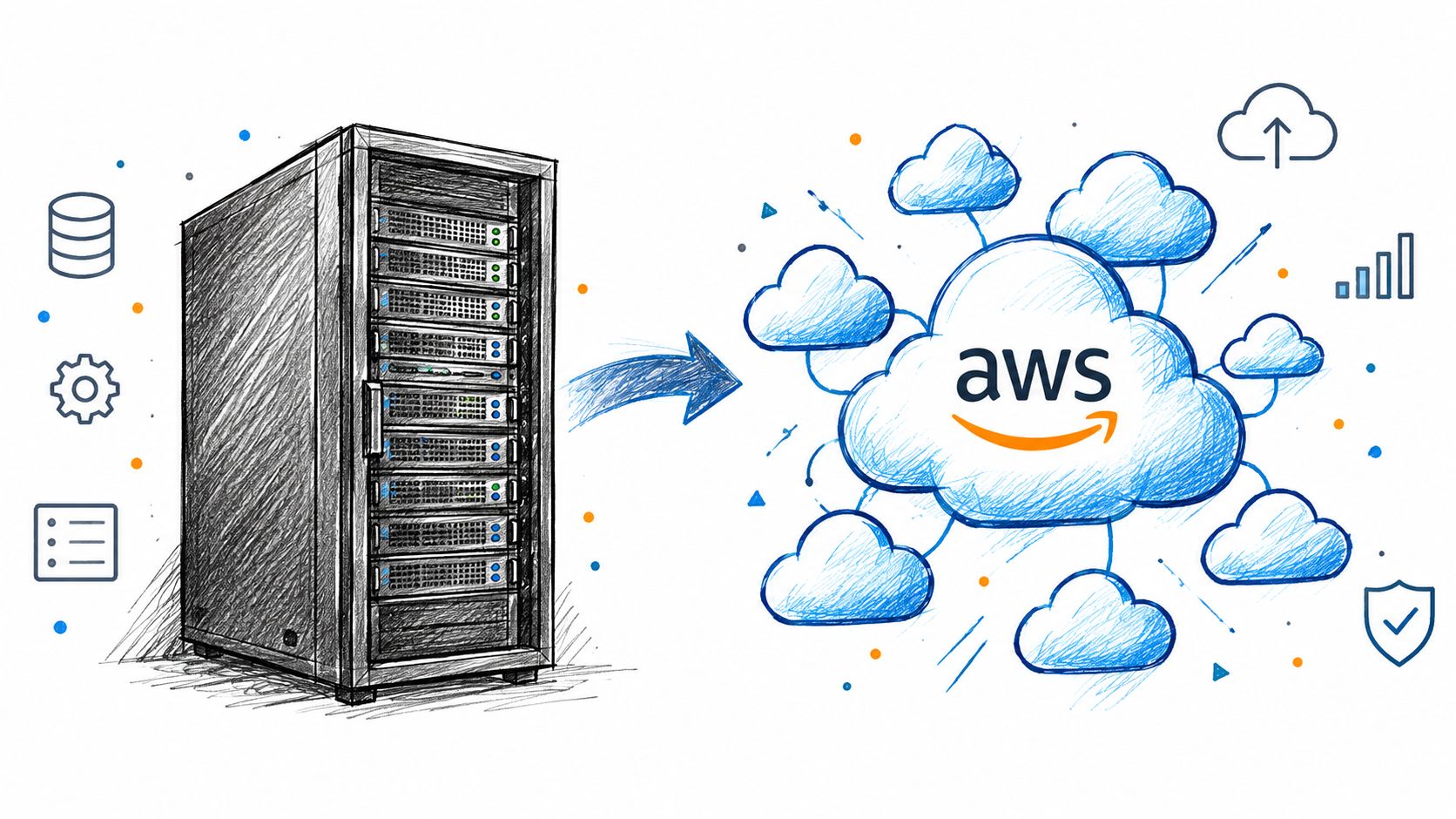
A website migration to AWS is a change to how each workload operates, not a file transfer followed by a DNS update. Static assets may fit object storage and a content delivery layer. Dynamic applications need a runtime, session handling, deployment controls, and health checks. Databases require decisions about consistency, replication, backup, and recovery. Search indexes often need rebuilding or synchronization, exposing content-model differences that a file copy will miss.
The migration pattern sets the operating burden. A lift-and-shift preserves much of the existing runtime while changing its hosting location. Replatforming changes more of the model, perhaps placing the application behind a load balancer, using managed containers, or handing more of the CMS and infrastructure lifecycle to a managed service. That choice affects cost, uptime, deployment ownership, scaling behaviour, and the boundary between AWS responsibilities and customer responsibilities.
AWS reports that 77% of IT leaders had moved web applications to the cloud and 78% had moved storage and backups to the cloud in its 2025 Migration and Modernization summary (AWS Migration and Modernization). The figures show that website migration is now a common enterprise workload. They do not make the work routine. Teams still need controls for governance, performance, and coordinated changes across the digital estate.
The failures that telemetry exposes
Functional tests can pass while production behaviour deteriorates. Monitor for:
- Silent latency drift, where the page loads but the origin, database, or external call takes longer.
- Cache fragmentation, caused by inconsistent hostnames, query strings, headers, or cookie behaviour.
- Broken rewrite rules, including legacy paths, trailing slashes, language variants, and query parameters.
- Mismatched TLS chains, which can affect older clients, integrations, or internal services.
- Stale cron jobs, webhooks, queues, and scheduled imports that still target the old environment.
These defects are why migration remains an operating change for months after launch. Track origin response time, cache hit behaviour, error rates, indexing, redirect outcomes, and infrastructure spend against the pre-migration baseline. A faster cutover can still produce a worse business result if the new environment is harder to govern or costs more per transaction.
Security ownership requires the same precision. AWS manages the resiliency of the infrastructure underlying its services, while the customer remains responsible for application configuration, identity, data handling, and workload-level controls, as described in the shared responsibility documentation cited in the Security section. Agree on WAF placement, logging, alert ownership, and incident escalation before launch.
Teams assessing the operating model can review the managed AWS hosting approach. Storage-heavy workflows also benefit from repeatable processes. This cloud storage automation guide provides a practical reference for planning asset movement instead of relying on one-off transfers.
Discover, Design, and Plan the Migration Wave
For a 40-site portfolio, discovery fails when the team copies the hosting spreadsheet and calls it an inventory. Start with DNS records, access logs, deployment history, CMS exports, database schemas, cache configuration, certificate details, scheduled jobs, and synthetic monitoring. These sources reveal what is serving traffic, changing data, and creating operational dependency.
AWS's large-scale migration strategy recommends automated discovery, early agreement on business drivers and escalation paths, limited unnecessary change, documented standard patterns, and one source of truth for migration metadata. Apply that discipline to each site, even when the portfolio is smaller than an enterprise estate.
Turn evidence into a migration brief
Trace each hostname to its application, origin, database, cache, content delivery layer, identity provider, payment service, analytics, search, email system, and external API. Record where forms, webhooks, imports, and scheduled tasks send data. Check which publishing workflows write to which tables, which redirects support organic search, which integrations require fixed outbound addresses or allowlisted certificates, and which workloads contain regulated or contractually restricted data.
AWS defines a large migration as 300 or more servers, and its guidance describes the initial Initialize phase as lasting 1–3 months (AWS migration guidance). A website portfolio may contain fewer servers but still demand the same control when brands, regions, integrations, and governance requirements interact.
Do not assign a wave until the owner can answer four questions: what depends on this site, what must remain unchanged, who approves the cutover, and what evidence permits rollback?
Choose the target by operating requirement
A load balancer and autoscaling application tier fits a conventional site that needs virtual-machine control. A managed container runtime fits an application with repeatable images, service health checks, and automated deployments. Static content generally suits object storage with content delivery, provided forms, search, personalization, and preview workflows are designed separately. A small isolated site may need a lighter target.
The target follows the workload, not the team's preferred architecture. Overbuilding a brochure site adds operating cost and governance work. Under-designing a revenue-critical application postpones failure rather than removing it.
| Workload Profile | Recommended AWS Target | Wave Priority | Risk Class |
|---|---|---|---|
| Static content with limited dynamic behaviour | Object storage plus content delivery | Early, after a representative test | Low |
| Conventional CMS with moderate integration needs | Load balancer plus autoscaling application tier | Middle wave | Medium |
| Container-ready application with repeatable deployments | Managed container runtime | Middle or later wave | Medium |
| High-change application with regulated data or complex dependencies | Target architecture selected after deeper validation | Later, with executive sign-off | High |
The deliverable is an application portfolio brief for every site. Include its owner, dependency map, migration track, target architecture, compliance classification, wave date, rollback owner, and acceptance criteria. Teams refining their web hosting migration process can use this brief as the control document. A calendar invite is not a plan.
Staging, Parity Testing, and Pre-Cutover Validation
A staging environment that only proves the homepage renders is a preview, not a migration test. Build a production-shaped target with matching network boundaries, identity assumptions, security groups, certificates, deployment paths, and data-handling behaviour. The purpose is to expose operational differences before they reach users.
Reproduce the conditions that matter
Create a representative staging account and mirror the target topology. Include VPC layout, IAM roles, security groups, routing, certificate chains, load-balancer rules, cache policy, database configuration, scheduled tasks, and observability. Use realistic content volumes and permission sets. Empty databases and administrator accounts conceal failures in queries, access control, publishing, and background work.
Capture source baselines before changing anything:
- HTML responses and asset hashes
- Response headers, compression, and cache status
- Redirects, canonical URLs, and status codes
- Sitemaps, schema, and structured data
- Search results and indexing inputs
- Form submissions, webhooks, and email delivery
- CMS publishing, preview, media, and administrative workflows
Compare both environments systematically. A page can look correct while returning a different header, dropping structured data, losing a redirect, or causing a cache miss on every request. Record these differences in a parity report, with an owner and disposition for each finding.
Test performance and operations together
Run load tests against both environments with the same agreed traffic shape. Load-testing tools can expose cold starts, autoscaling lag, connection-pool limits, and database latency that a manual smoke test will miss. Synthetic checks should cover business journeys, including login, search, form submission, checkout where applicable, and content publishing.
Test failure handling as well as normal traffic. Stop an application task, delay a dependency, exhaust a connection pool, and confirm that alerts, retries, logs, and recovery procedures behave as expected. A staging result has little value if nobody can explain who responds when it fails.
Each test needs a recorded result and accountable owner. Sign-off should require:
- Engineering, content, SEO, and the business owner have reviewed the parity report.
- Performance remains within the agreed tolerance against the captured baseline.
- Scheduled jobs, integrations, certificates, backups, and alerts have named owners.
- The rollback trigger is documented and technically executable.
- A named decision-maker can declare go or no-go.
Practical rule: A green homepage is not a go-live signal. Readiness requires explicit business paths, operating controls, and rollback conditions.
As noted earlier, migration success requires pre- and post-migration baselines to be compared under the same usage pattern, with planned performance gains validated and migration-specific errors removed (AWS migration measurement guidance). That standard is more useful than approval from one tester.
Cutover, DNS, and Zero-Downtime Mechanics
Cutover should run as a scripted sequence with timestamps, owners, evidence capture, and abort conditions. Manual execution creates uncertainty at the exact point when the team has the least time to investigate it.
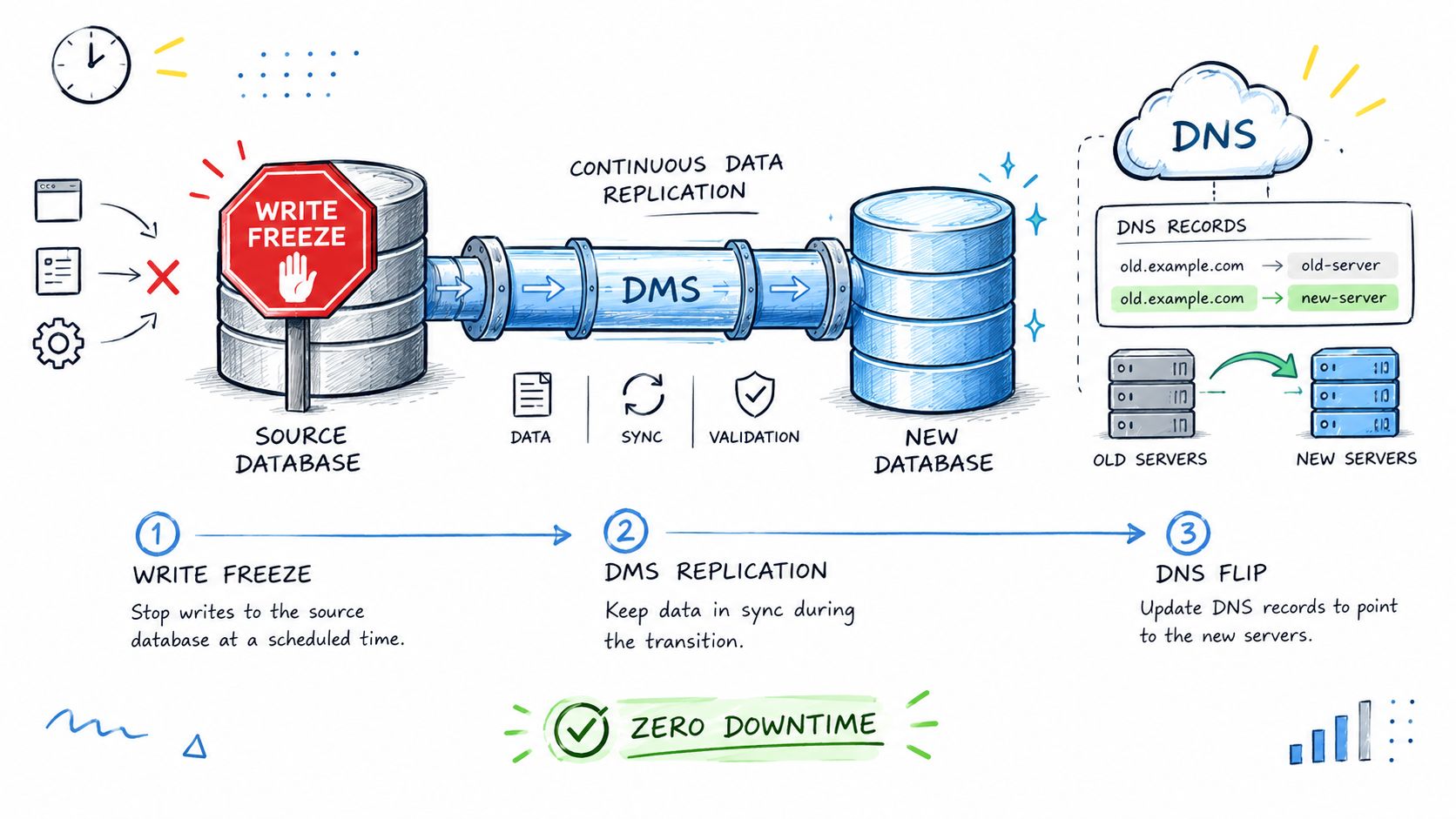
Start with a controlled write freeze on the source CMS and database. Capture a final backup or snapshot, replicate the final deltas to the target, and verify that the target contains the expected content and transactional state. If the application continues serving reads during replication, the team still needs a clear point at which writes stop and the final consistency check begins.
Shift traffic deliberately
Set a low DNS TTL 24–48 hours before the planned change so resolvers can honour the intended transition quickly. Use a health-checked alias or weighted record that points to the target load balancer or content delivery distribution. During propagation, watch synthetic journeys, origin latency, error rates, cache behaviour, application logs, and business transactions.
AWS's cutover guidance identifies the core sequence as freezing ingestion, taking a final backup, performing a final sync, routing users to the cloud through DNS or load-balancer targets, and testing before completion (AWS migration cutover best practices).
Make rollback a decision, not a hope
Every step needs a trigger and an owner. Useful triggers include error rates exceeding the agreed baseline, a sustained 5xx burst, origin latency doubling against the validation result, failed certificate provisioning, broken authentication, or a critical transaction failing.
A rollback plan that says “restore the old DNS” is incomplete. It must define whether writes are still frozen, how new data is reconciled, which record is restored, who approves the action, and how the team confirms that users have returned to the source. Teams can use an AWS zero-downtime deployment strategy as a reference for designing this discipline.
A useful pre-cutover check also verifies that the public hostname presents the intended certificate and that the delivery path behaves as expected. A focused resource on AI builder detection for CloudFront can support that review when teams are auditing generated or migrated front ends, but it doesn't replace functional, security, and business-path testing.
Security, Compliance, and Shared Responsibility
Security decisions shape the migration before any workload moves. They determine account boundaries, identity design, logging, encryption, evidence collection, and the controls required for approval. Treating security as a final checklist usually exposes gaps when the architecture is already expensive to change.
AWS operates the underlying cloud infrastructure, while customers secure their workloads. For a website, customer responsibilities typically include IAM policies, application code, secrets, data classification, encryption choices, access reviews, patching of customer-managed components, and managed-service configuration. The AWS shared responsibility model describes the division in more detail.
Map ownership before architecture approval
Write ownership in plain language for every layer:
- AWS owns: Facilities, hardware, foundational infrastructure, and the resiliency of the underlying services. You own: Service and Region selection for the website's requirements.
- AWS owns: Operation of the managed-service platform and its baseline controls. You own: Configuration, access controls, data settings, and monitoring.
- AWS owns: Infrastructure directly managed for the selected runtime service. You own: Application code, images, dependencies, runtime settings, and deployment controls.
- AWS owns: Available service security features and encryption mechanisms. You own: Data classification, IAM, credentials, keys, retention, and access reviews.
- AWS owns: Available security services and infrastructure controls for website protection. You own: WAF rules, application security, logging, alert response, and incident procedures.
This division changes with the service choice. A managed runtime can reduce patching work, while a customer-managed component leaves more operating responsibility with the migration team. Record those boundaries in the architecture decision and assign an owner before approval.
Regulated projects need their compliance regime defined early. Healthcare, payment data, government requirements, privacy obligations, and contractual controls can impose different conditions. Region selection, service eligibility, key management, retention, audit logging, and support processes may all affect the target design.
Find the gaps that migrations hide
Review the source and target for public storage, broad security groups, inactive accounts, unrotated secrets, unmanaged certificates, missing audit logs, and permissions inherited from the old environment. Build WAF controls, threat detection, denial-of-service protection where appropriate, and centralized logging into the landing zone rather than adding them after launch.
Moving a website to AWS does not transfer every security obligation to the provider. The post-migration posture should be documented and at least as strong as the source posture.
A compliance sign-off should name the evidence owner, control owner, retention location, and incident path. For government or regulated projects, WebinOne can be delivered with systems integration partners and licensed deployments, including AWS GovCloud, subject to project agreement. Confirm the required compliance architecture before selecting a migration wave, then keep reviewing it as the workload operates.
Cost, Observability, and Post-Migration Operations
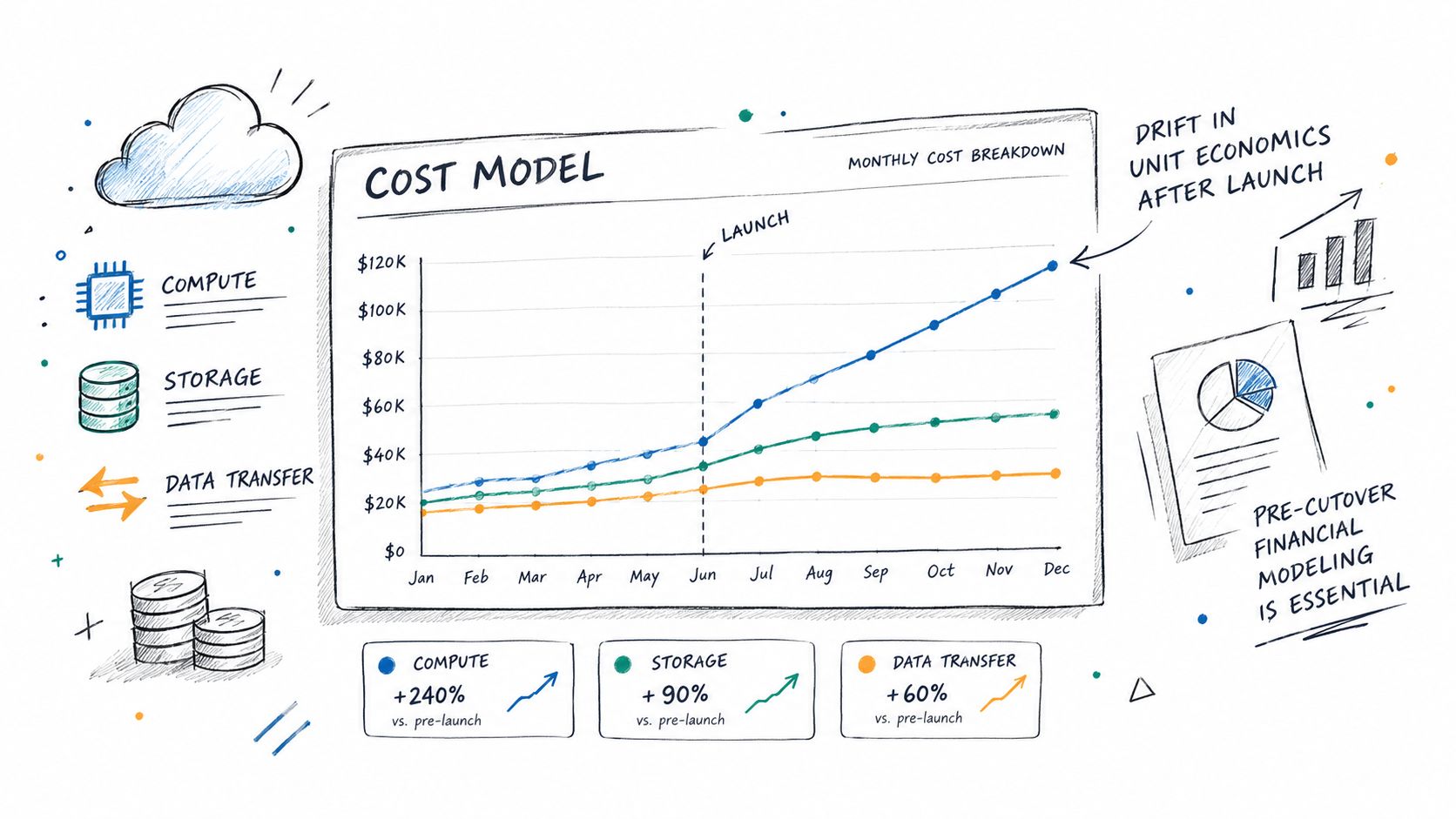
A successful cutover can still produce an expensive, fragile website. The first operating cycle often reveals idle resources, weak cache policies, cross-availability-zone traffic, oversized instances, unmanaged snapshots, and support work missing from the original budget. Treat migration as a multi-month operating change, not a weekend deployment.
AWS-published benchmarks cite 20% to 31% infrastructure cost savings, 43% to 45% fewer security incidents, faster feature delivery, and improved staff focus, with other reported gains in infrastructure management and downtime reduction (AWS OpsGuru migration benchmarks). These are portfolio averages, not a forecast for one website. Use them to form hypotheses, then validate the assumptions against the account, workload, and service design.
Model the bill before traffic arrives
Separate compute, storage, data transfer, and managed-service charges in the forecast. Include content delivery egress, NAT gateway usage, cross-availability-zone traffic, database storage, backup retention, logs, and monitoring. Egress follows traffic, so it can remain invisible in a fixed hosting comparison until usage rises.
Build low, expected, and peak traffic cases. Assign an owner to each assumption, including cache-hit rate, request volume, retention period, database growth, and recovery requirements. Review the model after real traffic arrives, because early demand patterns often differ from the migration plan.
Operate the new environment visibly
Observability must exist before the DNS change:
- Structured logs: Centralize application and access logs, with retention rules and searchable fields.
- Synthetic monitoring: Test availability and key user journeys from outside the environment.
- Tracing and correlation: Connect edge requests, application work, database calls, and third-party failures.
- Resource tagging: Map infrastructure to a client, brand, product, environment, and owner.
- Cost alarms: Alert on unexpected service growth and unusual transfer patterns.
Post-launch reviews should right-size capacity, assess commitment options for steady workloads, remove unused snapshots, tune caching, and revisit database performance. Track cost per request, error rate, latency, and time to restore. Migration is complete only when those measures have owners, thresholds, and a review cadence.
Migration Checklist and Next Steps for Agencies and SIs
A migration checklist should produce artifacts, not merely confirm that meetings happened. Agencies and systems integrators can use the following sign-off structure for each site or wave.
Discovery and design
- Inventory: Record domains, applications, databases, integrations, scheduled jobs, certificates, owners, and data classifications.
- Dependency map: Show the relationships between the web tier, runtime, data, cache, search, identity, and external services.
- Wave plan: Assign a target architecture, migration track, risk class, date, rollback owner, and business approver.
- Architecture record: Document account boundaries, network layout, identity controls, logging, backup, and recovery decisions.
Staging and validation
- Parity report: Compare HTML, assets, headers, redirects, canonical signals, sitemaps, schema, search, forms, and publishing workflows.
- Performance evidence: Record load-test results and synthetic checks against the agreed baseline.
- Operational sign-off: Confirm alerts, backups, certificates, cron jobs, webhooks, email, and support ownership.
- Rollback plan: Define the trigger, decision-maker, data treatment, DNS action, and verification steps.
Cutover and operations
- Change record: Include the write freeze, final backup, final sync, DNS action, validation sequence, and timestamps.
- Security baseline: Confirm IAM, secrets, encryption, WAF, logging, threat detection, and access review.
- Cost model: Separate compute, storage, transfer, managed services, monitoring, and optimization work.
- Post-launch review: Track errors, latency, cache behaviour, cost per request, restore readiness, and unresolved migration defects.
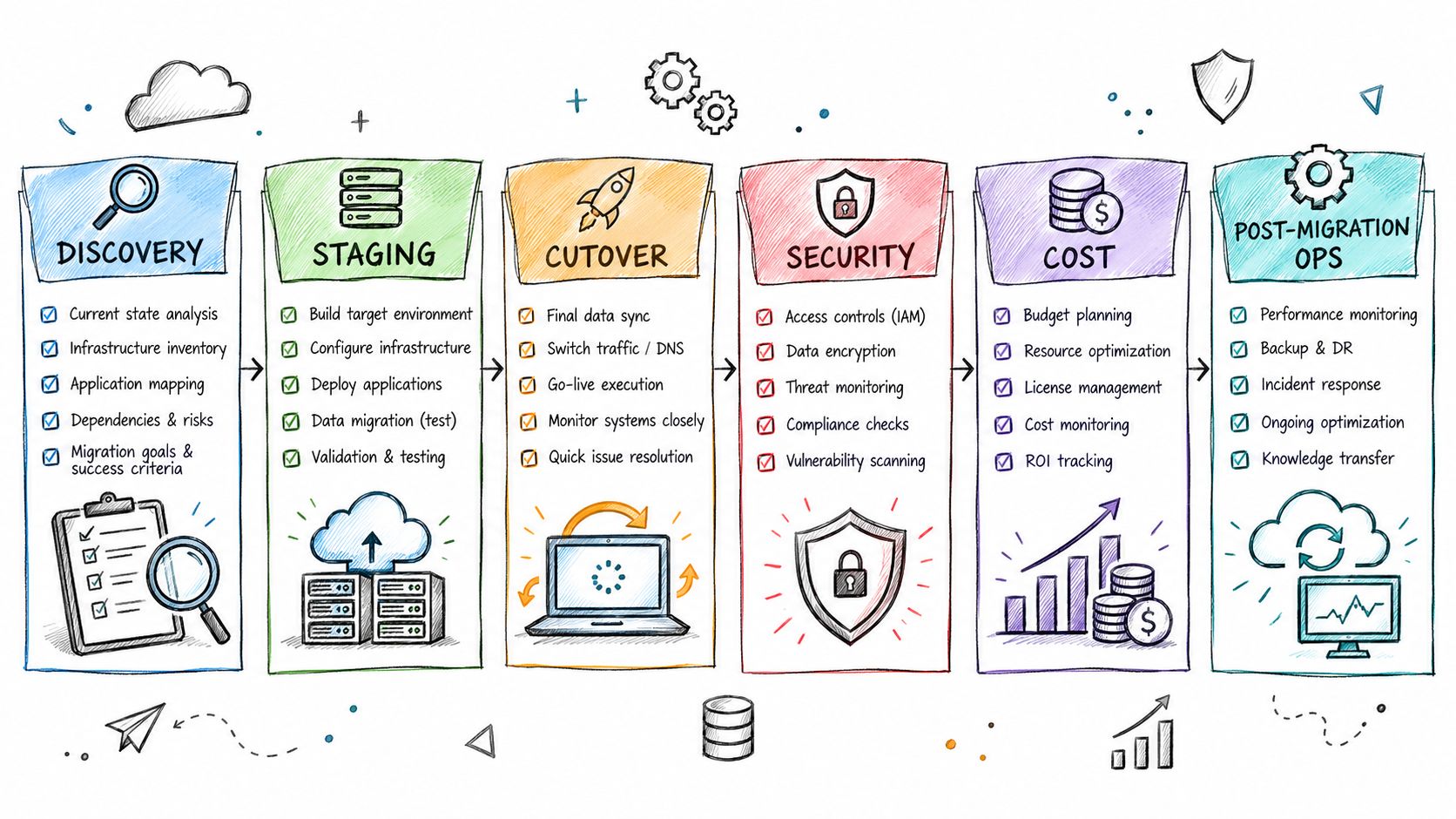
For agencies, the next decision is whether the bottleneck is platform selection and portfolio governance or engineering execution. WebinOne provides a managed DXP hosted on AWS, with CMS, ecommerce, CRM, email marketing, multi-site management, headless APIs, and white-label agency operations in one system. Its platform runs across six AWS regions, and WebinOne is an AWS Partner, has passed the AWS Foundational Technical Review, holds the AWS Qualified Software designation, and is available on AWS Marketplace.
For systems integrators, enterprise teams, and AWS partners, the practical next step is a migration conversation that defines account ownership, deployment model, compliance needs, data residency, wave boundaries, and the division of work between the SI and WebinOne. A licensed deployment in the SI's or customer's AWS account, including AWS GovCloud, is available by agreement for qualifying projects.
WebinOne gives agencies and systems integrators a managed AWS-based platform for staged website migration, multi-site governance, content, commerce, and ongoing operations, with migration delivery available through TeamOne. Visit WebinOne to start a focused conversation about the target architecture, migration waves, and the operating model required after cutover.