Web Hosting Migration Playbook for Agencies and Teams
A client's checkout fails after a plugin update. An end-of-life notice gives the agency a fixed deadline. A renewal quote exposes how much margin disappears into hosting coordination. The team starts searching for a web hosting migration plan, usually after uptime, security, or profitability has already become a problem.
That timing creates the wrong instinct. Teams rush to copy files, restore a database, and change DNS, then call the move complete when the homepage loads. A serious migration is different. It's a governance decision, covering ownership, rollback, multi-site operations, SEO recovery, security, and the destination stack that will carry the business after launch.
Table of Contents
- The Decision Moment That Triggers a Migration
- Discovery and Pre-Migration Assessment
- Choosing the Destination Before You Plan the Route
- Building the Migration Plan and Staging Environment
- The Cutover Sequence for Zero Downtime
- Post-Migration Validation and Recovery
- Why Cheap Migrations Often Cost More
The Decision Moment That Triggers a Migration
The migration usually begins with a ticket, not a board presentation. A WordPress update breaks checkout on a client store, an aging server receives an end-of-life notice, or a renewal forces the agency to explain another cost increase. The technical incident creates urgency, but the underlying problem is usually older: nobody has a reliable view of the stack, its dependencies, or who can safely change it.
Three triggers appear repeatedly across agency portfolios.
Legacy performance decay shows up first as intermittent slowness. The source may combine an old LAMP stack, layered caching, oversized media, background jobs, and plugins that were added for one campaign and never removed. The result isn't always a complete outage. It's degraded performance that becomes visible during traffic peaks, checkout activity, or content publishing.
Security and compliance gaps create a different kind of deadline. An audit may expose unsupported runtime versions, incomplete access controls, weak backup practices, or unclear data residency. A host move can address infrastructure, but it won't fix undocumented ownership or an application that remains impossible to patch safely.
Shared multisite limits become obvious when one client's workload affects others. A shared environment may have worked for a small portfolio, but agencies eventually need isolation, predictable scaling, separate release controls, and a way to monitor every property from one operational view.
Treat the trigger as a checkpoint
Adobe Business Catalyst demonstrates how quickly a platform sunset can create a migration wave. Adobe announced the end of development on March 26, 2018, extended the hosting shutdown to March 26, 2020, and later extended final retirement to September 26, 2021. All trial and paid websites were ultimately scheduled for takedown, with customer data deleted after the cutoff, leaving thousands of site owners with a fixed migration deadline. Adobe Business Catalyst's retirement timeline and migration implications show why platform retirement turns migration from an optional improvement into an operational obligation.
The correct response isn't panic. It's a decision checkpoint:
- Name the forcing event: Record whether the issue is reliability, security, cost, platform retirement, or portfolio scale.
- Set business priorities: Decide which sites, transactions, integrations, and SEO assets cannot fail.
- Choose the operating model: Determine whether the move will preserve the existing architecture or replace the fragmented stack.
- Assign accountable owners: DNS, content, application, analytics, security, and rollback each need a named person.
A rushed lift-and-shift can reproduce the same incident on a new host. A governed web hosting migration uses the forcing event to remove the operational debt that caused the incident in the first place.
Discovery and Pre-Migration Assessment
Discovery is an inventory exercise, not a generic checklist. Before a team chooses a cutover date, it needs one source of truth that describes what exists, who owns it, and what could break when traffic moves.
Start with the source stack. Capture the PHP version, web server, database engine, cache layer, scheduled jobs, CDN behavior, SSL dependencies, and deployment path. Then map the content footprint, including page types, media, dynamic routes, forms, member areas, product records, and URLs that receive organic traffic.
Build the inventory around failure impact
Integrations deserve their own pass. Payment gateways, CRM webhooks, marketing pixels, SSO, email delivery, search tools, and third-party scripts don't all carry the same risk. A checkout webhook belongs on the critical path. A campaign pixel still matters, but it shouldn't delay a database validation decision.
Traffic shape also changes the cutover plan. The team needs to understand peak request behavior, geographic distribution, bot activity, cache effectiveness, write-heavy workloads, and the time windows when scheduled jobs run. Hidden downtime isn't limited to a server being unreachable. A site can remain live while latency, queue depth, or database contention makes the experience unusable.
Ownership is just as important as infrastructure. The inventory must identify who controls DNS, the registrar, SSL certificates, CDN settings, source deployments, analytics, payment credentials, and rollback approval. A migration stalls when the person with DNS access is unavailable, or when an agency discovers that a client owns the registrar account but not the recovery email.
| Inventory Area | What to Capture | Cutover Risk |
|---|---|---|
| Source stack | Runtime, web server, database, cache, cron, CDN, SSL | Compatibility failure or inconsistent behavior |
| Content and URLs | Page types, media, dynamic routes, products, legacy URLs | Missing content, broken links, lost search equity |
| Integrations | Payments, CRM webhooks, SSO, email, pixels, analytics | Failed transactions, missing leads, incomplete attribution |
| Traffic shape | Peak periods, regions, bots, cache behavior, write load | Degraded performance or hidden downtime |
| Ownership | DNS, registrar, SSL, deployments, credentials, approvals | Delayed cutover or blocked rollback |
| Data handling | Backups, sensitive fields, retention, restore process | Data exposure or unrecoverable changes |
Maintain a migration risk register
The risk register should fit on one page and remain useful during the live event. Each line needs a risk, impact, owner, validation method, and fallback. “Checkout may fail” is not a control. “Payment owner validates a live test transaction on staging and confirms the source remains writable until the freeze” is a control.
Practical rule: If a risk has no named owner and no fallback, it isn't managed. It's an undocumented assumption waiting for cutover.
This artifact also exposes portfolio problems early. An agency may discover that every client site has a different deployment method, an unowned analytics account, or a bespoke integration known only to one developer. Those findings should influence the destination decision, not get buried in a project spreadsheet.
Choosing the Destination Before You Plan the Route
The destination stack matters more than the migration route. A team that moves the same plugins, release process, monitoring gaps, and ownership confusion onto a cheaper server has completed a transfer, not a transformation.
A lift-and-shift can be valid when the application is stable, documented, and intentionally retained. It's a poor default for a portfolio carrying years of plugin additions, custom patches, duplicated CMS instances, separate ecommerce tools, disconnected CRM data, and manual operational work. The new box may reduce a hosting line item while preserving every reason the team wanted to leave.
Compare operating models, not feature lists
A managed DXP changes the unit of management. CMS, ecommerce, CRM, email, and multi-site operations can sit inside one governed environment rather than being coordinated across unrelated vendors. For an agency, that means a portfolio stops behaving like a collection of isolated incidents. Releases, access, support, backups, and monitoring can follow a consistent operating model.
WebinOne is one example of that approach. We combine CMS, ecommerce, CRM, email marketing, multi-site management, and a headless API in a managed platform, with AWS hosting across 6 global data centers and 99.99% uptime over the last 12 months. We're an AWS Partner, live on AWS Marketplace, and have completed an AWS Foundational Technical Review and an AWS Well-Architected Review. Those details matter because a migration destination should be judged by operational controls, not only by how quickly it imports content.
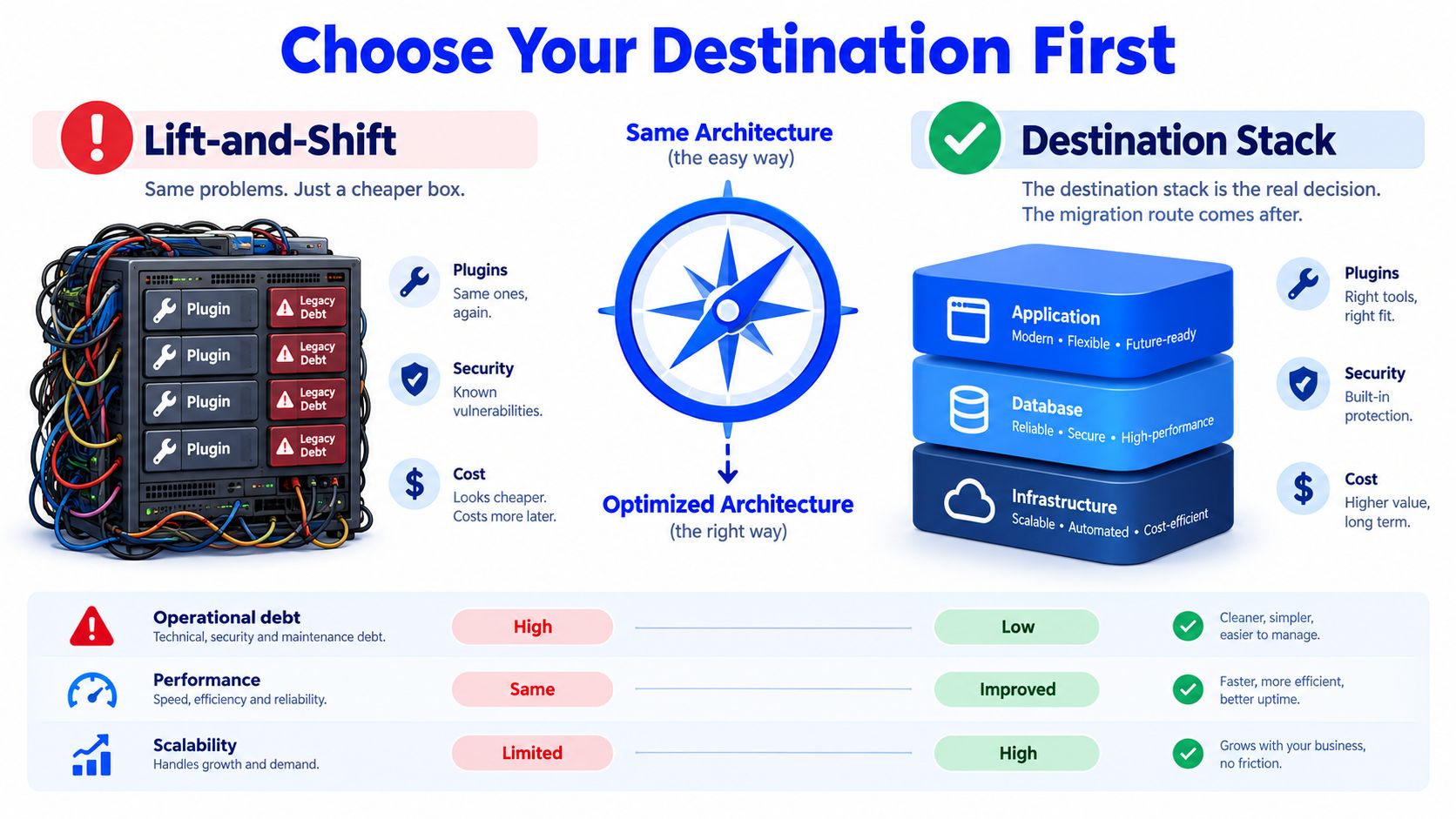
A per-site VPS may look cheaper in isolation, but it multiplies patching, monitoring, access management, staging, incident response, and vendor coordination. A managed platform absorbs more of that work as a platform capability. The relevant comparison is not server price. It's the operational burden attached to every site after launch.
Ask destination vendors operational questions
A credible evaluation should include questions that most feature grids omit:
- Multi-tenancy: Can the team separate client access, data, environments, and billing without duplicating administration?
- Rollback: Can releases, content changes, redirects, and infrastructure settings be reversed independently?
- DNS automation: Can the team coordinate records, certificates, propagation, and ownership without a manual scramble?
- Post-launch coverage: Who monitors errors, performance, indexing, integrations, and security after the migration team leaves?
- Dependency control: Are extensions maintained within the platform, or will the agency inherit another plugin ecosystem?
- Portfolio governance: Can operators see site health, permissions, incidents, and changes from one console?
Teams planning AWS-based hosting can also review this overview of managed AWS hosting for digital teams before comparing vendors. The key question remains simple: does the destination reduce the number of things the agency must remember at 2 a.m.?
Building the Migration Plan and Staging Environment
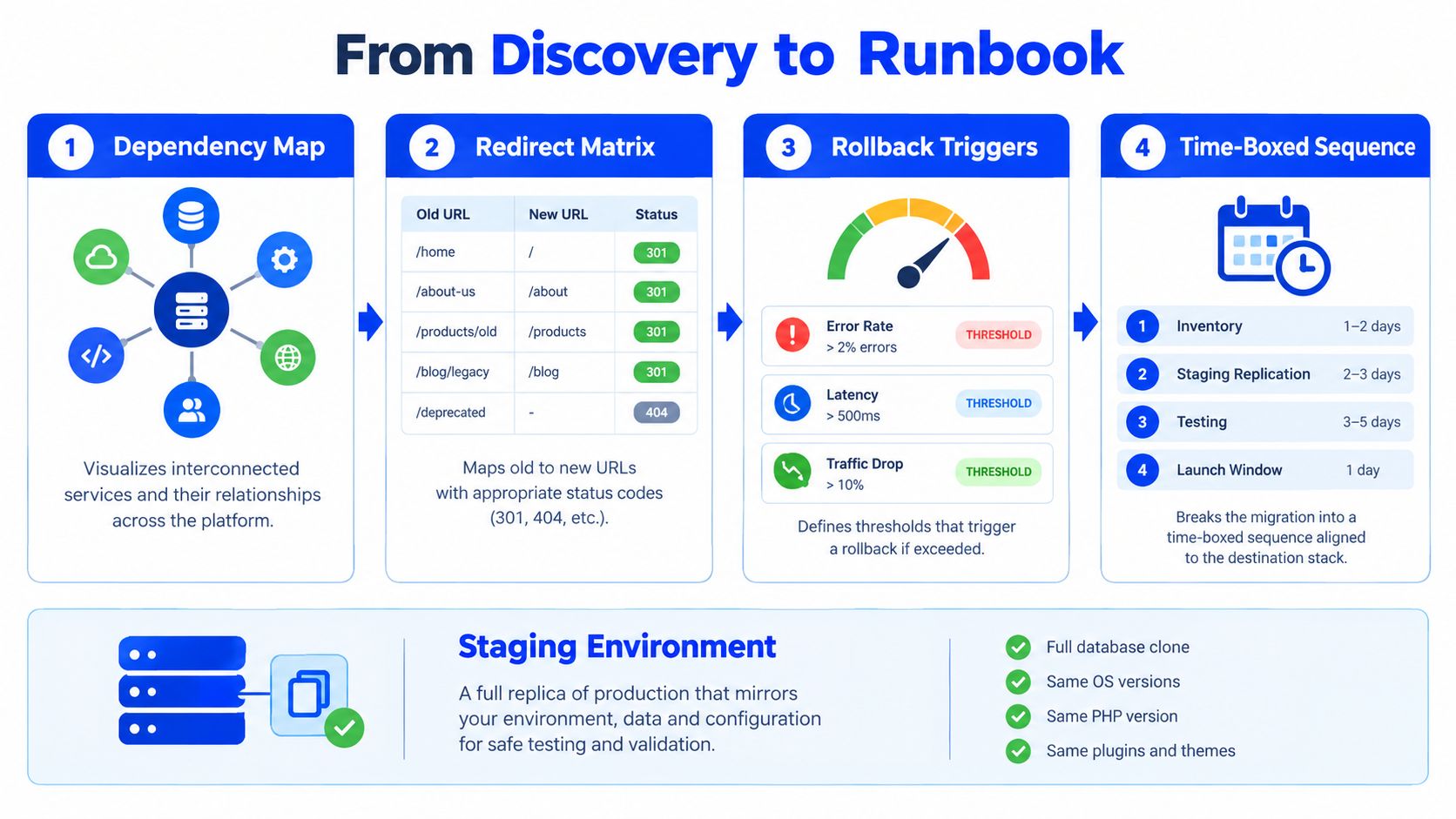
A migration plan becomes executable when discovery turns into dependencies, decisions, and measured timings. Start with a dependency map that connects domains, applications, databases, payment flows, webhooks, scheduled jobs, CDN behavior, and external services. Then create a redirect matrix with every legacy URL, its closest destination, status expectation, canonical target, and validation owner.
Don't allow redirects to live only inside application code. Edge rules can be tested and changed independently, which makes them safer during a cutover and easier to disable during rollback.
Make staging production-shaped
Staging must reproduce the destination environment closely enough to reveal behavior differences. Match the runtime, operating system assumptions, web server settings, cache layer, CDN configuration, SSL chain, cron schedule, authentication flow, and integration webhooks. Mask sensitive data before importing production content, then replay representative requests and workflows to test parity.
The agency should validate more than page rendering:
- Content parity: Confirm pages, media, metadata, forms, products, and member data.
- URL parity: Compare legacy and destination paths, canonicals, sitemap entries, and internal links.
- Transaction paths: Test checkout, payment callbacks, form delivery, CRM creation, and confirmation emails.
- Operational paths: Run deployments, backups, restores, scheduled jobs, cache invalidation, and access reviews.
- Failure paths: Test what happens when a webhook fails, a deployment is rejected, or the destination must be abandoned.
A useful external checklist of site migration pitfalls for WordPress can help teams challenge assumptions before the rehearsal. It should supplement, not replace, the agency's own inventory and risk register.
Set timing and rollback conditions
Reduce DNS TTL to 300 seconds at least 48 hours before cutover, following the timing guidance in this hosting migration checklist. Confirm registrar lock status, access recovery, certificate readiness, and the authority to make the final switch.
Run a full rehearsal on a non-production domain owned by the agency. Use the same freeze, final sync, QA, DNS switch, monitoring, and rollback choreography planned for production. Record the duration of each step. Those measured timings, not optimistic estimates, should set the launch agenda.
The Cutover Sequence for Zero Downtime
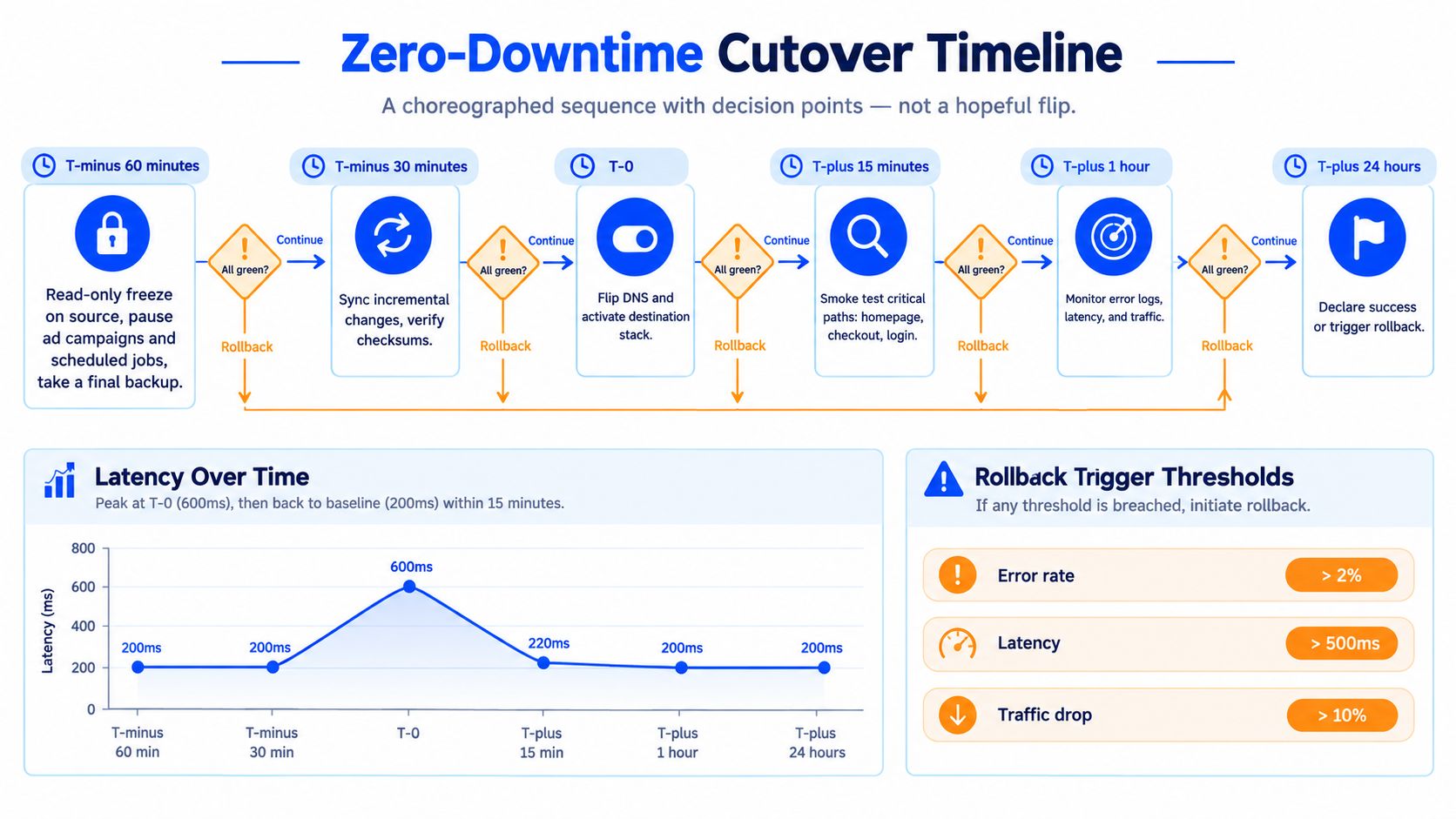
A zero-downtime cutover succeeds through controlled decisions, not a hopeful DNS change followed by homepage refreshes. Use the same discipline described in these zero-downtime deployment strategies, with an explicit owner for each action and a written rollback threshold.
At T-minus 60 minutes, put the source into read-only mode, pause advertising changes and scheduled jobs, take the final incremental backup, and warm the destination cache. This freeze prevents data divergence while the final synchronization runs.
At T-minus 30 minutes, perform the final delta sync for files and the database. Verify checksums for critical assets. Test checkout, forms, authentication, webhook receivers, and every workflow that writes data. Stop before DNS changes if any critical path fails. A rollback decision made before the switch costs less than a recovery project after it.
Use the live window deliberately
At T-0, switch DNS at the registrar, change the CDN origin, and enable edge redirects. Keep the source environment warm. DNS propagation and cached responses will send users to different environments during the transition, so the old host must continue serving remaining traffic.
From T-plus 15 minutes through T-plus 240 minutes, compare destination behavior with pre-migration baselines:
- Availability: Watch 5xx responses, connection failures, and origin health.
- Performance: Track p95 latency, cache behavior, queue depth, and database pressure.
- Business paths: Re-test checkout, login, forms, search, and webhook delivery.
- Search behavior: Check crawler requests, robots directives, canonicals, sitemaps, and redirects.
- Traffic quality: Compare geographic patterns, bot activity, and important landing paths.
Traffic spikes, write-heavy databases, and large memory footprints can degrade performance even when the site remains available. Live migration research recorded service discontinuity of around 3 seconds and more than 44 seconds of downgraded performance in one scenario. Another scenario found downtime could exceed 20 seconds under high dirty-memory rates. The live migration study separates user-facing downtime from degraded-but-live performance, two risks hosting runbooks often combine.
Rollback rule: A rollback window exists only while the source remains warm, data writes are controlled, and the DNS path can change without rebuilding the old environment.
Keep the old server online for a defined safety period, commonly 48 to 168 hours, following this zero-downtime migration sequence. Publish the new edge configuration, monitoring owner, decision authority, and rollback expiry to every stakeholder. This governance step is what protects agencies across multi-site portfolios when one launch develops a problem after traffic begins shifting.
Post-Migration Validation and Recovery
Go-live starts recovery. A move can pass technical checks and still lose search visibility, break webhooks, create soft 404s, or weaken conversion paths once real users arrive. Treat the destination stack as an operating decision, with monitoring ownership, rollback authority, and recovery work assigned before launch.
For the first 3 days, review server logs, Search Console crawl activity, indexed URL patterns, conversion funnels, error rates, and support tickets against pre-migration baselines. Audit redirect chains, missing mappings, soft 404s, stray noindex tags, canonicals, internal links, and sitemap coverage. Use this site migration SEO checklist to keep the review consistent across sites. These defects often surface only when crawlers and users reach routes staging never exercised.
Manage the long tail
A short monitoring window is inadequate. Well-managed migrations typically see under 15% traffic loss in the first 30 days, while partial redirect coverage can produce 20 to 40% loss, and poor coverage can drive losses above 50%. Recovery to 90% of pre-migration traffic is often estimated at 60 to 120 days for a well-executed move, but can take 6 to 18 months when remediation is required. The website migration SEO analysis shows why launch checks cannot replace sustained ownership.
A larger study summarized by Candid Creative's web migration mechanics guide reviewed 892 migrations and reported that the average domain migration took 523 days to regain the same organic traffic level. 17% of migrations had still not recovered after 1,000 days. Domain changes need their own recovery plan because the exposure lasts far beyond cutover.
Close the recovery loop
During days 4 through 14, establish a post-launch Core Web Vitals baseline, resubmit updated sitemaps, and verify product, article, and breadcrumb schema rendering. During days 15 through 30, tune cache rules, image delivery, and edge logic using observed traffic, not staging assumptions.
The final variance report should record downtime, SEO changes, support volume, redirect defects, unresolved integrations, and remaining operational risks. For agencies managing multiple sites, a managed DXP platform keeps monitoring, patching, and incident response inside the operating model. That governance reduces the long tail left behind by a file-and-DNS-only migration.
Why Cheap Migrations Often Cost More
The cheapest migration quote usually excludes the work that determines whether the move succeeds. It prices file transfer and DNS assistance, then leaves the agency holding redirect audits, testing, incident response, SEO recovery, client communication, and the cost of lost billable time.
The failure modes are familiar. Redirects are undocumented, PHP versions differ between staging and production, SSL chains are assembled incorrectly, staging gets skipped, and the rollback plan disappears as soon as the first production error appears. WordPress estates add another layer of exposure. A March 19, 2025 vulnerability snapshot reported 173 publicly disclosed vulnerabilities, with security patches available for 63 plugins and themes, as documented in SolidWP's WordPress vulnerability report. A separate mid-year 2025 report identified 6,700 new vulnerabilities in the WordPress ecosystem over six months, reinforcing the maintenance pressure created by unmanaged plugin and theme dependencies. The WordPress vulnerability analysis provides the relevant context.
Redirect engineering remains the most expensive hidden risk. Poorly mapped or missing 301 redirects are cited as the root cause in roughly 9 out of 10 failed migrations, while poorly handled moves are associated with 30 to 60% organic traffic losses, according to Skrol's migration guidance. The agency doesn't save money when a low-cost move creates weeks of emergency remediation.
| Cost Driver | DIY / Internal Team | Low-Cost Mover | Managed DXP Platform |
|---|---|---|---|
| Discovery | Internal staff absorb inventory and risk mapping | Often limited to files and database | Pre-migration audit with ownership and dependencies |
| Staging | Built only if internal capacity exists | Frequently compressed or skipped | Parallel environment with production-shaped testing |
| Redirects | Manual mapping and post-launch repair | Basic bulk rules | Redirect matrix with verification and edge control |
| Cutover | Staff-led coordination across vendors | Fixed handoff with limited support | Timed DNS choreography and named decision owners |
| Rollback | Depends on internal readiness | May be undefined after launch | Defined safety window and tested reversal path |
| Recovery | SEO, monitoring, and incidents remain internal | Support scope often ends at launch | Post-launch monitoring, validation, and remediation |
| Portfolio operations | Each site retains separate processes | Repeated project work | Centralized governance across sites and brands |
The right budget question is not “What's the hosting quote?” It's “Who owns the unbilled hours and business risk after the switch?” Agencies should start with a scoped migration conversation, not another request for a superficially cheap transfer.
WebinOne gives agencies and enterprise teams a managed destination for CMS, ecommerce, CRM, email, multi-site governance, and headless delivery, while TeamOne handles staged migration, testing, cutover, and post-launch operations. Visit WebinOne to scope a portfolio migration, escape plugin sprawl, or evaluate a governed platform before the next forcing event sets the deadline.