Website Meta Tags: A Complete Reference with Examples
Popular advice treats website meta tags as a character count checklist. Fill in a title, squeeze a description into a box, add keywords for luck. That advice fails on real portfolios because the tag in a CMS field isn't always the tag a crawler sees.
Templates stack. Layouts duplicate declarations. A response header can override the HTML, and a staging default can ship to production. Agencies and systems integrators don't need more tag trivia. They need governance, meaning one owner per control, one precedence model, and verification of the rendered output rather than trust in the source.
Table of Contents
- Every Core Meta Tag and Where It Lives
- Title, Description, Charset and Viewport Tags Explained
- Robots and Googlebot Directives Compared
- Canonical Tags and Which Signal Wins
- Open Graph and Twitter Card Tags for Shared Links
- Structured Data Snippets Beside Your Meta Tags
- Audit Meta Tags and Retire Legacy Ones
- Confirm Your Meta Tag Governance Before the Next Release
Every Core Meta Tag and Where It Lives
WebinOne gives teams full access to head output through Liquid templating, so every core tag below can be emitted deliberately from one shared layout. That control matters because placement and consumer determine whether a tag does anything at all.
Core website meta tags by purpose and placement
| Tag | Purpose | Where It Goes | Who Acts on It |
|---|---|---|---|
| title element | Names the page in results and browser tabs | Inside head | Search engines, which may rewrite the displayed title |
| meta description | Page summary that can feed the search snippet | Inside head | Search engines, which may replace it with on-page text |
| meta charset | Declares the character encoding | First elements in head | All browsers and parsers |
| meta viewport | Sets layout width and scale on mobile | Inside head | Mobile browsers |
| meta robots | Page-level indexing and snippet controls | Inside head | Search engines, also set by X-Robots-Tag header |
| link rel canonical | Names the preferred URL among duplicates | Inside head | Search engines, treated as a signal |
| og:title, og:description, og:image | Preview content when a link is shared | Inside head, property attribute | Social platforms that read Open Graph |
| twitter:card | Sets the card layout on shared links | Inside head, name attribute | X |
| JSON-LD script | Structured data describing the page entity | Inside head or body | Search features that support the type |
The meta element carries metadata that title, base, link, style and script can't express, so these tags inform search engines and other clients without appearing on the page. Adoption is near universal. In 2024, the HTTP Archive Web Almanac markup dataset found the HTML <meta> element on 99.2% of mobile pages.
Clients process the tags they understand and ignore the rest. A tag being present doesn't guarantee a ranking, snippet or indexing effect.
Canonical is a link element, not a meta element. It's grouped here because teams govern it through the same template fields, and conflicts between canonical and robots values cause the same class of failure.
How to Use This Inventory
List the rows each template emits. Mark which fields come from the CMS and which are hardcoded, then flag any row missing from a template that serves indexable pages. The reading order that follows matches a build order, core page tags, then robots and canonical controls, then social and structured data, then audit and cleanup.
Title, Description, Charset and Viewport Tags Explained
A page can have the right meta fields in the CMS and still publish the wrong HTML. Templates govern how those fields reach the rendered document, so check the output each page serves.
Title Element
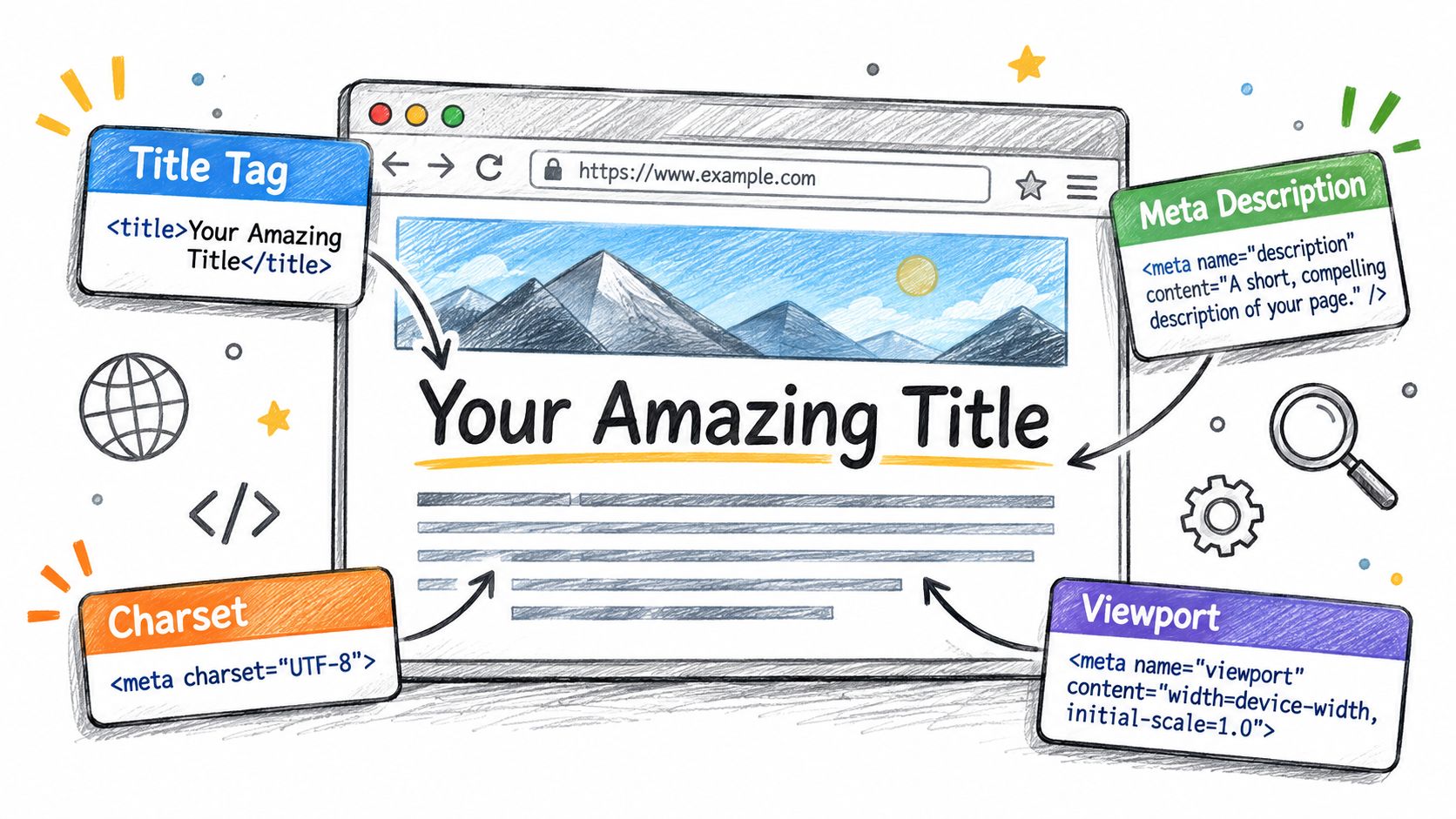
Put the page subject first and the brand name last, as in “Pricing for Reseller Plans | Example Agency.” Google's title link guidance says there is no fixed character limit. Google may rewrite or truncate a title link based on the device width, and recommends descriptive, concise titles over vague labels such as “Home,” verbose wording, keyword stuffing, or repeated boilerplate.
Lead with the detail that distinguishes the page. If the brand suffix is cut off, the subject remains clear. Reusing one title across every URL gives search engines little help distinguishing those pages.
Meta Description
Write a description that summarizes the individual page, such as “Compare hosting, SSL and support terms for a three-site agency portfolio.” Search engines may use on-page text instead, so treat the description as useful guidance for a potential visitor, not guaranteed snippet copy.
For service businesses refining summary copy, meta description tips for contractors offer practical guidance on writing for searchers rather than a character counter. In a multi-page template, check that a site-wide default has not replaced distinct descriptions with repeated text.
Charset and Viewport
Place one <meta charset="utf-8"> early in the head. Duplicate declarations often point to multiple layout components emitting head markup, so correct the shared layout rather than removing tags from individual pages.
For responsive layouts, set the viewport to width=device-width and initial-scale=1. Avoid user-scalable=no and maximum-scale=1.0, which prevent visitors from zooming.
- Count the rendered output: Check for one charset, viewport, title, and description per page.
- Check for repetition: Flag identical descriptions across pages using the same template.
- Check the title: Flag titles that contain only “Home” or the brand name.
Robots and Googlebot Directives Compared
A staging noindex can ship with a production release and keep a public page out of search results. The robots meta tag sets instructions for crawlers generally; googlebot applies instructions specifically to Google. Both belong in the page head. Google's documentation on special tags explains these page-level controls and their equivalents in the X-Robots-Tag HTTP response header, which can also govern non-HTML files.
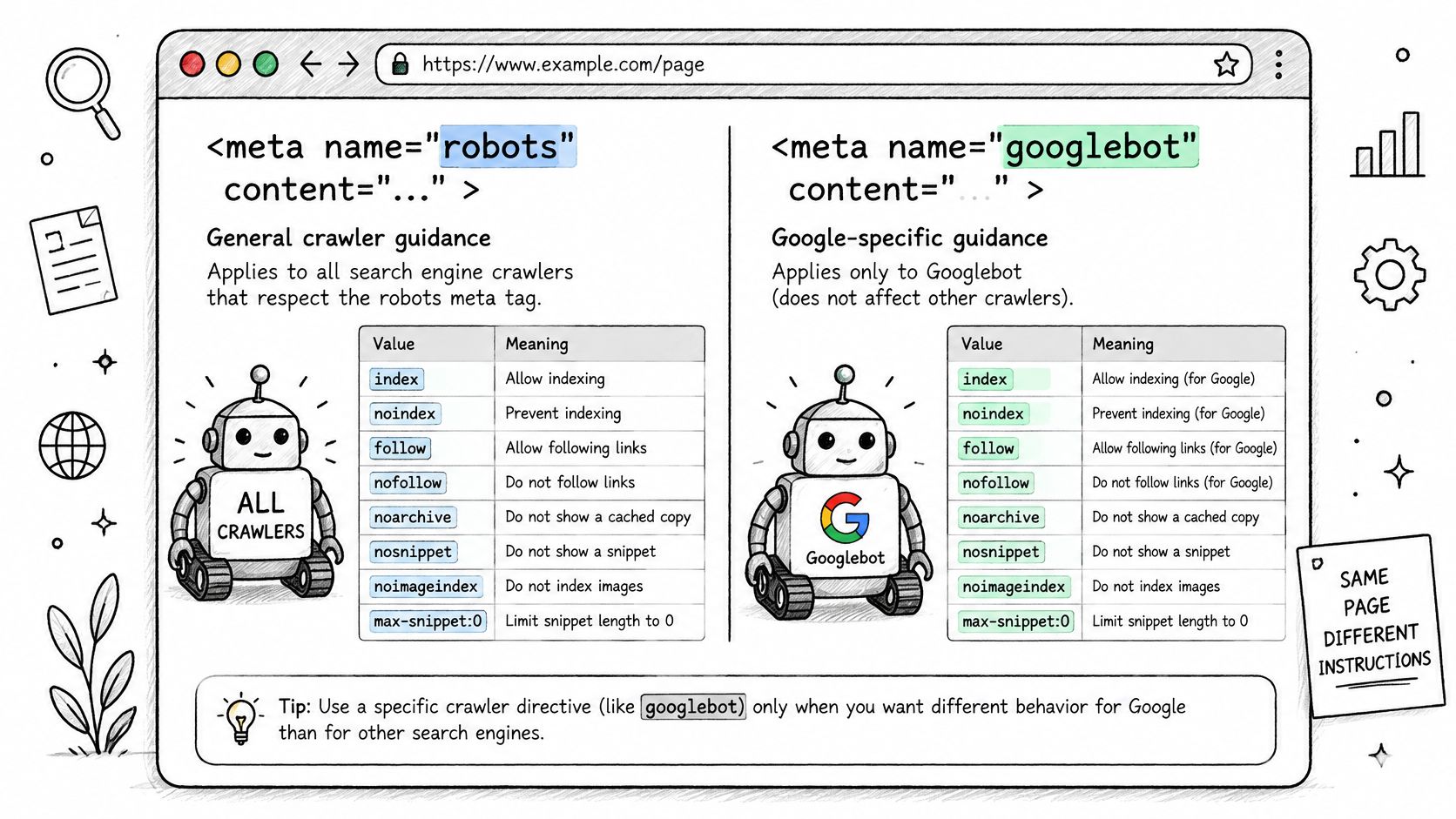
Robots directive values, their effect and header equivalent
| Directive | Effect | Meta Robots Example | X-Robots-Tag Example |
|---|---|---|---|
| noindex | Keeps the page out of search results | robots: noindex | X-Robots-Tag: noindex |
| nofollow | Search engines do not follow links on the page | robots: nofollow | X-Robots-Tag: nofollow |
| nosnippet | No text or video snippet in results | robots: nosnippet | X-Robots-Tag: nosnippet |
| max-snippet | Caps snippet length in characters | robots: max-snippet:150 | X-Robots-Tag: max-snippet:150 |
| max-image-preview | Sets the largest image preview allowed | robots: max-image-preview:large | X-Robots-Tag: max-image-preview:large |
| noarchive | Hides the cached copy link | robots: noarchive | X-Robots-Tag: noarchive |
| unavailable_after | Removes the page from results after a date | robots: unavailable_after: 31-Dec-2026 23:59:59 EST | X-Robots-Tag: unavailable_after: 31-Dec-2026 23:59:59 EST |
Use the response header for PDFs and other files without an HTML head. Set snippet directives deliberately: nosnippet and max-snippet also limit what AI-mediated search features can quote.
Two Traps That Cost Visibility
A crawler must fetch a page to read its noindex directive. If robots.txt blocks the URL, the crawler may not see the directive, leaving the page indexed. Allow crawling long enough for the directive to be processed, then assess whether the crawl block is still needed.
Noindex is not access control. It requests exclusion from search results but does not restrict public access. Protect confidential content with authentication or authorization. For teams setting defaults across decoupled front ends, headless CMS SEO considerations explain why directives need to reach the rendered page or response.
A Precedence Model That Holds
A base template can set the site default, while a section layout or CMS field supplies a more specific page value. Server-level X-Robots-Tag headers can also apply, including to non-HTML files. Check the rendered HTML and response headers together: routing, caching, or server-side rendering can make the delivered instructions differ from what a template or CMS field shows.
Pre-release check: Search the shipped output of every site for
noindexand conflicting directives before approving the release.
Canonical Tags and Which Signal Wins
Manual canonicals can drift across a portfolio within a few releases. Derive the canonical from routing rules in the template, then verify the rendered HTML: a canonical is a hint that names the preferred URL, and search engines can ignore it.
Standard Setup
Every indexable page should carry a self-referencing canonical: an absolute URL that matches the preferred version, including protocol and trailing slash. Tracking parameters and filtered listings should point to the clean URL. Print or alternate-format versions should point to their primary page.
This default handles common duplication without requiring editor input. Editors should override it only when the content lives elsewhere, and the override field should require a full absolute URL.
Conflicts That Cancel the Signal
- Canonical to a noindex page: The canonical suggests indexing while the noindex directive asks search engines to exclude the target.
- Canonical to a redirect: The preferred URL redirects elsewhere, so the canonical target is not the final destination.
- Canonical on a crawl-blocked page: Crawlers cannot fetch the page to evaluate its canonical.
Resolve the conflict at the target or in the relevant directive. Then check the rendered output, not just the CMS field.
International Variants and Template Ownership
Use hreflang link elements to identify language and regional versions. Each page should list itself and its alternates, and every alternate should point back to the same set. One-way declarations can be ignored.
Template owners should define canonical logic from routing rules; editors should use the override only for content hosted at another URL. After a migration, crawl old and new outputs side by side to check that the rendered canonicals point to the intended pages.
Open Graph and Twitter Card Tags for Shared Links
A shared link with a relative image path can show a blank card across platforms. Use absolute image URLs, and check the rendered preview rather than assuming the CMS field produced the intended tag.
Open Graph and Twitter card tags with example values
| Tag | Purpose | Example Value | Setup Note |
|---|---|---|---|
| og:title | Headline in shared previews | Pricing for Reseller Plans | Set per page, not site-wide |
| og:description | Summary text in shared previews | Hosting, SSL and support for agency portfolios | Keep it page-specific |
| og:image | Preview image for the shared link | Absolute image URL | Always use an absolute URL |
| og:url | Address the share should resolve to | Absolute URL of the canonical page | Match the canonical URL |
| og:type | Kind of object being shared | website or article | Use article on editorial posts |
| twitter:card | Layout of the card on X | summary_large_image | Use summary for small thumbnails |
| twitter:title | Headline on X cards | Same as og:title unless copy differs | Set explicitly when copy differs |
| twitter:image | Image on X cards | Absolute URL at a 2:1 aspect ratio | Set together with the card type |
Set the card type and image together. A large-image card using a small thumbnail may look blurry or cropped. Use an image sized for the intended preview; this Open Graph image guide covers the asset requirements.
Agency Template Workflow
Map og:title and og:description to the same CMS fields as the title and description. Allow page-level overrides for campaigns where the share copy should differ from search copy. Set a default image per brand and allow article-level overrides, so each page has a suitable image.
Keep og:url aligned with the page's canonical URL. That gives the preview one preferred address rather than a tracking-parameter variant.
The Caching Trap
Social platforms cache previews, so a changed image or description may not appear immediately. Refresh the URL in each platform's share debugger to request a new fetch.
Before launch, paste a staging URL into each debugger and inspect the fetched title, description, and image. This catches relative image paths, staging pages blocked by robots rules, and mismatched card types before the link is shared.
Structured Data Snippets Beside Your Meta Tags
Contradictory structured data can describe a page differently from its visible content, weakening the usefulness of the markup. Keep each value tied to the same CMS record as the page content it describes. In WebinOne, structured data can be placed as JSON-LD in a script element in the page template.
The Four Types Agencies Ship Most
Organization describes a brand, often on its home page, with details such as its name and contact information. Article describes editorial content, including its headline, author, dates and image. BreadcrumbList represents a page's place in the site hierarchy. Product describes an item offered for sale.
Generate each value from the same record that supplies the visible headline, date or price. If the markup claims a price that the page does not show, correct the data rather than publishing the mismatch.
Eligibility and Multi-Site Handling
Valid markup does not guarantee a rich result. Search features have their own eligibility requirements, so monitor which features appear with scalable SERP monitoring with Scrappey.
For a multi-site portfolio, keep one Organization entity per brand and associate that brand's sites with it. Consistent names, logos and contact details help search engines connect the sites to the same organization.
Validation
Run representative URLs through Google's Rich Results Test and a general schema validator. These tools can catch errors such as a Product offer missing its required price. Correct the template that generates the error so the fix applies to every page using it.
- Mark up visible content: The page should show what the structured data describes.
- Use accurate ratings: Include review values only when they appear on the page.
Audit Meta Tags and Retire Legacy Ones
Start with the crawl export, then compare it with rendered pages and response headers. A CMS field can be populated while the final HTML omits it, and an X-Robots-Tag header can contradict a robots directive in the page. Audit the output search engines receive, not just the values stored in the CMS.
In 2024, 66.7% of desktop pages and 66.4% of mobile pages included a meta description, according to the HTTP Archive Web Almanac SEO chapter. That leaves roughly one page in three without one.
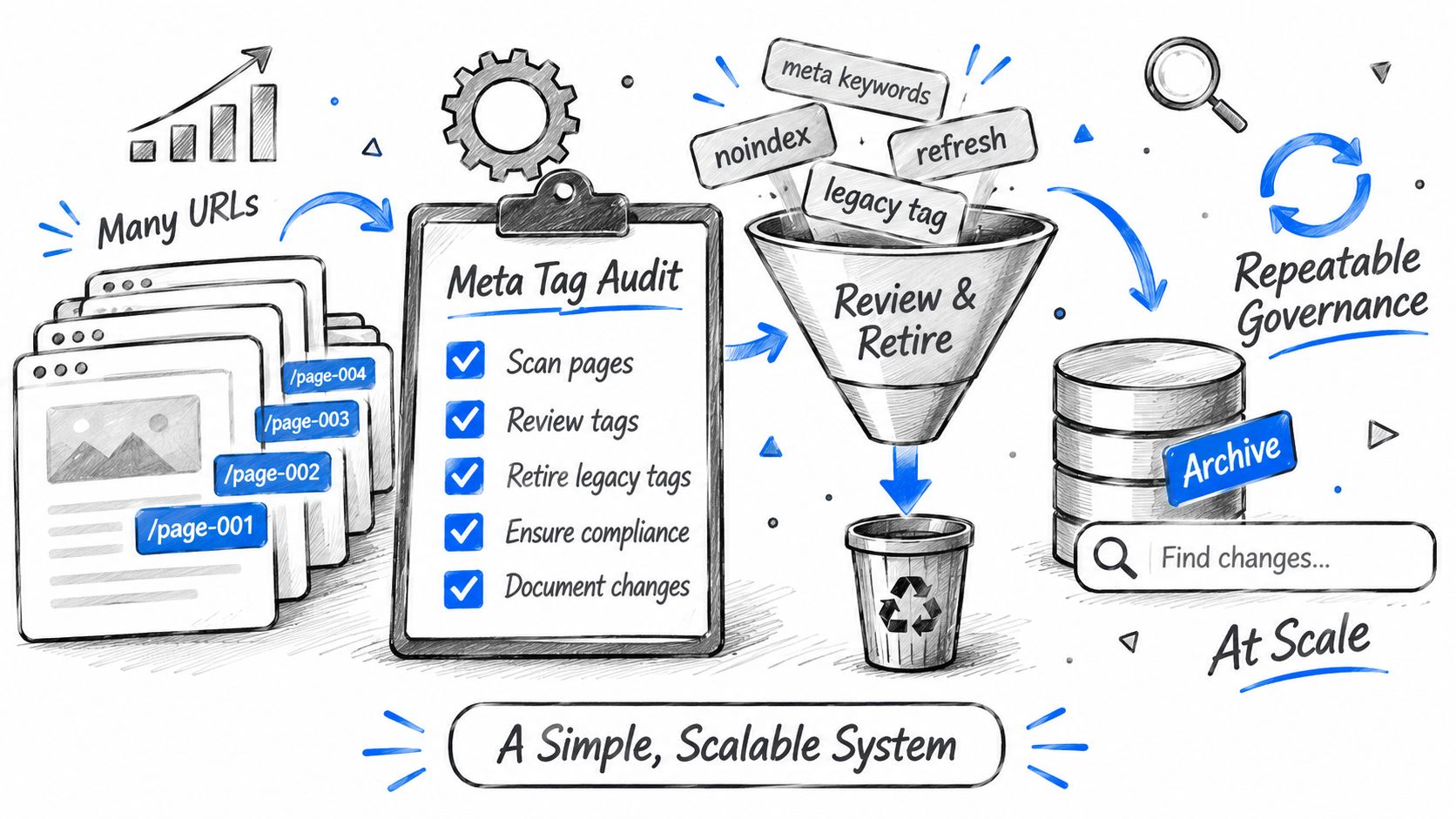
The Audit Sequence
- Crawl every indexable URL: Export title, description, robots, canonical, charset and viewport values.
- Inspect rendered HTML: Sample each template after server rendering and JavaScript execution, not only the CMS source.
- Capture response headers: Record
X-Robots-Tagvalues and compare them with page-level directives. - Compare fields with output: Identify populated CMS fields that do not appear in the rendered page.
- Flag concrete failures: Look for duplicate charset declarations, repeated descriptions, titles such as “Home,” and
noindexon pages intended to rank. - Assign control owners: Content teams manage titles and descriptions, developers manage charset and viewport, and platform administrators manage headers and redirects.
- Correct shared templates first: A template fix reaches every page it generates; handle exceptions separately.
- Re-crawl after release: Compare the new export with the baseline to confirm the change appears across affected pages.
Retiring Legacy Tags
Meta keywords are a clear candidate for removal. Google stated in 2009 that it no longer used the tag for web-search ranking. A September 2026 HTTP Archive-based study of meta keywords examined 782,850 homepages among the top 1 million sites by Chrome traffic and found 28.8% still contained the tag. The study also found empty keywords tags on 13.2% of the pages examined.
Remove the tag from templates, along with empty keyword tags, custom name values with no supported consumer, and boilerplate descriptions. Keep charset, viewport, robots and canonical tags where the template requires them.
During a migration, copied head blocks can carry duplicate charset declarations and stale directives. Build the head from the target template, then check the rendered output for leftover tags.
Put the time saved on dead fields into page titles and descriptions that accurately reflect each page.
Confirm Your Meta Tag Governance Before the Next Release
WebinOne is a white-label digital experience platform that gives agencies and systems integrators one place to build, host and manage client sites, with Liquid templating providing full code access to the head output described throughout this guide. Those template rules only hold if one named owner per tag signs off before a shared layout change reaches indexable pages.
Agencies reselling client sites under their own brand should start with the WebinOne reseller program and build these head controls into the templates clients buy. Systems integrators, AWS partners and enterprise teams should open a conversation about partnership or migration, including which controls sit in a managed platform or a licensed deployment. Teams comparing platform SEO depth can also review CMS with SEO capabilities ahead of that call.
Bring three items so the first conversation settles template fixes instead of discovery. Bring the list of head fields each template emits, the crawl export from the last audit with titles, descriptions, robots and canonical values, and the legacy tags found with the templates still carrying them.
Platform commitments belong in that same call, including 99.99% uptime with a 99.95% availability commitment in the published SLA and hosting on AWS across 6 AWS regions. Agencies can map those commitments onto sites they resell, and integrators can scope the estate against them.
Agencies ready to standardize meta tag governance across client templates should join the WebinOne reseller program, while systems integrators and enterprise teams planning a multi-site migration should start a conversation with the WebinOne team and bring the three audit items listed above.