Website Consolidation Without Losing Control: A 2026 Guide
Count the platforms. Pick a winner. Move the sites. That is the advice most consolidation programs open with, and it's why so many of them stall somewhere in wave two.
The number of CMS instances removed is a by-product, not the objective. Website consolidation succeeds or fails on two things that rarely make it into the business case: the rollback thresholds written before the first cutover, and the governance left standing after the last one. A program that retires nine platforms and leaves a single undocumented migration rule shared by every brand hasn't simplified anything. It has concentrated the risk into one place where a mistake costs all of it.
The operating detail behind that claim is what follows: what to record before any platform comparison, how each URL earns its outcome, which maintenance costs settle the platform question, and how to run waves so a bad pilot stops at the pilot.
Table of Contents
- Inventory Every Site Before You Pick a Platform
- Classify Every URL as Retain, Merge, Redirect or Retire
- Choose a Platform on Maintenance Load and Scale
- Plan the Content Model and Data Before Migration
- Set Ownership, Access and Rollback Rules Before Launch
- How to Run Migration Waves and Cut Over Safely
- Start a Migration Conversation With WebinOne
Inventory Every Site Before You Pick a Platform
| Field | What to record | Why it matters |
|---|---|---|
| Platform and version | CMS name, version and hosting location | Shows which sites carry patch and upgrade work |
| Monthly run cost | Hosting, licences and patching hours per month | Gives the business case a real baseline |
| Traffic and conversions | Twelve months of organic sessions and conversions | Sets the rollback thresholds |
| Backlinks and indexed URLs | Referring domains and indexed page count | Shows which URLs carry authority |
| Integrations | Forms, CRM, payments, email and APIs | Each one is a cutover dependency |
| Plugins, modules and custom code | Count and named owner of each | Drives testing and patching load |
| Integration support | Hours per month keeping integrations running | Shows the ongoing cost of keeping connections operational |
Use one row per source site, then have the person responsible for that site review it. Brand owners know what the site needs to do; finance can confirm costs, and support teams can identify recurring issues. No platform comparison is useful until those details are in writing.
Start with the platform and version, hosting location, and person who approves changes. Record the monthly run cost, including hosting, licences and patching time. Add twelve months of organic sessions and conversions, plus referring domains and indexed URL counts. These figures provide a baseline for setting rollback thresholds before cutover, not just a report on past performance.
List every integration the site depends on, including forms, CRM, payments, email and APIs. Name a technical owner for each one. Unowned connections create uncertainty during launch, especially when a site relies on plugins, modules or custom code that only one contractor understands. Record the count and owner of each, then check that the named person can support the transition.
Track integration support hours per month as a separate cost. An industry analysis of fragmented estates reports that organizations managing disconnected systems take three to five times longer to implement than those in integrated environments, and that 30% to 40% of digital budgets can go on keeping integrations operational, according to this analysis of digital foundations. These are benchmarks, not forecasts for an individual portfolio. Interface maintenance, vendor coordination and specialist knowledge cost more than the licences.
Crawl output depends on the tool and its settings. Choose one that respects robots.txt and rate limits, and returns one clean row per URL. The practical differences are covered in these crawler vs scraper decision criteria. Keep the crawl output with the inventory so URL counts and dependencies can be checked against the same baseline.
Rule for the baseline: no row is finished until the brand owner who funds that site has read it and signed it off.
Classify Every URL as Retain, Merge, Redirect or Retire
A food manufacturer runs two posts: one on proving a sourdough starter is active, one on reviving a neglected starter. A single reader wants both answers in sequence, and neither page is complete alone. Combine them into one fuller page, 301 both old URLs to it, and check that the merged page answers the second question without a second click. That is a merge. Sharing a topic is not enough on its own.
Two URLs that look related still need a score before anyone picks an outcome. Score each indexable URL on organic sessions, conversions, referring domains and strategic importance, then assign the outcome the score supports. Removing CMS instances does not tell you whether the move worked. The classification holds only when rollback thresholds are set before the first cutover, and when a named content owner still governs the redirect map after launch. A transfer onto WebinOne is still a URL-by-URL move. The four outcomes do not change because the destination platform does.
| Outcome | Use it when | Action | Check before cutover |
|---|---|---|---|
| Retain | Earns traffic or conversions and has a unique topic | Keep the URL and refresh the template | Returns 200 with a self-referencing canonical |
| Merge | Duplicates that share one search intent | 301 each duplicate to the surviving page and combine the content | One-hop redirect and merged content reviewed |
| Redirect | An equivalent page exists on the new estate | 301 one-to-one to the new URL | Destination returns 200 and no redirect chain |
| Retire | Thin or obsolete with no useful successor | Return 410 Gone | No internal links still point to it |
The merge rule that gets broken most often
Merge only when the surviving page can satisfy the combined search intent.
Two pages that serve different intents stay separate. Merging a pricing page into a product overview because both rank for the product name destroys the page a buyer needed.
Redirects go one-to-one wherever an equivalent exists. Sending a discontinued product section to the homepage is the single most common way authority evaporates. The redirect resolves, the crawler follows it, and the relevance is gone.
Before cutover, an automated test has to prove four things: every old URL resolves in one hop to its intended final URL, every destination returns 200, canonicals and hreflang point at the consolidated estate, and no staging noindex or blocking directive has survived. The site migration SEO checklist covers the test order if the estate is large.
Independent analyses cited in this migration SEO checklist report that roughly 60% of migrations show measurable organic-traffic loss, and that 17% of 892 studied migrations had not recovered after 1,000 days. That is the case for a numeric rollback threshold rather than a feeling. Predefine acceptable variance in traffic, conversions, error rate and uptime, and pause the next wave when the pilot breaches it.
Keep the redirect map in version control so content owners can review each line. An unreviewed mapping is where most lost traffic comes from.
Choose a Platform on Maintenance Load and Scale
A platform scorecard should measure the work required to operate the estate, not just whether a feature appears in a demo. Consolidation succeeds when maintenance responsibilities and governance move with the sites, and when the team sets rollback thresholds before the first cutover.
Why the patching row decides everything else
Open-source operations create recurring work across core software, extensions and integrations. One published maintenance plan for WordPress and Drupal states that both release monthly security patches, sometimes more than once a month, and warns that updates can break custom configurations, themes, plugins, modules or integrations if they are not handled carefully. The provider prices security-update-only coverage at $250 per month, with broader plans from $395 to $675 per month that include error and conflict resolution, according to its website maintenance plans.
These are one provider's prices, not industry averages. Use them to make the maintenance workload visible: count release monitoring, staging, remediation and compatibility testing across each installation. Record who owns each task and what evidence is required before updates reach production. Include the resulting cost in the scorecard.
What the scorecard is really testing
| Criterion | Question to ask the vendor | Fail signal |
|---|---|---|
| Patching | Who applies core and extension updates, and how are they tested? | Patching and testing fall to your team |
| Plugin dependence | Which required features depend on third-party extensions? | Core features depend on extensions you maintain |
| Hosting and residency | Which regions and data centers host sites, and can data stay in one country? | One region with no residency choice |
| Uptime | What is the written SLA and the measured uptime over the last twelve months? | No written SLA or no measured history |
| Multi-site control | Can one console manage every site, brand and staff login? | Each site needs its own login and billing |
| Support | Who answers out of hours, and what response is committed in writing? | Support limited to community forums |
Check residency by site and record the selected region. Each WebinOne website can be hosted in one of six data centers: USA (Oregon), USA (Virginia), UK (London), Australia (Sydney), EU (Germany) or Canada. Ask vendors where each site's data is held and whether it can be pinned to one country. Confirm the answer before signing, since a change in residency can create a compliance problem.
Compare uptime against a documented record. WebinOne reports 99.99% uptime over the last twelve months and runs on AWS across 6 AWS regions. Its published SLA includes a 99.95% availability commitment. Ask vendors for the measured history behind any uptime figure, and distinguish that record from the written commitment.
Put cost per site on the same scorecard. WebinOne plans start at $10 per month per site, giving a basis for comparison with the estate's existing licences and maintenance retainers. Score each criterion pass or fail before comparing platforms. Set the acceptable service thresholds and the owner authorized to pause a rollout before the first cutover, so a lower maintenance burden does not come at the expense of control.
One console with one written SLA beats a feature list every time. The feature list is a two-week conversation. The SLA is a five-year one.
Plan the Content Model and Data Before Migration
A date imported in the wrong format can silently misstate a deadline; a currency value stored as text can break sorting and calculations. Before any records move, map each content type and define how its fields will be transformed. Consolidation holds up when the shared model reflects how teams really publish and maintain content.
List the content types across all source sites. In a multi-brand estate, several sites may have location pages, case studies and team pages that serve the same purpose but use different field names. Bring those into shared content types with brand and region fields, rather than preserving separate variants that require separate templates.
The mapping sheet that prevents silent data loss
For each content type, create a four-column mapping: source field, target field, transform rule, owner. Set the transform rule explicitly. Dates can swap day and month; currency can arrive as text with a symbol; time zones can shift appointment times; language variants can collapse into one field. Check encoded characters in titles and URLs, too, since they can break during import and may go unnoticed.
Consolidate taxonomies alongside the field mapping. Decide which term to keep when source sites use different labels for the same topic. Deduplicate the media library and carry alt text with each asset so it remains available for accessibility work.
For articles that appear on multiple sites, record the canonical copy before import. Otherwise, both versions may be brought across, recreating the duplication consolidation was meant to resolve. Make the merge decision before the import rather than leaving it to whoever spots the duplicate later.
Contact records need their own mapping rules. Carry consent records and suppression lists with each contact. Where privacy wording differs by brand, agree on one authoritative version and obtain legal sign-off before import. A merged list without consent provenance creates legal exposure.
Test with a sample of about fifty records per content type, then compare record counts and spot-check values against the source. Counts reveal truncation; spot checks reveal transformation errors. Run both before the pilot, when corrections can be made before the wider cutover.
Assign a named owner to every transform rule. A mapping sheet without accountable owners leaves nobody responsible for resolving problems when imported data fails validation. Set rollback thresholds before the first cutover, including which count differences or incorrect field values require pausing the migration. That decision, together with clear ownership of the model, determines whether the consolidated structure remains manageable after launch.
Set Ownership, Access and Rollback Rules Before Launch
Write the ownership matrix before anyone books a cutover. Name the platform administrator, a content owner for each brand, a technical owner for each integration, and one approver who can trigger rollback. Use the same names as the inventory sheet. I treat a blank cell as a reason to delay launch: that dependency has nobody to call when a bad change hits every brand at once.
Concentration is the risk to name. A single undocumented migration rule, one data transformation, one permission model, or one custom integration can now affect every brand and region together. One platform is safer when portable documentation, scoped permissions, audit trails, tested recovery procedures, and a split between platform administration and content governance move with the sites. Set numeric rollback thresholds before the first cutover. The program is judged on those thresholds and on the governance left behind, not on how many CMS instances disappear.
The four artifacts that make one platform safer
A risk register names each single dependency and the brands it can affect. One line per integration, migration rule, and permission model is enough. If a line cannot say which brands break, the dependency is not understood yet.
The migration runbook is written so a second person can follow it without asking the author a question. If it cannot be followed cold, it is not a runbook.
The ownership matrix holds the four roles above. Rollback criteria are numeric thresholds taken from the baseline, checkable by someone who is not the migration lead. Agree the numbers in writing before cutover, and name the person who may invoke them.
Keep platform administration separate from content governance. A brand editor should not hold platform-level rights, and a platform administrator should not publish brand copy unreviewed. AgentOne keeps managed AI changes visible, reviewable, and reversible before they touch production. Scoped permissions and audit logs record who changed what, and platform backups mean recovery does not sit in one person's head.
After launch, a monthly operating review of change approvals, open risks, and documentation updates keeps those artifacts current. Two facts make that review easier to defend internally: no site needs to be migrated off the platform as it grows, and WebinOne is preparing for upcoming compliance certifications through platform-wide security improvements. Adapt the content governance framework rather than inventing a second structure.
How to Run Migration Waves and Cut Over Safely
Hold the first cutover until the rollback thresholds are written and owned. A wave that starts without those numbers does not simplify the estate. It copies the failure into every brand that follows.
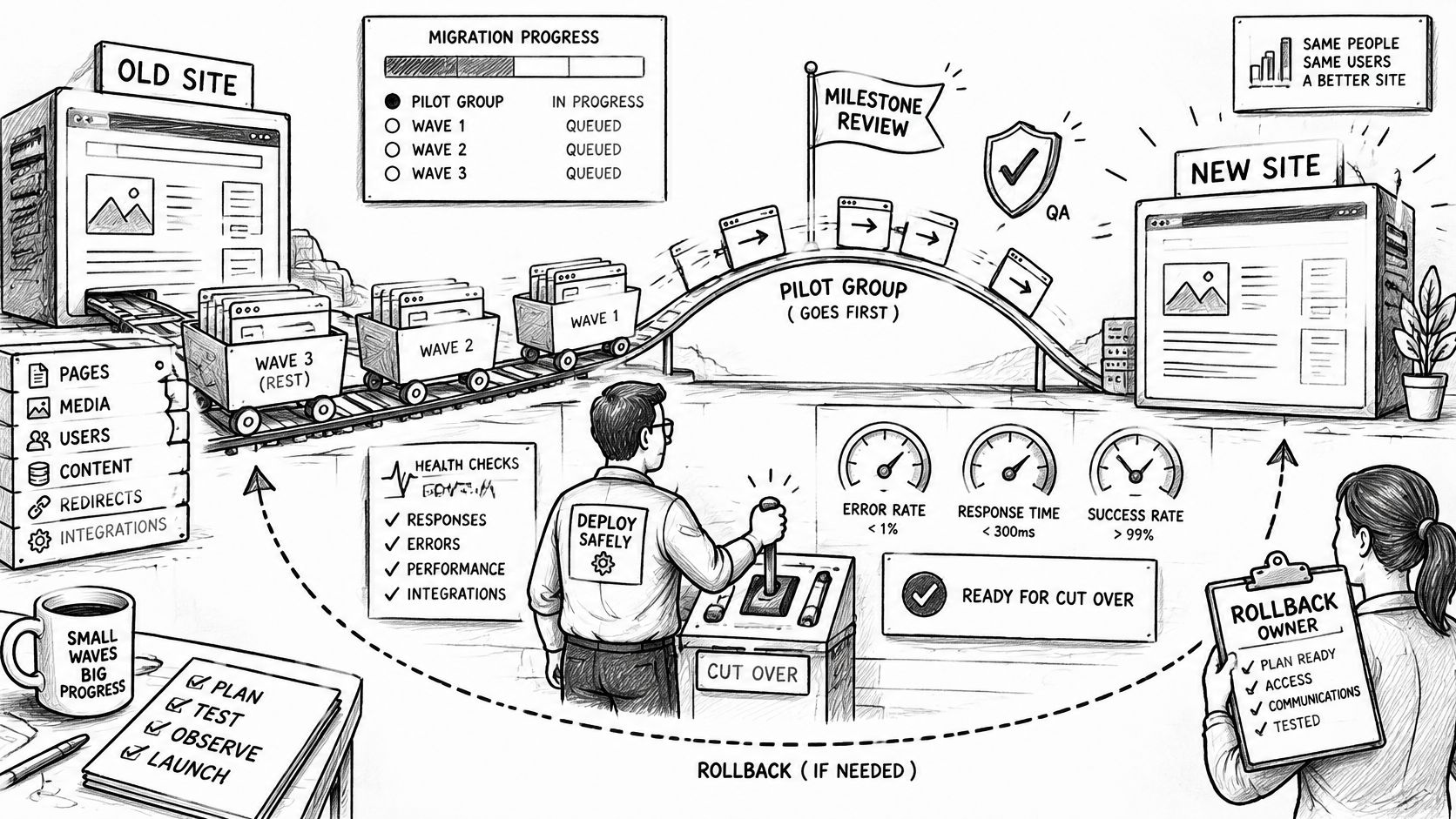
1. Pick a pilot with moderate traffic and typical integrations. Choose a site that exercises the estate's real dependencies. A quiet brochure site with one form proves nothing, and the first wave sets the pattern for every wave after it.
2. Build the pilot in staging with the approved content model and the full redirect map loaded. Load the mapping even for URLs outside the pilot's scope, so collisions surface early instead of in wave three.
3. Run the pre-cutover redirect, canonical and noindex tests and fix every failure. A pilot that ships with three known redirect chains teaches the team that chains are acceptable. Wave four will have thirty.
4. Test representative templates and key user journeys for keyboard and screen-reader use against WCAG 2.2 AA. Manual checks supplement automated scans, because scanners miss dynamic forms and composed components. The scale of the risk is measurable: the 2025 WebAIM Million analysis found detectable WCAG failures on 94.8% of the top one million homepages, averaging 51 errors per page, as reported in this accessibility compliance review. A shared design system distributes those defects to every brand at once.
5. Get written sign-off from each business owner on content, forms and integrations. Written, per brand. A verbal "looks fine" from someone who did not open the checkout flow is not sign-off.
6. Schedule cutover in a low-traffic window with DNS and certificate changes prepared in advance. The rollback owner already named in the governance pack stays reachable for the whole window. Do not assign that role on the launch call.
7. Monitor the pilot daily in week one, then weekly. Compare traffic, conversions, error rate and uptime by source site, template and country with the thresholds already set in the governance pack. Aggregate traffic hides a broken template on one brand.
8. Start the next wave only when the pilot holds inside those thresholds for the agreed period. Releasing early to protect a launch date transfers the defect to every brand that follows. The platform migration strategy covers sequencing across a large estate. TeamOne projects add milestone reviews and QA testing on every browser and platform before delivery.
Migrated sites arrive production-ready, with design customization where needed, so the wave ends at launch rather than drifting into a second project.
Start a Migration Conversation With WebinOne
Which migration wave would you use to test the rollback thresholds, and what evidence would let the team pause before the next cutover? Bring that question to the first call. The decisions in the earlier inventory, URL classification and governance work should make the answer specific to your estate.
Prepare one new artifact: a scope request. Ask it to name the proposed pilot, migration waves, QA plan, and whether delivery would be a TeamOne project. Include the boundaries of the work: which sites and data are in scope, what design changes are expected, and who approves each milestone. A clear request makes it easier to distinguish platform migration from additional design or development work.
WebinOne is a white-label digital experience platform that brings site building, hosting and management into one place for agencies. Its team can migrate sites from WordPress, Wix, Squarespace, Shopify and other CMS platforms. TeamOne can provide migration and development services, including complete white-label delivery. The right fit depends on the scope and on whether your team wants to manage the work or delegate it.
Use the first conversation to test the operating model, not just the feature list. Ask how the proposed setup will preserve ownership, support controlled releases and make rollback practical. Consolidation succeeds when governance travels with the platform, and when the team can stop a wave before it spreads a defect across the estate.
Start the conversation at webinone.com/enterprise.