Platform Migration Strategy: A Practical Playbook
Most platform migration advice is wrong because it obsesses over cutover weekend. That's the easiest part to control. The failure points show up long before launch, when teams skip inventory and sign off on vague scope, and long after launch, when everyone declares victory while rankings, forms, and editor workflows break.
A serious platform migration strategy is an operating program, not a deployment event. Enterprises already know the bill is real. A 2025 migration summary reported that 57% of enterprises spent more than $1 million on platform migrations, projects ran 18% over budget on average, and the typical overrun translated to about $315,000 in unplanned cost per organization according to CloudBees' migration cost analysis. That's why the teams that handle migration well don't anchor the plan on launch day. They anchor it on governance, sequence, and what has to keep working for the next year.
Table of Contents
- Why Migration Strategy Is a 12-Month Program
- Four Preconditions Before You Touch a Single File
- Discovery, Inventory, and the Redirect Map
- Staging, Parallel Run, and Acceptance Testing
- Cutover Day Run-of-Show and Rollback Triggers
- The First 90 Days After Launch
- Governance, Stakeholders, and Your Next Move
Why Migration Strategy Is a 12-Month Program
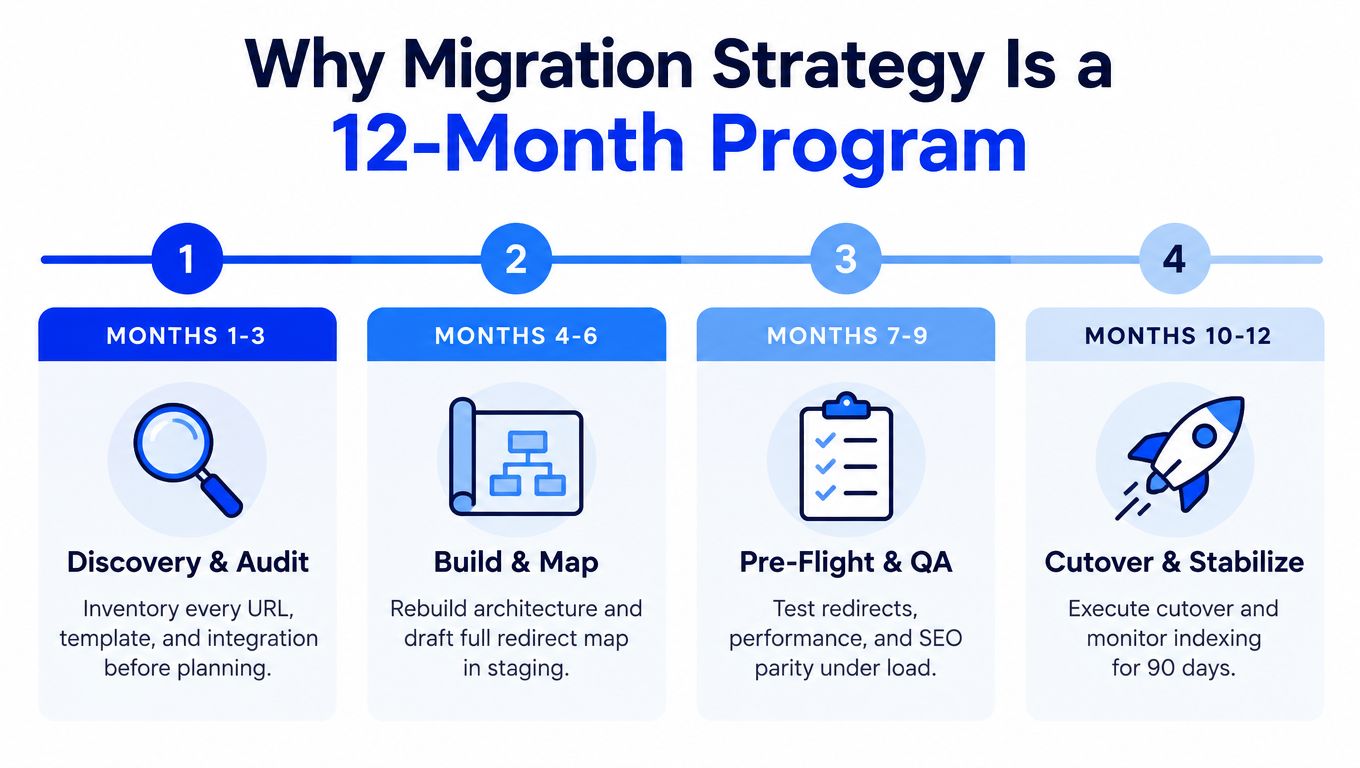
Teams that treat migration like a launch event create avoidable failures. Enterprise migrations succeed or fail across a longer window: the 90 days before cutover, when scope, inventory, and ownership either get locked down or left vague, and the 12 months after, when search visibility, editor adoption, support load, and platform retirement determine whether the move paid off.
The launch weekend is the easy part
Cutover gets too much attention because it is visible, scheduled, and dramatic. It is also the part you can script. If scope is frozen, redirects are mapped, integrations are tested, and rollback is rehearsed, launch weekend becomes an operations exercise.
What burns teams is everything they postponed.
Before build, the usual damage starts with fuzzy success metrics, incomplete inventories, and business rules hidden inside old templates, plugins, forms, or middleware no one documented. After launch, the problems change shape. Rankings drop on high-value pages. Editors bypass the new CMS because the workflow is slower than the old one. Support inherits broken submissions, missing notifications, and undocumented manual steps. Finance keeps paying for the legacy platform because no one planned decommissioning.
If your migration plan fits on a launch checklist, you do not have a migration strategy. You have a deployment plan.
The timeline that matters
Serious migration programs run on three horizons:
- Pre-launch window: business case, current-state inventory, content and data mapping, redirect design, integration review, environment setup, test planning, and decision rights
- Cutover window: final sync, routing change, smoke testing, incident command, and rollback decision points
- Post-launch year: stabilization, SEO remediation, editor training, workflow fixes, platform shutdown, and benefit tracking against the original case
That last horizon is where weak programs get exposed. The new platform goes live, leadership moves on, and the project team disappears before the organization has absorbed the change. Expected gains never show up because nobody owns adoption, cleanup, and operational hardening after launch.
CloudBees reported that many enterprises complete migrations without realizing the value they forecast in the first year. That pattern matters more than any launch-day success story. A working homepage is not the finish line. Real success means the estate performs, teams can run it, and the old stack is gone.
Governance decides the outcome
Multi-brand organizations and digital agencies need a standing operating cadence from day one. Set weekly risk reviews. Keep a live RAID log. Assign one accountable owner for redirects, one for content freeze exceptions, one for integration sign-off, and one for post-launch stabilization. Put a steering group in place that can approve tradeoffs fast, because delay is expensive and indecision is worse.
Optimism will not save a migration. Operating discipline will.
Four Preconditions Before You Touch a Single File
Bad migrations usually fail long before launch. They fail in the 90 days before build starts, when teams rush past decisions that should have been settled in writing. Cutover gets the drama. Preconditions decide whether the next 12 months are stable, expensive, or chaotic.
Adobe Business Catalyst shutdown projects made this obvious. Teams that started moving files before they had proof of scope, SEO coverage, and recovery paths paid for it later with missing records, broken journeys, and emergency fixes after launch. Teams that set gates first got through with fewer surprises. That is why TeamOne has migrated 3,000+ sites and treats these four preconditions as stop signs, not paperwork.
The required gates
| Precondition | Required Evidence | Owner | Failure If Skipped |
|---|---|---|---|
| Signed business case | Approved objective, named sponsor, defined success metric, post-launch owner | Executive sponsor | Launch becomes the only success metric |
| Frozen production scope | Inventory of plugins, integrations, modules, content types, templates, and custom code signed off | Product owner with engineering lead | Hidden dependencies appear mid-build |
| Redirect and SEO preservation plan | Redirect matrix, analytics baseline, top landing pages, metadata parity checklist | SEO lead | Search equity drops after launch |
| Rehearsed rollback strategy | Documented rollback path, test results, decision authority, comms path | Program manager and engineering lead | Team argues during incident instead of restoring service |
What each gate must prove
The business case must define operational ownership for the year after launch. If nobody owns adoption, cleanup, and benefit tracking after go-live, the program gets measured on one thing only: whether the new site appeared on time. That is a weak standard, and enterprise teams pay for it later with stalled rollout work, unresolved defects, and benefits that never show up.
The scope freeze has to reflect production reality. Documentation is often wrong, outdated, or incomplete. Capture every live plugin, every integration touchpoint, every custom field, every scheduled export, every tracking script, every search rule, and every exception that keeps one brand or market running.
A migration can survive imperfect design. It rarely survives unknown scope.
The SEO gate exists to prevent avoidable loss during the first quarter after launch. Baseline the pages that matter, define redirect rules before build, and set parity checks for metadata, canonicals, internal links, and structured data. If that work starts after templates are built, the project is already behind and recovery work will consume the first months of the new platform.
The rollback plan must be tested in a realistic rehearsal. Written rollback steps are not enough. The team needs a timed exercise that proves who makes the call, how traffic switches back, what data gets restored, which services stay live, and how stakeholders are informed. If that decision path is vague, launch day turns into a debate while revenue, leads, or support traffic are still exposed.
Discovery, Inventory, and the Redirect Map
Discovery is where agencies protect margin or destroy it. Underquote this phase and the rest of the project becomes archaeology. Skip it and the team will rebuild the wrong thing with confidence.
Inventory what production actually runs
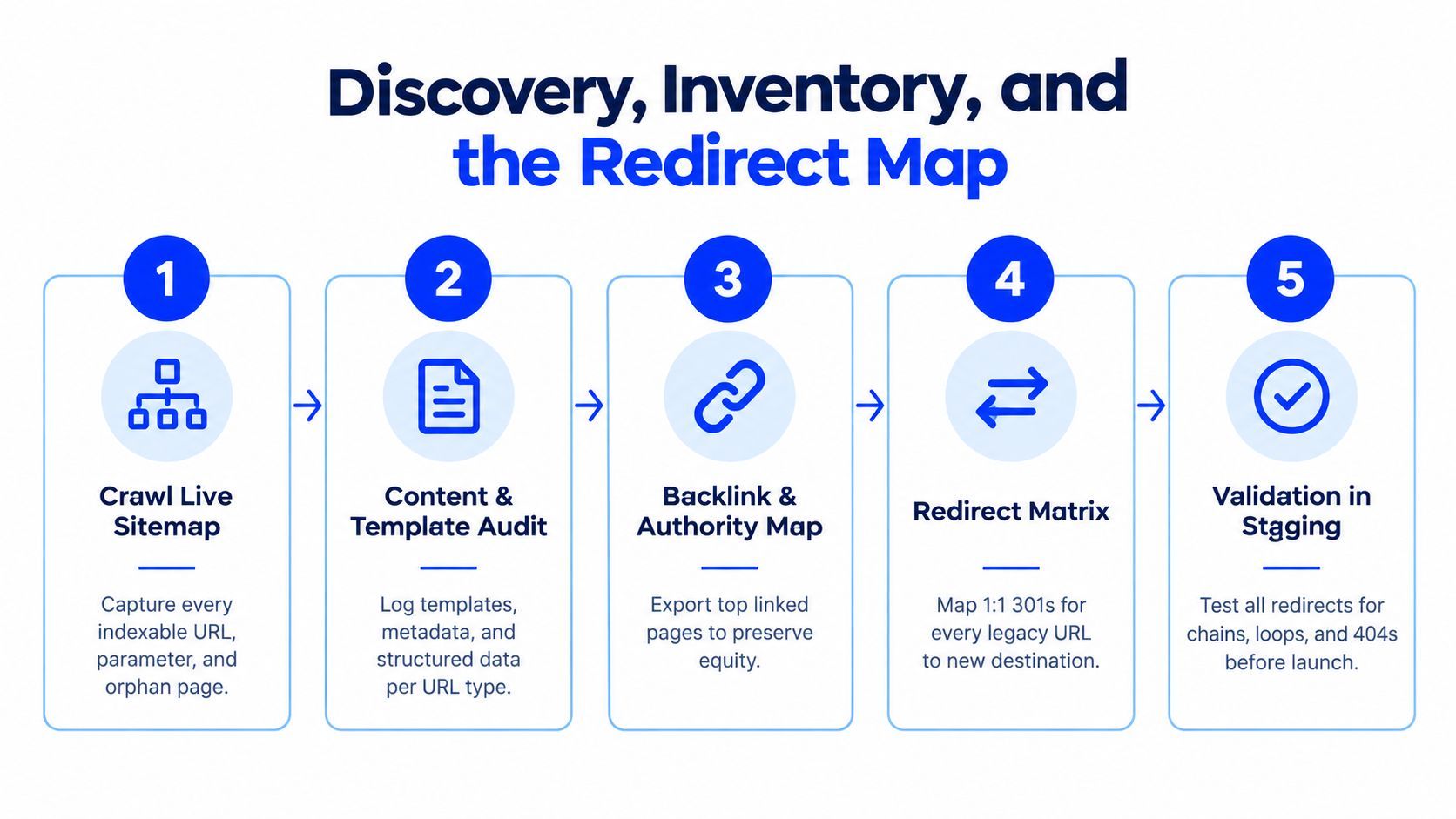
A serious inventory captures more than pages. It needs six layers:
- URL inventory including indexable pages, parameter variants, paginated views, media URLs, and orphan pages.
- Template inventory covering page types, archive behavior, metadata rules, schema, and navigation logic.
- Content model inventory for every content type, field, relationship, taxonomy, and reusable block.
- Integration inventory across CRM, ERP, analytics, email automation, payments, search, identity, and support tooling.
- Extension inventory including plugins, custom modules, theme overrides, snippets, and scripts.
- Code exception log for one-off logic living in templates, middleware, or injected scripts.
This is also the moment to decide what should die. Old campaign pages, duplicate landing pages, half-used category structures, abandoned forms, and broken microsites don't deserve a first-class migration path. Retirement is part of the strategy.
The redirect map is the highest-leverage deliverable
A redirect map is the document that protects discoverability, backlinks, and commercial continuity. Treating it as a launch task is amateur work.
A strong map includes:
- 1:1 mappings for high-value legacy URLs
- Rule-based redirects only where patterns are proven clean
- Intentional 404 decisions for content being retired
- Canonical parity checks on templates likely to create duplicates
- Validation against analytics and Search Console baselines
One practical resource for teams building that workflow is this site migration SEO checklist. It's useful as a pressure test because it forces attention onto parity, not just page movement.
Delivery rule: If a page has backlinks, rankings, leads, or revenue history, it gets a named destination. No guessing at launch.
What sign-off should look like
A delivery lead should be able to review a discovery pack and answer four questions immediately:
- What exists now
- What moves
- What changes
- What gets retired
If any of those answers depend on tribal knowledge, discovery isn't done.
Staging, Parallel Run, and Acceptance Testing
A fake staging environment is worse than no staging environment. It creates confidence without evidence. If staging doesn't mirror production behavior, traffic patterns, forms, integrations, and authoring flows, it won't catch the failures that matter.
Build a staging environment with real conditions
The pre-production stack should reflect live architecture closely enough to expose real issues. That means realistic content volume, full redirect logic, working third-party integrations where possible, equivalent caching behavior, and representative user journeys.
For agencies, the mistake is obvious. They test templates and call that QA. Enterprises need to test business behavior. Form submissions. Order flows. Member access. CRM syncs. Search indexing rules. Editorial roundtrips.
A useful outside reference on process discipline is Keyword Kick's guide on how to update a website safely. It aligns with the operational point that safe releases come from workflow control, not confidence in the build team.
Acceptance criteria need owners and scripts
Don't let engineers define “good enough” after the build. Acceptance criteria belong to the product owner and the business stakeholders who live with the result.
Use runnable scripts, not broad statements. For example:
- Redirect validation: test representative legacy URL classes for correct status codes and final destinations.
- Commerce parity: verify product display, cart behavior, tax or shipping logic, and successful transaction flow.
- Form parity: confirm every critical form reaches the right endpoint, triggers the right notification, and stores data in the right system.
- CMS workflow parity: have real editors create, edit, preview, approve, and publish content.
- Performance checks: compare key templates under realistic load and identify regressions before go-live.
Run both systems in parallel when risk is high
Parallel run isn't overkill when the estate is complex. It's insurance. Agencies handling portfolios and enterprise teams handling multiple brands should expose the new platform to controlled real traffic before full switch-over where architecture allows it.
Staging proves the build works. Parallel run proves the business still works.
If staging passes and production smoke tests fail, the launch doesn't proceed. That decision should feel routine, not heroic.
Cutover Day Run-of-Show and Rollback Triggers
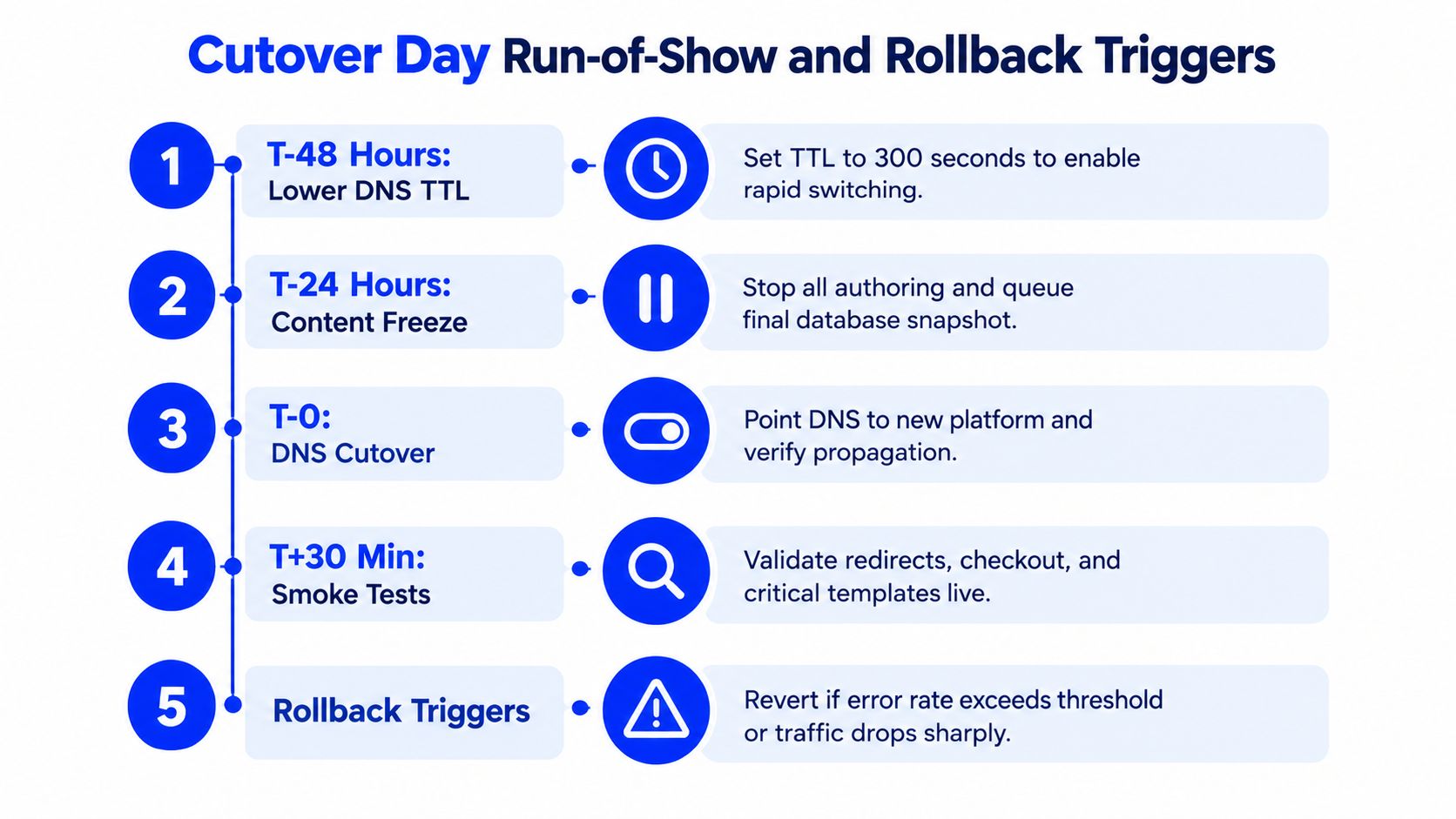
Cutover day needs a run-of-show, not a vague “everyone be online” plan. When the migration hits the freeze window, every person in the room should know the clock, the order of operations, the approval points, and the exact conditions that trigger rollback.
Assign roles before the freeze starts
A war room without role clarity becomes a group chat. Keep roles explicit:
- Incident commander: owns timeline, decisions, and go or no-go calls
- DNS lead: manages routing changes and propagation checks
- Database lead: handles final snapshots and restore readiness
- SEO lead: validates redirects, canonicals, status codes, and crawlability
- Comms lead: updates stakeholders and controls incident messaging
No one should be doing two critical roles at once. That's how teams miss obvious failures.
Use defined rollback triggers
Rollback can't depend on someone saying the launch “feels bad.” The trigger set has to be documented before the event starts. The exact thresholds vary by stack, but the principle doesn't. Tie rollback to observable failures in revenue paths, critical integrations, and live service behavior.
A strong run-of-show also defines checkpoint reviews through the freeze window. Every checkpoint should require verbal confirmation from responsible leads. That discipline catches hesitation early, before the platform drifts into partial outage.
One practical reference for deployment planning is this guide to zero-downtime deployment strategies. The value isn't in the phrase. It's in forcing teams to design for reversibility.
Treat rollback as a feature
Teams often write rollback plans as a compliance artifact. That's useless. Rollback is part of the productized migration method. It should be rehearsed the week before launch, with validated restore paths and a documented decision authority.
War-room standard: if rollback hasn't been rehearsed, cutover hasn't been approved.
The best migrations don't avoid tension on launch day. They contain it.
The First 90 Days After Launch
Cutover gets the attention. The first 90 days decide whether the migration worked.
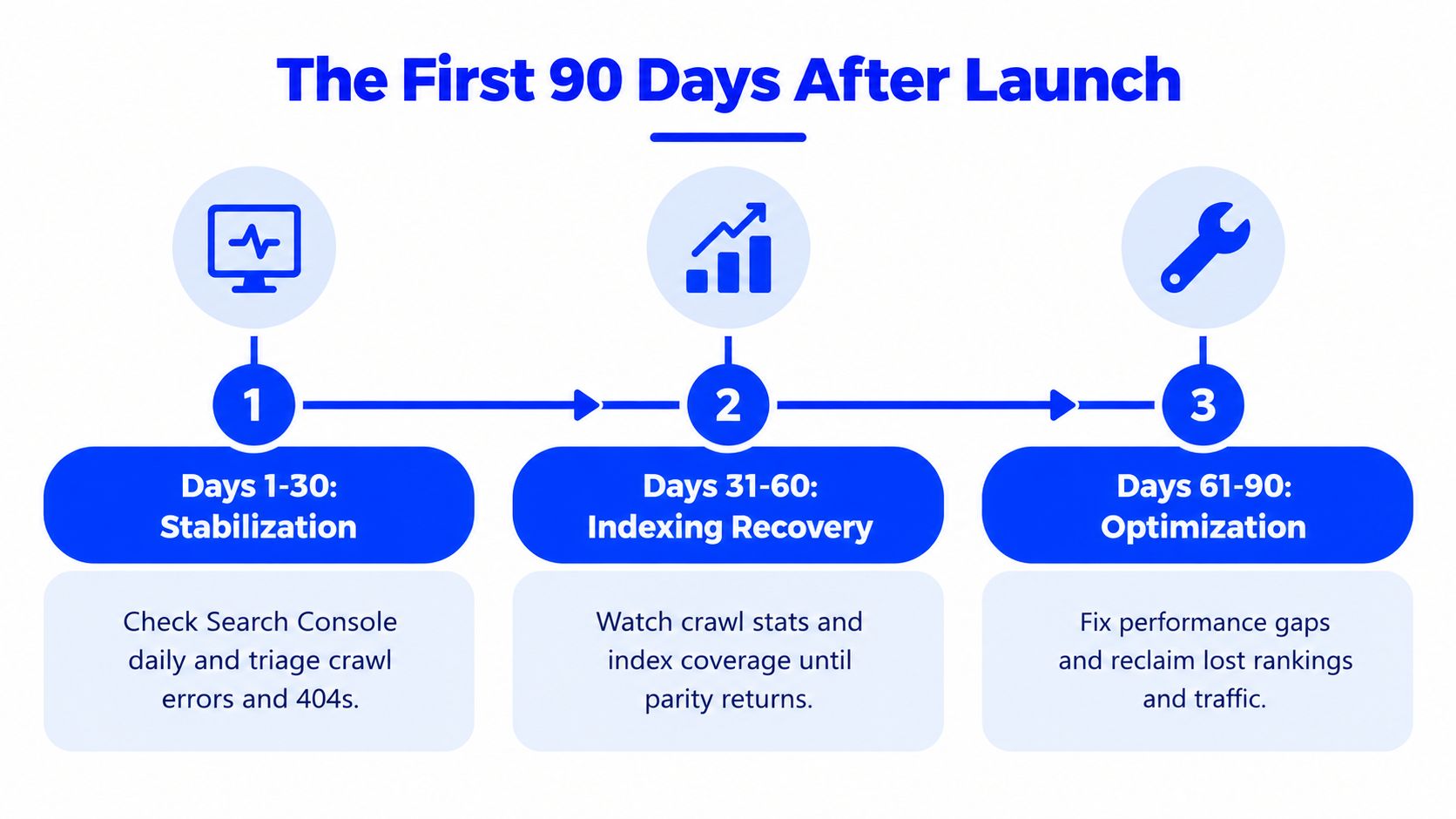
Teams that declare victory after launch create their own post-mortem. Traffic softens, forms fail in edge cases, rankings drift, editors hit workflow gaps, and nobody owns the cleanup because the project has already been treated as finished. For enterprise estates and multi-brand portfolios, that mistake spreads fast. One weak launch pattern gets copied across the group.
Days 1 to 30 require aggressive stabilization
Run hypercare like an operating model, not a status ritual. Check Search Console every day. Review analytics daily. Compare top landing pages, conversion paths, indexed URLs, crawl activity, and error patterns against the pre-launch baseline. Every issue needs an owner, a deadline, and a business priority.
As noted earlier, even well-run migrations often take an early traffic hit. Weak redirect coverage and missed template issues make it much worse. Treat every unexplained drop as a production issue until you can prove otherwise.
Watch the pages that pay you first. Category pages, high-intent service pages, lead forms, checkout steps, location pages, and top-linked legacy URLs should sit on a daily review list for the first month. If you manage multiple brands, do not roll reporting into one blended dashboard. Brand-level visibility is how you catch localized failures before they turn into quarter-long revenue leaks.
Days 31 to 60 are for recovery and correction
By this point, the obvious defects should be out of the way. Now fix the problems that suppress recovery.
Use this window to:
- Remove redirect chains and loops: every extra hop slows crawlers, weakens user experience, and creates avoidable failure points.
- Check authority transfer on high-value legacy URLs: top-linked pages need to resolve to the right new destination, not the nearest available match.
- Reconcile metadata and template output: titles, canonicals, structured data, robots directives, hreflang logic, and XML sitemaps need parity with the intended design.
- Review index coverage and duplication: find pages that dropped out, pages that should not be indexed, and duplicate versions created by parameter, faceted, or CMS behavior.
- Audit conversion instrumentation: forms, events, ecommerce tracking, and CRM handoffs often break after launch.
Do not let the team chase mood-based fixes here. Work the evidence. If rankings are down, isolate whether the cause is redirects, internal links, rendering, indexation, template changes, or content loss. Different failure modes need different owners.
Days 61 to 90 determine whether the migration sticks
This phase decides whether you have a stable new platform or a lingering liability. Clean up residual debt now, while the migration team still remembers why decisions were made and how the old estate behaved.
Focus on performance tuning, internal linking repairs, redirect refinement, content consolidation, editor training, support runbooks, and operational handoff. If the old platform is still being consulted to answer routine content, routing, or reporting questions, the migration is not finished. It is still in assisted living.
A migration isn't done when the new site is live. It's done when the old platform is irrelevant.
Keep reporting cadence tight. Daily in week one. Weekly through the remainder of hypercare. Monthly once performance, indexing, and operations stabilize. If reporting stops, issue ownership disappears with it.
Governance, Stakeholders, and Your Next Move
Hero migrations make for nice agency folklore and terrible operating practice. The “one senior dev knows the whole stack” pattern works right up until that person is unavailable, leaves, or makes a judgment call nobody else can verify. Enterprises and multi-brand teams need governance because migrations involve tradeoffs, not just execution.
Build a steering group that can make decisions
A working migration steering committee is small and acts with clear authority. It should include:
- Executive sponsor for budget and business priority
- Product owner for scope and acceptance decisions
- Engineering lead for technical execution
- SEO lead for discoverability and redirect ownership
- Security or compliance lead where regulation matters
- Program manager with single-point accountability
This group should meet weekly during build, tighten cadence during cutover, and stay active through hypercare. A migration without a decision forum becomes an escalation maze.
Put decision rights in writing
RACI sounds bureaucratic until launch day. Then it's the difference between motion and chaos. Document who decides redirect exceptions, who approves content freeze breaks, who can sign off scope changes, and who authorizes rollback.
For complex estates, governance and migration discipline connect directly to long-term estate control. Teams evaluating cross-brand consistency, permissions, and operating models should think in terms of multi-site management, not just single-site launch mechanics.
The next move should be practical
Don't start with procurement. Start with readiness. Run a no-fee scoping review with the TeamOne migrations practice and force the current-state inventory into the open. If the organization isn't ready for a date, it's definitely not ready for a cutover.
For teams that want to pressure-test assumptions first, stand up a parallel staging environment and run acceptance scripts against the current migration plan. That exercise will expose missing owners, undocumented dependencies, and fantasy timelines fast.
A platform migration strategy works when it is governed like a business-critical change. That's the standard. Anything softer is just a risky rebuild with better slides.
WebinOne gives agencies and enterprise teams one managed platform for CMS, ecommerce, CRM, multi-site operations, and AI-assisted delivery, with native extensions instead of plugin sprawl, 99.99% uptime over the last 12 months, AWS hosting across 6 global data centers, and transparent pricing from $10/month. Teams that are planning a replatform, escaping WordPress dependency, or consolidating a multi-brand estate can visit WebinOne to review the platform and speak with the migration team about a readiness assessment.