Web Design for Plastic Surgery: Trust and Conversion
A practice site can look polished, load quickly on a desktop, and still lose prospective patients at the point that matters: when someone tries to understand a procedure, verify the surgeon's qualifications, or decide whether to request a consultation. For agencies, the work isn't just a visual refresh. It's designing a patient journey where the page experience, consultation form, and analytics setup all earn trust without exposing sensitive information.
Web design for plastic surgery should treat the website as part of the care decision, not merely as an advertisement. That means building for discovery, comparison, follow-up, and privacy from the outset.
Table of Contents
- How Plastic Surgery Patients Research Before Booking
- Trust Signals That Earn the Consultation
- Procedure Pages Built for the Phone
- Consultation Flows That Protect Patient Data
- Accessibility Built Into the Design System
- Measuring Consultations Instead of Leads
- Choosing a Platform for Plastic Surgery Client Work
How Plastic Surgery Patients Research Before Booking
Agencies sometimes approach a plastic-surgery website as an ad with a gallery and a booking button. Patient research suggests a more demanding job: the website needs to help people find information before they meet a surgeon, then revisit and assess that information afterward.
In a 2016 survey of patients considering breast reconstruction, breast reduction, or abdominoplasty, Internet searches were the most commonly used information source before the first surgical appointment, cited by 56.9% of respondents. Family, friends, and other patients followed at 39.7%. After the initial consultation, the surgeon became the most useful source for 84.5%, but the Internet remained useful to 36.2%. Overall, 73.5% continued seeking outside information after meeting the surgeon (patient research before plastic-surgery consultations).

Design for the decision that comes before and after the appointment
These findings don't prove that a particular page layout causes a patient to book. They do establish a practical design principle: the site must be useful at more than one point in the decision process. A prospective patient may arrive with basic questions, return after a consultation to review recovery information, and revisit the surgeon's credentials before deciding what to do next.
That calls for procedure-specific pages, clear qualification information, plain-language education, and a consultation path that's easy to find without crowding out the information patients need to make an informed choice. Follow-up resources matter, too. If the site explains recovery or risks only during the first visit, it won't support the patient who returns with new questions.
A useful example of procedure education is Athena Plastic Surgery's rhinoplasty surgery planning guide, which gives prospective patients a focused resource to consult as they consider treatment.
Make returning visitors feel expected
The design should assume that people may leave and come back. Keep navigation predictable, use consistent labels for procedures, and make key content easy to locate on a return visit. A single promotional landing page may attract attention, but it can't replace an information architecture built around patient questions.
For agencies, that's the core assignment: organize content so a patient can move from discovery to comparison and then to a better-informed consultation. A website that answers useful questions before the appointment and supports careful review afterward does more than generate inquiries. It helps the practice communicate clearly throughout a decision that patients may take time to make.
Trust Signals That Earn the Consultation
Trust signals need to appear beside the patient's first meaningful decision, not be buried in the footer. Web design for plastic surgery should make it easy to check the surgeon, understand the procedure, and review relevant patient experiences before asking for personal information.
Research involving breast-augmentation patients found that 94.1% searched online for aesthetic-surgery information before consultation (research on online behavior among breast-augmentation patients). In related research, more than 50% of patients in both an aesthetic clinic and a public plastic-surgery department considered the clinic website a good information source. In the aesthetic group, 47.96% investigated the surgeon's qualifications and 55.10% looked for before-and-after photographs. Those behaviors point to specific content needs, not a generic promise that the practice is trustworthy.
Put evidence where it can guide a choice
A procedure page should bring together the information a patient needs to evaluate the next step:
- Surgeon qualifications: Present training and credentials in a clear, consistent location near procedure information. Don't require visitors to search across unrelated pages to understand who performs the surgery.
- Procedure-specific cases: Organize before-and-after images by procedure, with clear context and appropriate consent. A patient comparing outcomes for one procedure shouldn't have to scan a mixed gallery of unrelated cases.
- Patient experiences: Place reviews and testimonials where they add context, while avoiding presentation that implies every patient will have the same result.
- Social connections: Link to the practice's social presence as a supporting touchpoint, not as a substitute for complete, practice-controlled procedure information.
Authenticated cases and careful image governance matter because visuals can shape expectations. Galleries should be curated and labeled, not treated as decoration. A large undifferentiated image grid may look impressive, but it makes it harder to find relevant examples and easier to mistake an individual outcome for a promise.
For a sense of how practices present patient feedback, Georgia Plastic & Reconstructive Surgery's patient testimonials offer a focused example of that content type.
Practical rule: Put credentials, candidacy guidance, and relevant patient evidence close to the consultation action. Don't make trust a scavenger hunt.
A patient may discover a procedure through search or social content, then use the clinic website to validate the practice. The page should make that validation straightforward and balanced. It should show what the practice can substantiate, explain what varies from patient to patient, and let the visitor choose whether to continue.
Procedure Pages Built for the Phone
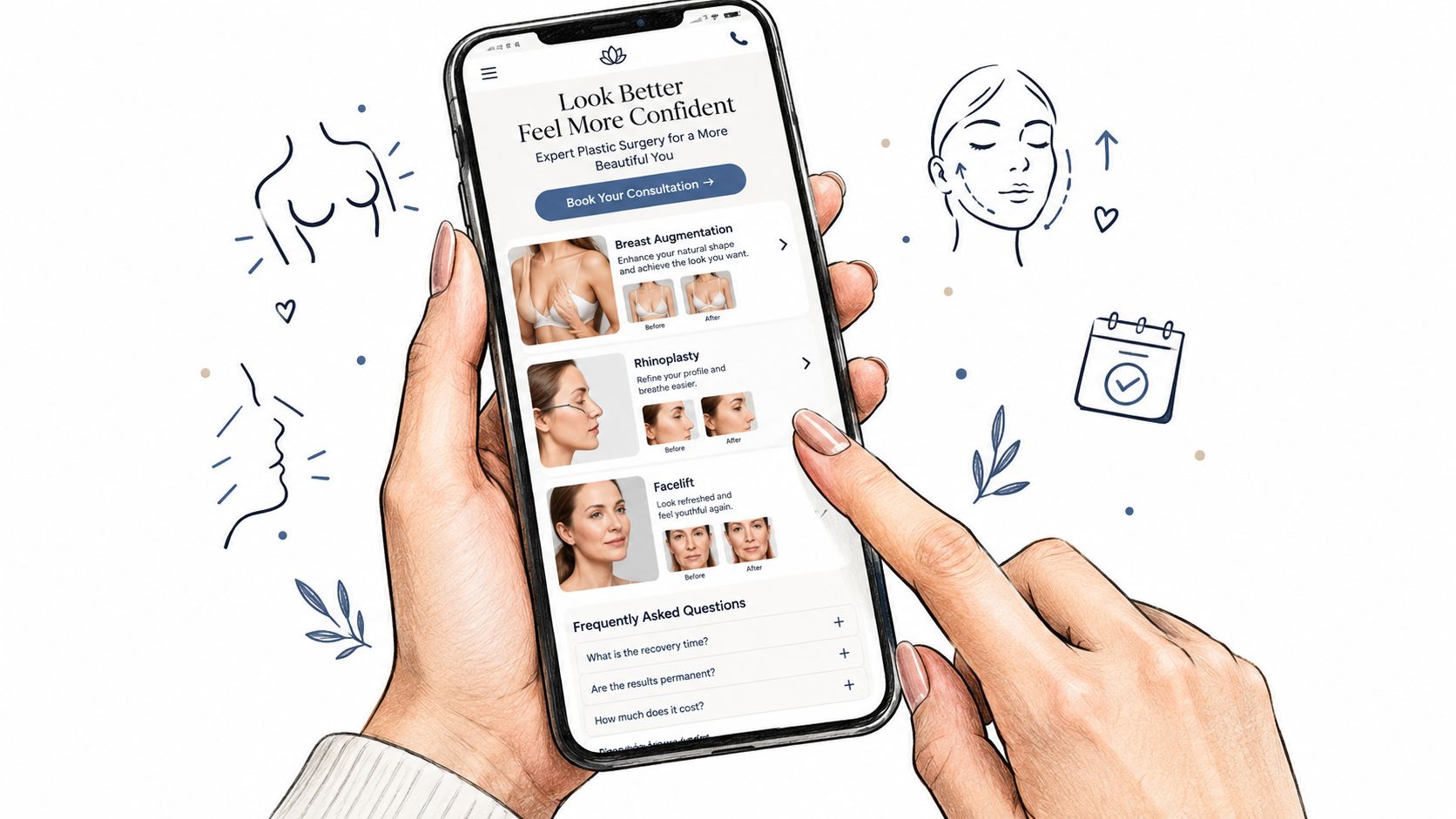
Build one mobile-first page for each procedure intent, and make the core information render before large media. Web design for plastic surgery has to serve visitors who arrive on phones with practical questions, so the page should answer those questions before any video or oversized gallery finishes loading.
A large-scale mobile-page-speed study reports that when load time increases from one second to ten seconds, the probability of a mobile visitor bouncing rises by 123%. The same analysis identified page-element count as the strongest predictor of mobile conversions (mobile page speed research). These findings do not guarantee a particular result for an individual practice. They do support a clear trade-off: every large visual, third-party script, and interface element should justify the time and complexity it adds.
Sequence the page around patient needs
Start with the procedure and the practice's identity. Put concise candidacy guidance, surgeon credentials, safety information, and a visible consultation action ahead of decorative media. Explain recovery expectations and risks in readable sections, then place relevant cases and testimonials where they support the decision already in progress.
A useful page sequence is:
- Match the intent. Give each high-intent route, such as breast augmentation, rhinoplasty, or facelift, its own focused page.
- Render the core content first. Prioritize procedure information, credentials, and the primary action over background video and large image collections.
- Control image weight. Serve appropriately sized images, compress them, and load gallery content as visitors reach it.
- Test the route on a phone. Check the page patients open, including its images and third-party components, instead of relying only on a desktop score.
A fast page can still feel rich. It needs deliberate sequencing. A small set of relevant images helps patients assess the practice, while a large gallery that delays the page or overwhelms the visitor works against that goal.
The first screen should answer the visitor's immediate questions, not prove how many visual effects the design team can fit into it.
Third-party components deserve the same scrutiny as images. Each widget, map, or chat tool adds weight, and each one also widens the flow of visitor data leaving the page. Treat every embed as a privacy decision as well as a speed decision, and keep only what the page needs.
Measure the experience on real mobile pages and revisit it whenever a new script, widget, or gallery feature is added. The design question is whether each element earns its place without delaying the content that helps someone make an informed next move.
Consultation Flows That Protect Patient Data
Treat the consultation form and the analytics stack as one privacy-sensitive system. Web design for plastic surgery shouldn't add tracking to every point of patient interaction just because a marketing dashboard can accept another event.
Healthcare websites can expose sensitive information through cookies, pixels, session-replay tools, fingerprinting, and similar technologies. The U.S. Department of Health and Human Services explains that tracking technologies may collect information from healthcare websites and that, on authenticated pages, they generally have access to protected health information (HHS guidance on online tracking technologies). Whether particular legal obligations apply depends on the practice and its circumstances, so the practice should confirm requirements with counsel.
Keep measurement separate from patient-submitted data
A consultation request may reveal a person's identity, procedure interest, contact details, or appointment context. If those details flow into advertising tools through a pixel or identifiable URL parameters, the practice may create a disclosure risk while trying to improve attribution. The safer design starts by asking which data the operations team needs to respond, then excludes sensitive content from general analytics and advertising flows.
- Minimize form fields. Ask only for information needed to route and respond to the inquiry. Don't collect sensitive details out of habit.
- Separate measurement from submission data. Use aggregate interaction metrics where appropriate, without passing form contents or identifiable procedure context to advertising platforms.
- Review page and query data. Keep sensitive information out of URLs and suppress identifiers or parameters from analytics events.
- Document recipients. Track which vendors can receive information and how each system is used.
- Write clear consent language. Explain what's collected and why. Consent to advertising cookies shouldn't suggest unrestricted permission to share health information.
A compact form can reduce friction, but shorter isn't automatically safer if the remaining fields still send sensitive information to an unreviewed destination. The flow must be assessed end to end: what the visitor enters, where the information goes, who can access it, and what the practice's policies say.
For a practical overview of form design, see this guide to a website contact form. The implementation should still be reviewed against the practice's privacy obligations and counsel's guidance.
Make the boundary visible
Keep educational content distinct from individualized medical advice. Tell visitors what happens after they submit a request, and don't place marketing instrumentation on appointment or patient-information flows without a documented privacy review. A form that converts while expanding data exposure isn't a successful design.
Accessibility Built Into the Design System
Build accessibility into shared components before they reach a practice site. Web design for plastic surgery should make procedure information, galleries, booking, and virtual consultation usable by people with different ways of accessing the site.
The U.S. Department of Justice says its longstanding interpretation of ADA nondiscrimination and effective-communication requirements applies to web accessibility. Its guidance identifies WCAG and Section 508 Standards as established technical references, without prescribing one universal technical standard for every organization (DOJ guidance on web accessibility). For an agency, the practical point is to define accessible behaviors in the design system and test them in the finished experience.
Specify behaviors, not just appearances
A reusable component library should define keyboard operation, visible focus states, meaningful heading structure, sufficient contrast, descriptive links, and form instructions with actionable error messages. Patient-education videos need captions or transcripts. Images need useful text alternatives that convey relevant information, rather than empty or generic labels.
Galleries, sliders, accordions, navigation menus, and modal consultation forms deserve specific review. A gallery can fail if keyboard users can't move between images, if focus disappears after closing a modal, or if the images carry information that isn't available in text. A form can fail if labels aren't connected to fields or an error appears without telling the visitor how to fix it.
The same care applies to virtual consultations. A video link alone doesn't make a remote visit accessible. Booking instructions should be clear, the appointment path should work with a keyboard, and patients should know how to request assistance or an alternative when the technology presents a barrier.
For a practical example of how a practice communicates its accessibility approach, review Ideal Face & Body's website accessibility statement. That kind of statement supports communication, but it doesn't replace accessible implementation and testing.
Test the whole journey
Automated scans can identify some technical issues, but they can't reliably judge whether alternative text is meaningful or whether a patient can complete the booking journey. Before launch, combine automated checks with manual keyboard testing and screen-reader review. Test the actual interactions, including error recovery, focus order, gallery controls, and modal behavior.
A design system should make accessible choices the default for every practice site, not leave each project team to rediscover the same component failures. For more implementation guidance, see this overview of accessibility compliance.
Measuring Consultations Instead of Leads
Measure progress toward attended consultations, not just traffic or form submissions. Web design for plastic surgery needs a funnel view because a high count of inquiries doesn't show whether the website is attracting suitable prospective patients or helping them reach an appointment.
Published industry benchmarks for plastic-surgery website conversion vary: one commonly cited range puts average conversion around 1%–3% and high-performing sites around 8%–15%, while another reports 2.3% average and 4%–6% for high-performing sites (industry guidance on plastic-surgery conversion optimization). Those ranges shouldn't become targets. Definitions differ: a conversion might mean an inquiry, a qualified lead, a consultation, or a surgery, and those outcomes aren't interchangeable.
Track the funnel stage by stage
| Funnel stage | Question it answers | Why track it separately |
|---|---|---|
| Landing page visit | Which source and procedure page brought the visitor in? | Shows the context behind later actions. |
| Gallery view | Did the visitor review relevant cases? | Separates content engagement from form activity. |
| Form start | Did the visitor begin a consultation request? | Reveals whether the page action earns initial commitment. |
| Form completion | Did the visitor submit the request? | Helps identify friction between starting and completing. |
| Booked consultation | Did the inquiry become an appointment? | Distinguishes submissions from scheduled visits. |
| Attended consultation | Did the patient arrive for the appointment? | Connects the digital funnel to a meaningful practice outcome. |
Establish a baseline across at least four weeks of traffic, device, procedure page, source, form-start, form-completion, booked-consultation, and show-rate data. Segment paid, organic, referral, branded, and non-branded traffic, then account for procedure mix, geography, and seasonality when comparing performance.
Test one substantial change at a time
Change one major variable, such as form length, the placement of the gallery, a procedure-specific call to action, or how price-range guidance is presented. Evaluate whether qualified and attended consultations change, rather than treating every submitted lead as equal. A test can generate more submissions and still perform poorly if the added inquiries don't fit the practice's services or fail to become appointments.
A structured A/B testing approach for landing pages can help teams isolate changes. The useful result isn't a universal conversion number. It's a clearer view of which page decisions support the practice's actual consultation process.
Choosing a Platform for Plastic Surgery Client Work
A platform decision outlasts any template. The agency that launches a plastic surgery site still owns the consent language in the intake forms, the analytics events firing on procedure pages, and the access controls when a staff member leaves the practice. Evaluate the platform on how it handles those obligations at month twelve, not on how fast it ships a homepage in week two.
Judge the platform by the work it must support
A practical evaluation covers more than the visual editor. Can teams build focused procedure templates, manage form and consent language centrally, govern access across sites, and update shared components without losing local flexibility? Can analytics configuration respect the same privacy boundaries as the intake forms, so tracking never touches the data the consultation flow is designed to protect? Can the agency deliver the platform under its own brand and keep ownership of the client relationship?
WebinOne brings CMS, forms, CRM, and multi-site management together in a managed, white-label platform. It publishes per-site pricing tiers, reports uptime history and an availability commitment through its SLA, and runs on AWS across multiple regions, with paid partner support available. For agencies moving existing client sites, TeamOne provides migration services.

Those capabilities cover the infrastructure side. The agency still configures consent language per form, restricts who can export inquiry data, and decides which analytics events fire on procedure pages for each practice.
The question worth asking during evaluation is whether one team can manage privacy-sensitive forms and the measurement stack in the same place. When consent settings, form data, and analytics configuration sit under a single set of admin controls, fewer gaps open between what the privacy policy promises and what the site does. A white-label setup also turns that ongoing configuration work into part of a larger engagement, covering migration, multi-site governance, and monthly operations rather than a one-time visual rebuild.
Agencies ready to move plastic-surgery clients onto a more governable platform can explore the WebinOne reseller program and discuss fit with the WebinOne team or an existing Partner.