Web Content Management System: What It Is and How It Works
A client calls because a price changed on one page, stayed wrong on three others, and nobody can say who published the update. The editor remembers approving a draft. The developer remembers a different version. The agency has screenshots, emails, and a live site that doesn't match either account.
That moment exposes the core job of a web content management system. Page editing is the visible part. The harder part is governance infrastructure: who can change what, under which rule, with what record, and with a tested way back. Agencies and systems integrators feel that gap first because they carry the same question across dozens of client sites, brands, and regions, often while also carrying patching, plugin upkeep, and hosting questions that have nothing to do with writing a paragraph.
Table of Contents
- What a Web Content Management System Is and Why It Matters
- Core Capabilities Every Web Content Management System Covers
- How Coupled, Headless and Hybrid Architectures Differ
- Publishing Workflows, Roles and Audit Trails
- Running Many Sites and Brands From One Console
- Hosting, Performance and Accessibility Responsibilities
- Deciding Which Platform Fits Your Client Portfolio
What a Web Content Management System Is and Why It Matters
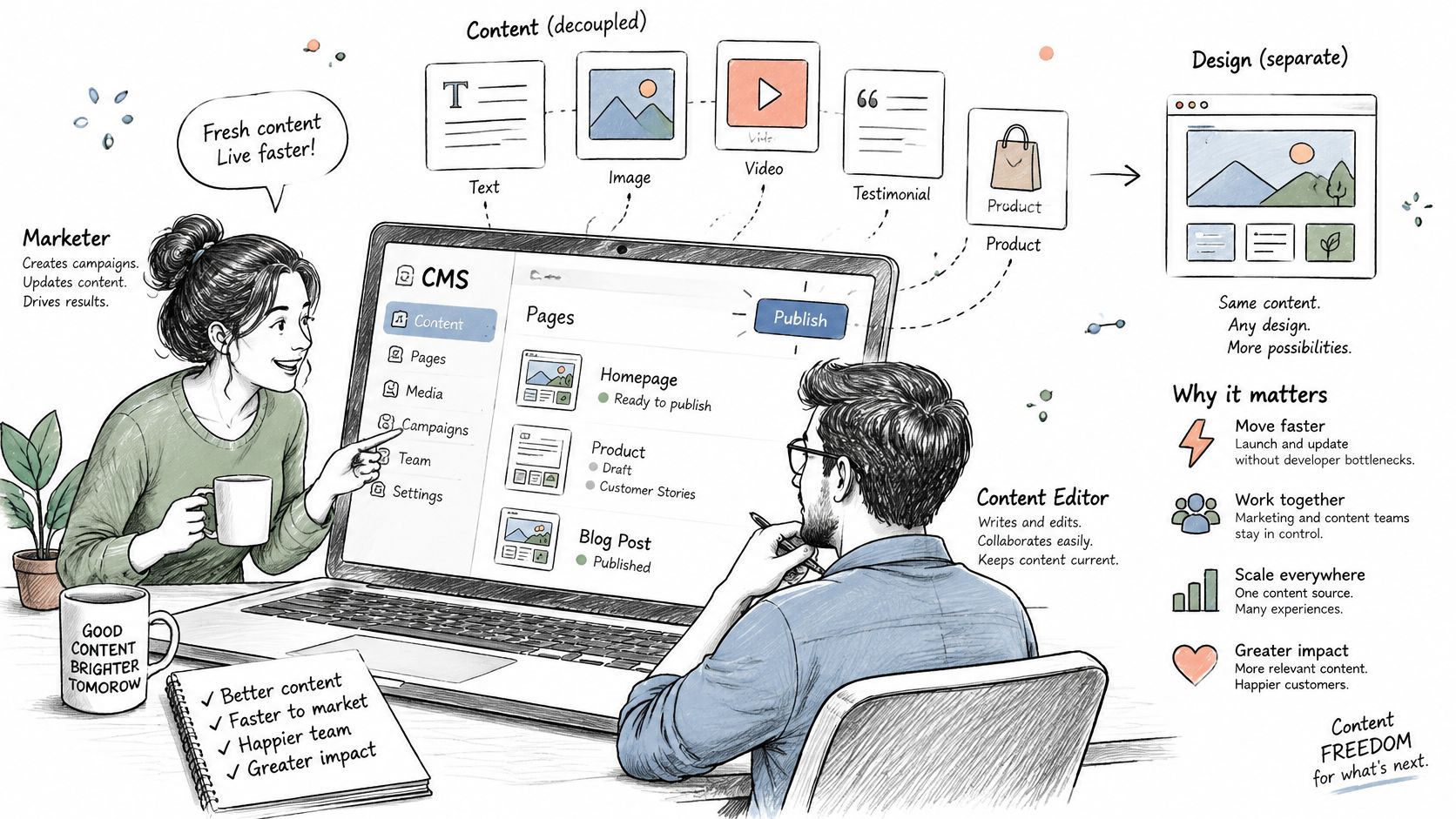
A web content management system is software that separates content from presentation so non-technical teams can create, review, and publish pages without touching code, and WebinOne delivers that model as a managed platform with the governance layer built in. The definition matters because it shifts the buying question from editor comfort to publishing control.
A newsroom makes the structure plain. Writers file stories to a shared desk, editors approve them, and layout staff place approved copy into a page design. Writers don't rebuild the printing press for every article, and layout staff don't rewrite the story to fit the column. A web content management system plays all three parts at once. It's the desk where content is filed, the approval rules that decide what moves forward, and the layout system that places approved content into templates for visitors.
Four Short Stops in the History
The category became a distinct web technology around 1995, when organizations needed to create and maintain far more pages than hand-built publishing could handle. A historical review of content management stages places mainframe content management around 1975, desktop publishing around 1984, client-server content management around 1990, and web publishing around 1995. Open-source systems later widened access beyond large enterprises, and headless architectures then separated content management from front-end presentation. Modern platforms added API delivery, multi-channel publishing, and automation on top of that base.
Say a regional operator wants to build a profitable directory business with hundreds of listings. Hand-editing each listing page collapses quickly. Structured entries, templates, and review rules turn that pile of pages into a repeatable publishing operation. That's the lasting value buyers miss. Structured workflow lets teams publish at scale. Page editing alone never did.
Core Capabilities Every Web Content Management System Covers
Ten capabilities decide whether a platform governs content or just stores it: content modelling, templates, editing, workflow, versioning, media, SEO controls, roles, multi-site management, and API delivery. Read the list as a governance checklist. Each row answers who can change what, and whether every change can be proven and reversed. A platform missing one item doesn't remove the work. The work moves into a plugin, a spreadsheet, a second vendor, or one person's memory.
| Capability | What it covers | What breaks without it |
|---|---|---|
| Content modelling | Typed fields such as title, author, price and event date | Every page becomes a one-off, so changes must be repeated by hand |
| Templates and layouts | Reusable page structures bound to content types | Design changes require editing each page separately |
| Editing and preview | Rich-text and visual editing with draft preview | Non-technical staff depend on developers to publish |
| Workflow and approvals | Draft, review, approve and publish stages | Unreviewed changes reach production |
| Versioning and rollback | Stored revisions that can be restored | A bad publish needs a rebuild instead of a restore |
| Media management | Central library with resizing and alt text fields | Image weight and accessibility drift across pages |
| SEO and metadata controls | Titles, descriptions, redirects and structured data | Search visibility is lost in redesigns and migrations |
| Roles and permissions | Role-based access per site, section or content type | Editors can change pages they should not touch |
| Multi-site management | Shared components and brand rules across sites | Each site is governed separately and drifts apart |
| API and headless delivery | Content served to apps and front ends through an API | The same content has to be re-entered for each channel |
Structure Comes Before Editing
Content modelling is the capability teams most often skip, and it pays back longest. When product name, price, and availability live as typed fields rather than pasted paragraphs, one correction updates every page, listing, and feed that draws on them. Templates then bind those fields to a layout, so a design change lands once instead of page by page. Without that structure, editors aren't managing content. They're maintaining copies.
Editing and preview sit on top of structure, not in place of it. A visual editor lets non-technical staff publish safely only when the fields underneath constrain what can break. Free-form page building feels faster on day one. By month three it produces inconsistent headings, oversized images, and orphaned metadata that someone cleans up by hand.
Control Means a Tested Way Back
Rollback is the second capability buyers underweight, and the one that defines governance. A bad publish should reverse in minutes through a stored revision, not trigger a rebuild, a database hunt, or a call to whoever set up the backups. Workflow stages, role permissions, and versioning belong together for the same reason. They decide who may move content forward, and they preserve the state to return to when a decision turns out wrong.
Practical rule: A capability that lives in a plugin still needs an owner, an update path, and a rollback plan. If nobody can name all three, the capability isn't covered.
Reach is the third layer. SEO controls protect titles, redirects, and structured data during redesigns. Multi-site management keeps shared components consistent across a portfolio. API delivery stops teams re-entering the same content for an app or portal. Each missing piece reappears as coordination cost, usually billed to the agency in support time rather than to the platform in licence fees.
Ownership is where the table turns practical. WebinOne covers the list above as built-in features in a single platform, with no plugins required, so each capability has one accountable owner instead of a stack of vendors with separate update cycles. On platforms assembled from parts, the same coverage exists only on paper until someone accepts responsibility for each piece.
A useful check takes one afternoon. List the ten capabilities against the current stack and mark each as built in, plugin dependent, spreadsheet dependent, or memory dependent. The last three marks show where margin leaks and where a platform decision should start.
How Coupled, Headless and Hybrid Architectures Differ
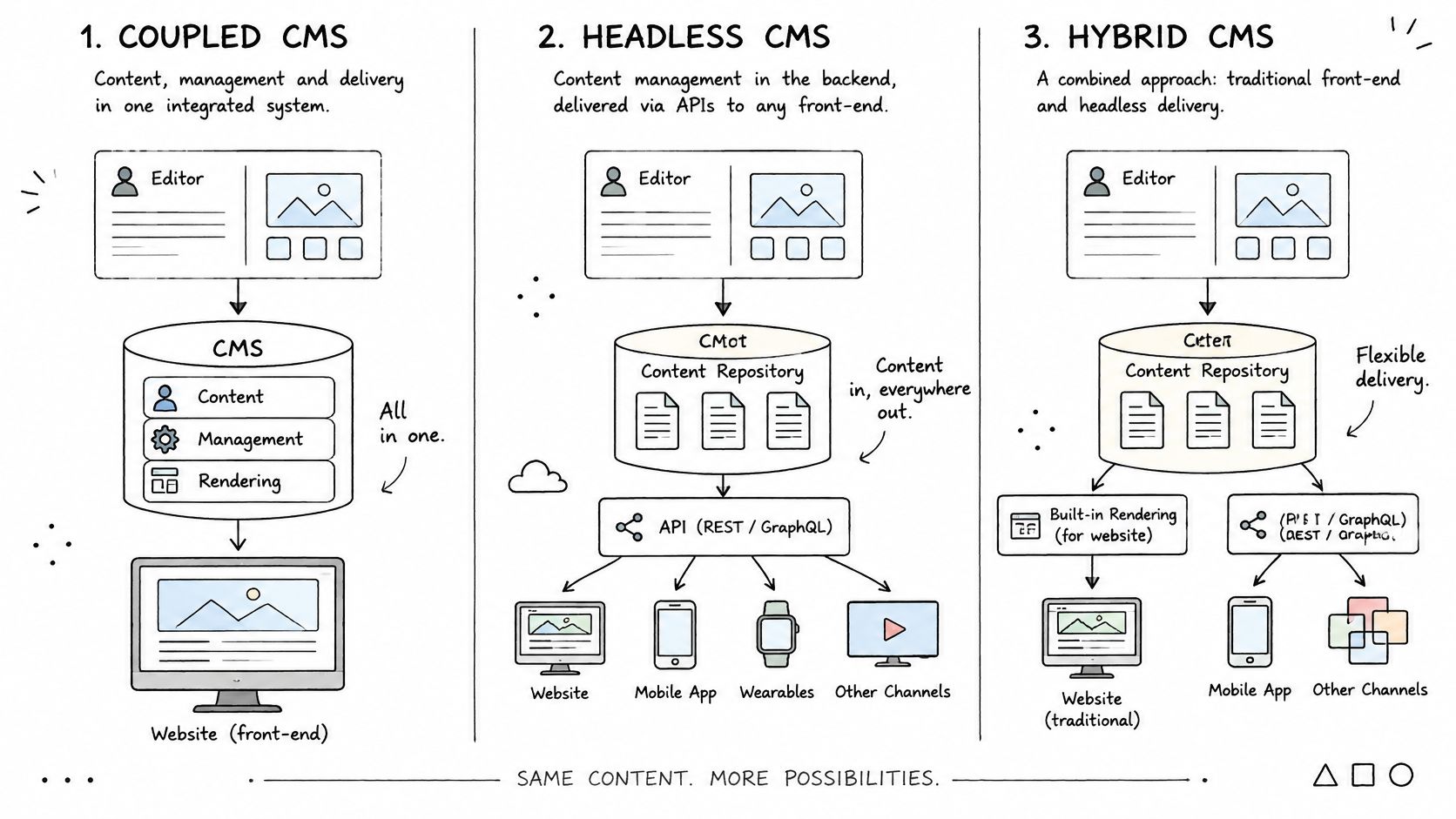
One question separates the three models: who renders the page? Hosting, editing, and API design all sit downstream of that answer. WebinOne carries both a page-based CMS and a headless API in one platform, so the choice is an architectural decision rather than a platform switch.
A coupled system stores content and renders the finished page in the same place. Launch is fast, and operations stay simple for a single site run by a marketing-led team. The cost surfaces later as limited front-end freedom, because presentation choices stay tied to what the platform's templating layer allows.
A headless system separates storage from presentation. Apps, kiosks, portals, and custom front ends request content through an API and render it themselves. Teams comparing leading headless content management systems usually focus on API design, but the operational cost sits elsewhere: every channel needs front-end build work, preview handling, and its own release discipline.
| Architecture | Who renders the page | Best fit | Main cost |
|---|---|---|---|
| Coupled (page-based) | The CMS renders the page | One site, fast launch, marketing-led teams | Limited front-end freedom |
| Headless | Apps and front ends render through an API | Many channels and custom front ends | Front-end build work for each channel |
| Hybrid | Page-based editing plus API delivery | Marketing sites that also feed apps | Clear template ownership rules needed |
The Decision Rule
Ask who renders the page and how many channels need the same content. Those two answers settle most architecture debates.
Hybrid setups keep page-based editing for marketing teams while exposing the same content over APIs to other channels. The combination suits portfolios where most value sits in websites but product data, member content, or location details also feed apps and portals. The trade-off is governance: someone must own each template, decide which fields are shared, and stop two teams editing the same presentation logic in two places.
WebinOne is a SaaS content management system, not open source, which shifts the operations side of the same decision. The delivery team still chooses between page-based rendering, API delivery, or both, while platform maintenance stays with the vendor rather than the agency. That distinction matters when the architecture diagram looks clean and the upkeep column stays blank.
Three checks expose weak diagrams in a vendor call. Rendering location: pin down exactly where HTML is produced for each channel. Content storage: confirm one modelled source feeds every output. Template ownership: name the team that can change each layout and the team that can't. A diagram that can't answer those three points will produce arguments after launch.
Publishing Workflows, Roles and Audit Trails
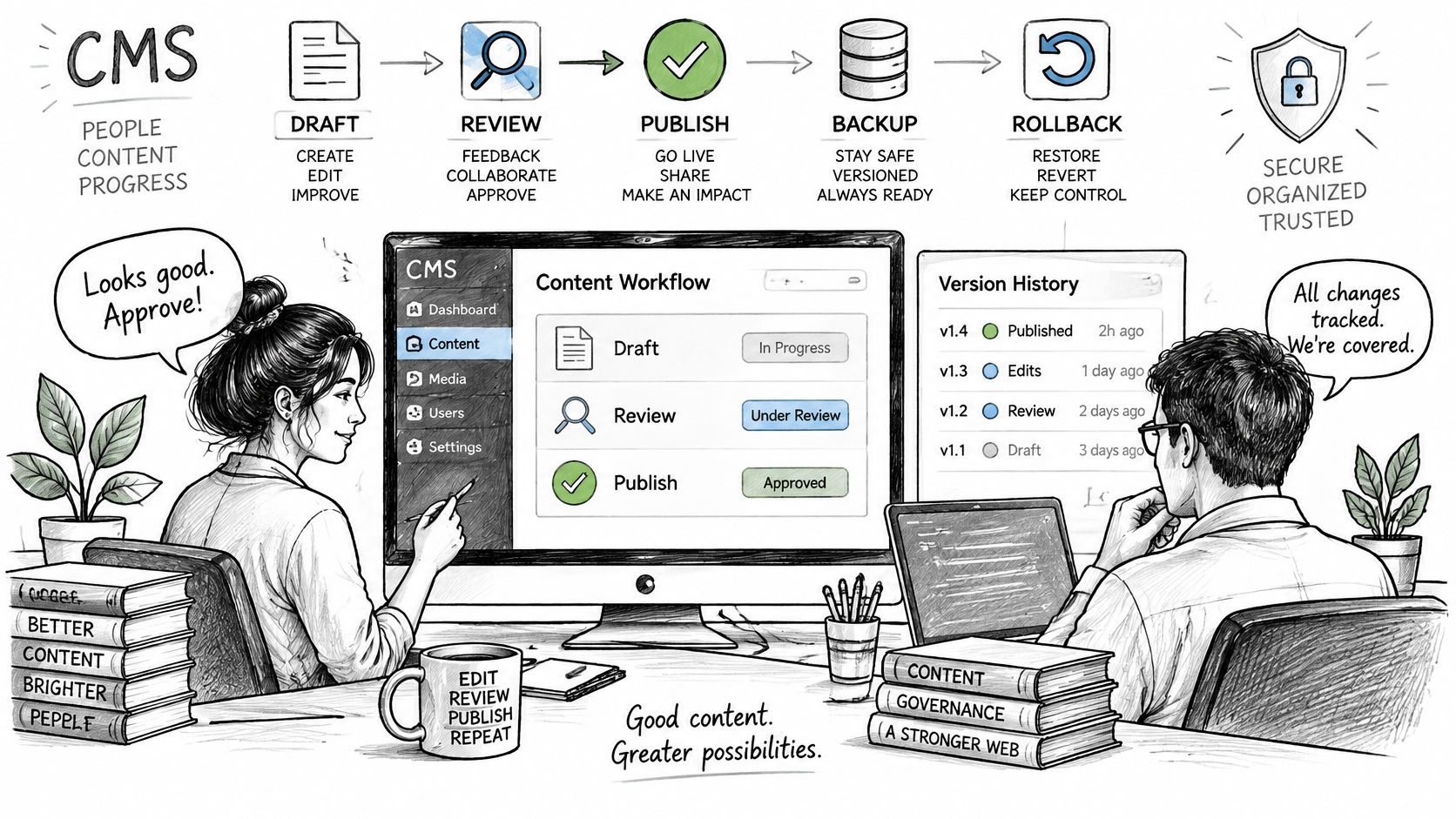
Publishing rights decide more outcomes than page templates do. WebinOne governs publishing with scoped role permissions, reviewable changes, activity logs, and backups, and AgentOne works inside those same platform boundaries. The buyer's question is blunt: can the organization prove what changed, who approved it, and how to reverse it?
Generation features alone don't settle that question. A survey reported in Agentic Advertising research found 86% of content managers use AI features, but only 14% completely trust AI to publish without human review and 28% trust it little or not at all. Tool use is running ahead of publishing trust, and closing that gap takes controls inside the system that publishes.
Controls in the Order They Bite
- Roles first: Editors, reviewers, and publishers hold different rights per site and content type, so a regional contributor can't edit global legal copy.
- Approval thresholds by risk: A blog draft moves quickly, while pricing, legal, and regulated pages wait for named sign-off.
- Changes held for review: Edits stay visible to reviewers until a person publishes them, so unapproved work never reaches the live site.
- Activity logs for attribution: Every change ties back to a user and a time, which ends reconstructive guesswork after an incident.
- Reversal as the exit: Restoring the last good version fixes the public damage while legitimate later changes stay accounted for.
Documented content approval workflows matter because informal review habits break under staff turnover. Email approval and chat sign-off leave no enforceable record inside the system that publishes. When a client disputes a change, the platform log carries weight a forwarded message doesn't.
Where AgentOne Fits
AgentOne is WebinOne's managed AI that designs, builds, and manages sites inside the platform. The surrounding controls belong to the platform. Role permissions, activity logs, backups, and the boundaries the agency sets apply to automated work exactly as they apply to a staff editor's work, so adding AI contributors doesn't mean inventing a second governance model.
The test isn't whether AI can draft a page. It's whether a wrong automated change can be traced, stopped, and reversed before it propagates.
That propagation risk is the one governance plans miss most often. One automated edit to a shared product field can reach localized sites, catalogues, portals, and machine-readable endpoints in a single publish cycle. Test the reversal path on a real shared component before relying on it, because a restore that has never been rehearsed is only a plan.
Running Many Sites and Brands From One Console
A franchise group runs forty location sites. Every site shares the same page structure, brand tokens, and legal footer, while each location carries its own opening hours, phone number, manager name, and local offers. A shared opening-hours component holds the common layout and behaviour. Each site overrides only its local fields.
When head office changes how holiday hours display, the component update reaches all forty sites in one release. When one location extends Saturday trading, only that site's field changes. Nobody opens forty admins, and nobody pastes the new footer into forty templates. A capable multi-site platform turns portfolio updates from a recurring project into routine publishing.
WebinOne's multi-site management gives agencies and enterprise teams that console, with shared templates, components, and brand rules applied across every site and brand they operate. Common decisions get made once, and local decisions stay local.
The Governance Split That Makes It Work
- Per-site permissions: Location staff edit their own pages and nothing else.
- Global content managed once: Legal footers, privacy copy, and brand components live in one controlled place.
- Regional variants under shared tokens: Local offers and language change while type, colour, and spacing stay on brand.
The same mechanism carries the risk. A shared component that breaks, breaks everywhere. Portfolio reuse and portfolio blast radius come from the same coupling, so write access to global components should sit with a small named group, and component releases should move through staging on a set schedule rather than ad hoc edits. Agencies that skip that discipline trade forty small maintenance tasks for one large incident.
Migration is usually the entry point to this model. The WebinOne team helps set up the white-label portal and migrate existing sites if needed. A staged cutover, moving a first wave of sites before the rest follow, catches template and data problems while they are still cheap to fix. For systems integrators and enterprise teams that need delivery inside their own or a client's AWS account, a licensed version is available by agreement, and that conversation starts through WebinOne for enterprise and systems integrators.
White-label presentation completes the agency side of the model. Clients log in under the agency's brand, raise support through the agency's portal, and see one coherent service. The platform work stays centralized while the commercial relationship stays with the agency. Multi-site tooling then supports margin directly, because portfolio-wide improvements can be packaged and sold instead of absorbed as unpaid maintenance.
Hosting, Performance and Accessibility Responsibilities
WebinOne runs on AWS across 6 AWS regions, with 99.99% uptime and a 99.95% availability commitment in its published SLA, but hosting alone doesn't remove the work of keeping applications patched and configured. Every platform conversation should draw that boundary in writing before anyone signs.
Under the shared-responsibility model, AWS secures the underlying cloud infrastructure. The customer remains responsible for the guest operating system, application software, security patches, and firewall configuration. A managed platform changes that boundary only when the provider explicitly assumes those application and system tasks. Agencies comparing self-managed open-source deployments with managed platforms often compare licence costs and forget to assign the patching column. Unassigned work doesn't disappear. It lands on the delivery team during the next critical update.
Performance Is Measured on Real Visits
The HTTP Archive Core Web Vitals reporting evaluates results at the 75th percentile of real page loads, with thresholds of 2.5 seconds for LCP, 200 milliseconds for INP, and 0.1 for CLS. Field data at that percentile captures device, network, and rendering variation that a developer's local test misses. A template can pass in the office and fail for a quarter of real mobile visitors.
Segmentation matters more than the site-wide average. Excess JavaScript hurts interaction, unoptimized hero media hurts loading, and unstable component dimensions hurt layout stability, so each failing template needs its own diagnosis. Teams looking for practical speed work, including faster sales funnels for small businesses, should still verify gains in real-user data by device and template. Publishing controls such as responsive image handling, explicit media dimensions, deferred scripts, and cacheable output keep everyday edits from gradually eroding those scores.
Accessibility Names a Level or It Means Nothing
WCAG 2.2 conformance levels A, AA, and AAA are cumulative, so an accessibility claim should name the target level and apply it to actual published pages. A CMS can support compliance through semantic components and authoring checks, but authors can still publish low-contrast text, vague link labels, and images without alternative text. Structured accessibility compliance work therefore belongs in templates, QA, and remediation ownership, not in a launch-day audit alone. Every WebinOne project is tested on every browser and platform before delivery, which covers rendering checks without replacing ongoing content discipline.
Vendor-call test: If a team can't say which template fails which vital and at which WCAG level its pages conform, it doesn't yet own its operations.
Deciding Which Platform Fits Your Client Portfolio
The right web content management system keeps publishing governance, architecture, multi-site control, and operations inside one boundary an agency can test: who may change what, and whether each change can be proven and reversed. Market share shows popularity, not fit for a specific portfolio.
Concentration is real. W3Techs market-share reporting puts most sites running an identifiable CMS on a small group of systems. That scale buys developer familiarity and ready migration tooling, and those strengths still leave the operative questions open: who patches a client's stack at short notice, and who can prove a disputed publish.
A Checklist That Produces a Decision
- Publishing rights: Who can publish each content type, and how are approvals enforced inside the system?
- Tested rollback: Has restoration been proven on a real site, including a shared component?
- Modelled content: Is content structured once for web, app, portal, and other channels?
- Multi-site governance: Do shared components, brand rules, and per-site permissions cover every brand and region?
- Performance by template: Are Core Web Vitals monitored on real visits, segmented by device and template?
- Named accessibility target: Is a WCAG level stated, tested on live pages, and owned after launch?
- Patching ownership: Who fixes critical issues, against which deadline, and with what rollback if an update fails?
- Hosting boundary: Which operating system, application, and configuration tasks sit with the provider, in writing?
Weak answers cluster predictably. Portfolios carrying repeated patch work, plugin sprawl, and governance gaps usually fail items two, seven, and eight while passing every editor demo. Item two fails first: backups exist, but nobody has restored a live page from one on a deadline. That's why feature tours mislead. The checklist prices the work agencies carry after launch, including the client conversations that start with a broken page and end with unpaid investigation time.
The verdict depends on situation. A single brochure site with one careful editor rarely justifies a platform switch, and migration cost would outweigh modest gains. A portfolio where the same update touches many sites, where clients demand approval records, or where maintenance hours squeeze project margin usually justifies the move. Scale changes the answer because governance failures multiply with every added site.
An agency can take the completed checklist to the WebinOne reseller program, where the white-label portal and client migrations are scoped against those answers. Scoring the current stack first turns the first conversation into a migration plan instead of another platform tour.