How to Launch an Online Ecommerce Store in 2026

A client launch date is fixed, ads are booked, and the store is still missing a payment decision. That pattern stalls more launches than design or development ever does. A successful online ecommerce store isn't a page build with a cart attached. It's a sequence of decisions about catalog data, tax, shipping, fraud, and access that compound when they're left late. Agencies that name each decision early launch on time. Agencies that treat them as tuning tasks discover them during the first failed orders.
Table of Contents
- Launch Sequence and the Decision Each Stage Locks In
- Choose a Platform by Store Model and Growth Path
- How to Build the Catalog and Checkout Step by Step
- Payments, Fraud Controls and Customer Trust
- Hosting, Security and Scale Before Traffic Arrives
- Run the Store After Launch Without Breaking Checkout
- Plan Your Store Launch With the WebinOne Team
Launch Sequence and the Decision Each Stage Locks In
A store launch runs through six stages, each locking one decision and producing one output before the next stage starts, and WebinOne can carry the platform layer through all six. Skipping a gate doesn't save time. It moves the work to a stage where fixing it breaks something already tested.
Say a retailer is scheduled for a campaign date, the catalog is half imported, and payment methods aren't chosen. That's the most common reason launches slip, because tax display, checkout fields, and fraud settings all depend on decisions nobody has signed. The channel is too material for that casual approach. In the second quarter of 2025, the U.S. Census Bureau quarterly ecommerce release estimated U.S. retail ecommerce sales at $304.2 billion, representing 16.3% of total U.S. retail sales. Roughly one dollar in six spent through retail channels moved online, so checkout has to work on day one, not after a soft opening.
The Six Gates
| Stage | Decision to lock | Output before moving on |
|---|---|---|
| Scope | Store model, markets and launch region | One-page brief with SKU count, currencies and markets |
| Platform | Hosted, self-hosted or multi-site setup and plan tier | Signed platform choice with the plan and add-ons confirmed |
| Catalog | Product data model and variant axes | Imported and validated product sheet with images and tax classes |
| Checkout and payments | Payment methods, shipping rules and fraud settings | Test orders passing in every payment method |
| Security and hosting | Admin access, backups and expected peak load | Security checklist signed off and load test passed |
| Go-live | Launch date and rollback plan | Live store with checkout monitoring and a tested rollback path |
Order matters for a practical reason. Choosing the store model before building the catalog prevents product data from being restructured midway, when SKUs, variants, and URLs already exist. Locking payment and fraud rules before testing prevents late surprises, such as a new authentication step changing conversion on launch week.
Gate test: If the output in the right-hand column doesn't exist, the next stage hasn't started, whatever the project plan says.
Agencies can check a live project in minutes by asking for each output by name. A missing brief means scope is still opinion. Missing test orders mean checkout is still a design. A missing rollback path means go-live is a hope, not a plan.
Choose a Platform by Store Model and Growth Path
The platform decision starts with the store model, not a feature comparison, and WebinOne suits agencies that want catalog, checkout, CRM, and multi-site management on one managed platform rather than stitched components. Feature lists look similar at a glance. Operating models don't, and the operating model is what the agency lives with for years.
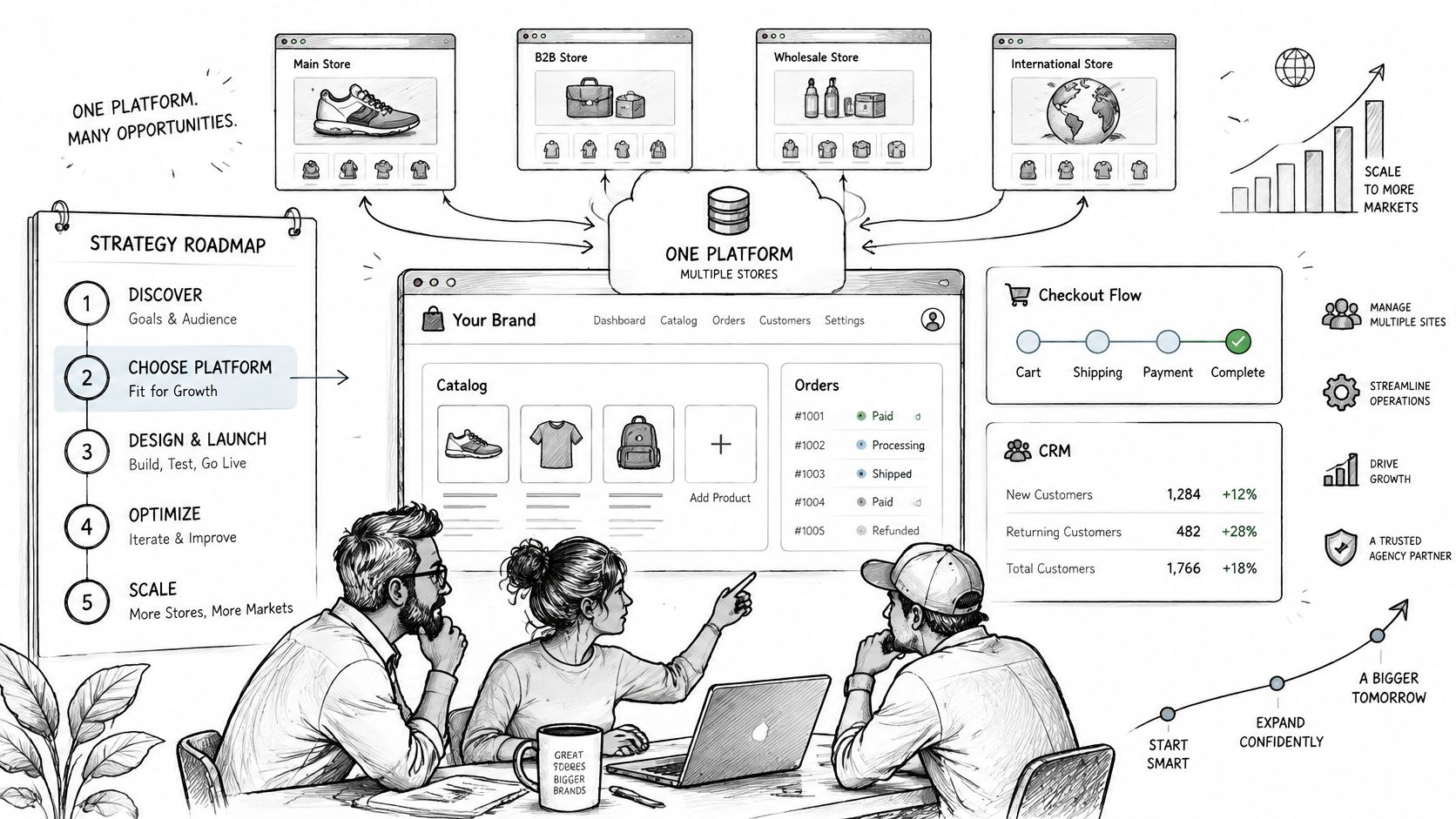
Four Models, Four Different Priorities
| Store model | Priority | Platform must support | Common mistake |
|---|---|---|---|
| Single-brand direct-to-consumer | Fast checkout and promotions | Discount codes, shipping rules, cart recovery | Building advanced catalog features before the first sale |
| Wholesale or B2B | Trade pricing and quoting | Customer-specific pricing, quotes and invoicing | Letting retail checkout rules apply to trade accounts |
| Large catalog | Import quality and filtering | Bulk import, variant handling and search | Loading unvalidated product data that breaks filters |
| Multi-brand or multi-region | Governance with local control | Shared templates, per-brand catalogs, currency and tax rules | Inconsistent promotion and fraud rules across brands |
A direct-to-consumer store lives or dies on checkout speed and promotion mechanics, so discount handling and cart recovery matter more than elaborate catalog tooling. A wholesale store reverses that logic. Customer-specific pricing, quoting, and invoicing are the core, and retail rules applied to trade accounts create pricing errors that surface as credit notes.
Large catalogs fail on data quality, not page design, so bulk import, repeatable validation, and variant handling carry the launch. Multi-brand estates fail on inconsistency, where one brand runs different fraud or promotion rules and support can't explain why two checkouts behave differently.
The Shortlist Test
Four questions cut through most platform claims, and an ecommerce CMS platform evaluation gives agencies a structured way to run them.
- Native payment methods: How many payment methods are native rather than added components, and who maintains them?
- Repeatable import: Can the catalog import run again after corrections without creating duplicates?
- Per-market rules: Are currency and tax rules handled per market, or forced into one global setting?
- Patching ownership: Who patches every component the checkout depends on, and how is that evidenced?
Agencies reselling a store under their own brand should review the WebinOne reseller program terms before committing a client to a plan, because margin and branding decisions belong at platform selection, not after the first invoice.
How to Build the Catalog and Checkout Step by Step
WebinOne gives agencies one place to build the catalog and checkout for an online ecommerce store, and the sequence below keeps product data clean enough to launch without a rebuild. Each step exists because a specific, common slip causes it to fail later in a more expensive place.
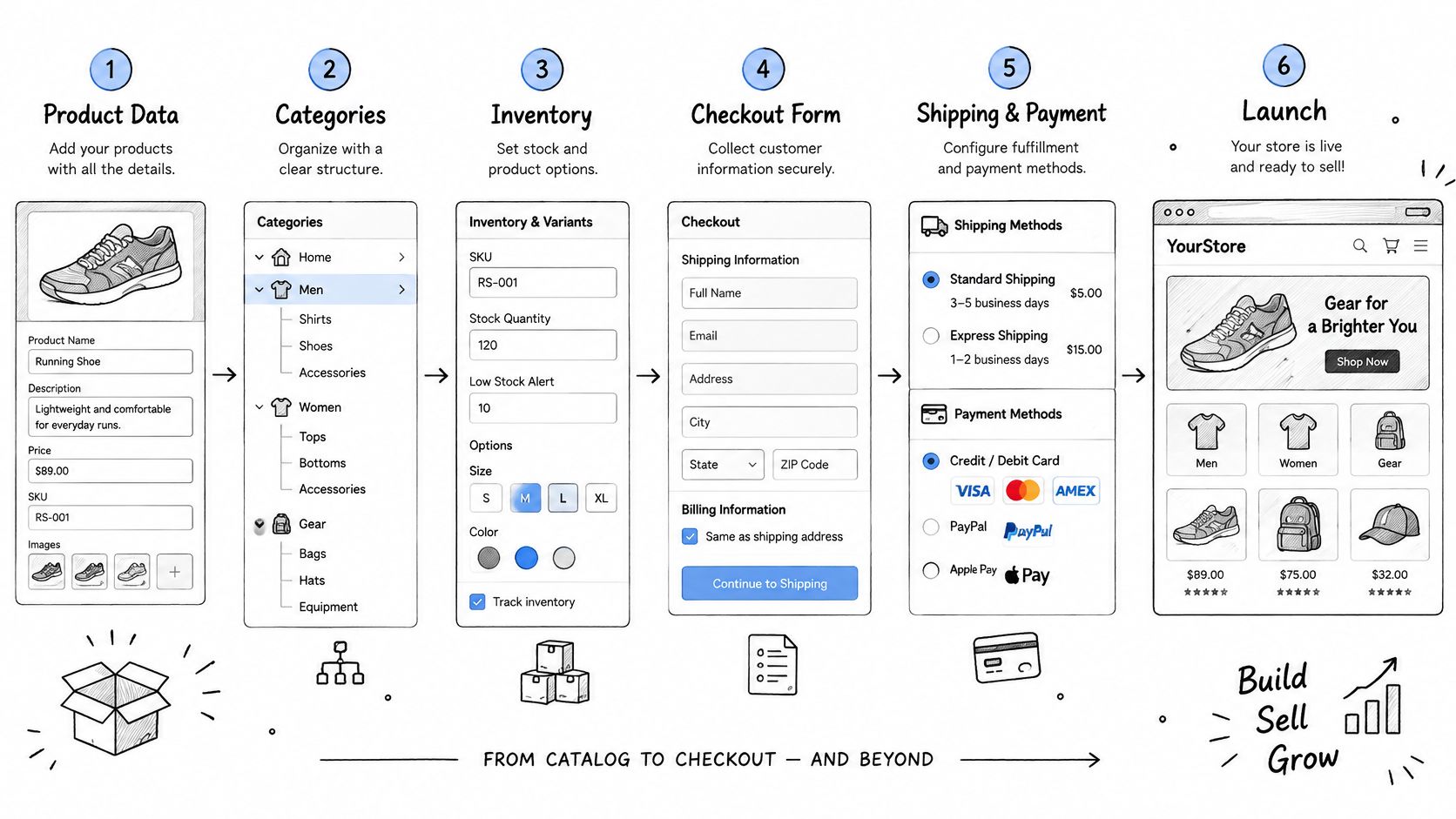
Catalog First, Checkout Second
- Define the product data model. Set required fields first, including SKU, barcode, weight, dimensions, and tax class, and reject rows that arrive without them. Import errors don't stay in the spreadsheet. They surface later as wrong shipping quotes and mispriced totals.
- Build variants only on axes that change price or stock. Size and colour normally qualify. Gift wrap, engraving text, and delivery notes usually don't. Turning every option into a variant multiplies stock rows until the sheet becomes unmanageable and counts drift.
- Import a sample before the full load. Load 50 representative rows, then check image rendering, duplicate SKUs, and missing tax classes on real product pages. Fix the source sheet, not individual products, then run the full import with confidence.
- Set shipping zones and tax rules per market. Decide whether displayed prices include tax before any total is tested or photographed for sign-off. Setting tax after launch changes every total, every invoice, and every customer expectation at once.
Naming discipline belongs in step three, not after launch, because inconsistent product names break search, filters, and feeds in ways customers notice immediately. Teams standardising large imports benefit from managing naming consistency across product catalogs as a working practice, with one naming pattern enforced in the source sheet before import rather than cleaned up product by product.
Checkout Configuration and Testing
- Configure checkout for the fewest fields possible. Enable guest checkout, keep totals visible before payment, and write error messages that name the exact field at fault. Every field that doesn't change fulfilment, tax, or payment is a reason for a stressed shopper to leave.
- Test checkout the way constrained shoppers use it. Complete a purchase with keyboard only, then with a screen reader, then in a phone-sized viewport. Unlabelled fields, totals that update discreetly, and focus that jumps after a cart change all show up in this pass and in no automated screenshot.
- Run test orders that cover failure, not only success. Place a standard purchase, apply a discount code, process a refund, cancel an order, and force a failed payment. A checkout that only handles the happy path isn't tested. It's rehearsed.
A checkout is ready when every failure mode produces a clear message and a way back, not when one successful order goes through.
A passing result is easy to recognise. Every SKU renders with correct images and stock, totals match across devices and tax settings, and every test order either completes cleanly or fails with a message a customer can act on without calling support.
Payments, Fraud Controls and Customer Trust
Before launch, decide which payment checks protect the store without blocking legitimate buyers. WebinOne ecommerce plans have zero transaction fees. Fraud controls, however, depend on the payment setup and the store's risk policy, so assign an owner to set and review them.
Checkout trust depends on clear totals, understandable errors, and a way to recover when a payment fails. A global consumer study on AI in the shopping journey reported that 73% of shoppers were already using AI during their shopping journey. Payment security was the leading concern for 32%, followed by privacy at 26%, possible mistakes at 18%, and loss of control at 17%. Make each challenge explain what the customer needs to do and what happens next.
Where Friction Comes From
| Control | What it stops | Conversion cost | How to tune it |
|---|---|---|---|
| Strong customer authentication | Unauthorised card use | Extra step on some cards | Apply where the issuer requires it or risk is high |
| Address and card verification | Mismatched cardholder details | Mistyped addresses get declined | Set strictness by order value |
| Velocity limits | Bursts of card testing | Can block fast legitimate buyers | Set per card and per address, review weekly |
| Manual review queue | Ambiguous orders | Delays good orders | Route a small share and set a response target |
| Automated risk scoring | Patterns across orders | False positives on unusual baskets | Track the false-positive rate, not only chargebacks |
Set these rules before go-live. Payment processing integration planning helps agencies define the payment flow and responsibilities. Apply strong customer authentication where the issuer requires it or order risk is high. Route only a small share of orders to manual review, and set a response target so legitimate purchases do not sit in a queue indefinitely.
Track the false-positive rate alongside chargebacks from the first week. Zero reported fraud paired with rising abandoned checkouts may mean legitimate orders are being blocked.
Revenue rule: A declined legitimate order can cost more than a fraudulent one once lifetime value, support effort, and reputation are counted.
Set controls against order value and risk signals, then review declined orders during the first weeks. Name the person responsible for adjusting the rules, and use the false-positive rate and chargebacks to guide changes.
Hosting, Security and Scale Before Traffic Arrives
Access control, backups, and capacity planning decide whether a campaign peak is a good day or an incident. WebinOne runs on AWS across 6 AWS regions, with 99.99% uptime and a 99.95% availability commitment in its published SLA. The agency and client still need to agree on who can change settings, how recovery will work, and what traffic the store must handle.
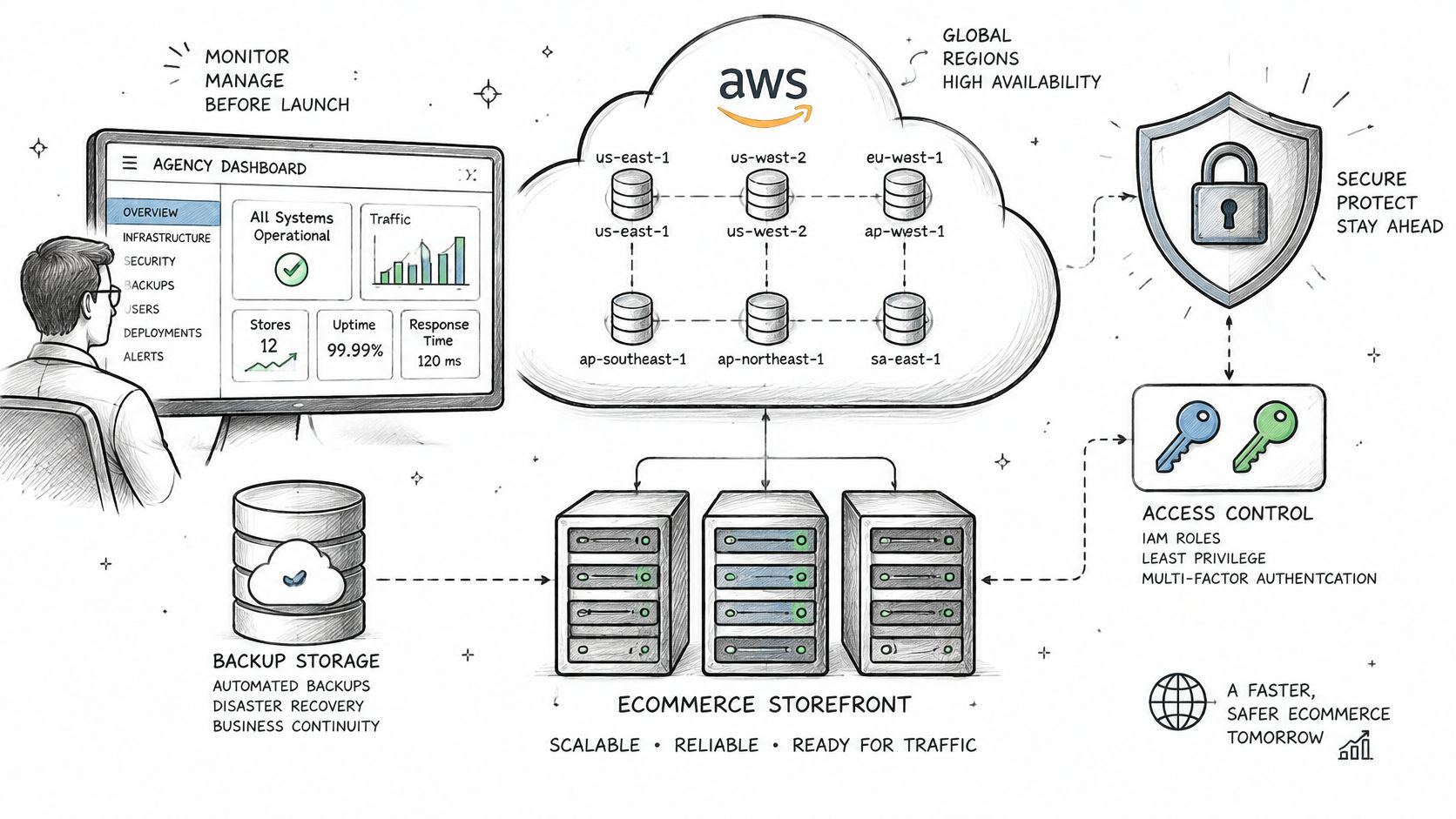
Credentials and neglected components deserve attention before launch. Verizon's 2025 Data Breach Investigations Report identified credential abuse as the leading initial access vector at 22%, with exploitation of vulnerabilities at 20%, and reported that third-party involvement doubled to 30% of breaches. Each independently maintained component adds patching work and another ownership boundary. Keep the stack and its responsibilities clear.
The Pre-Launch Checklist
- Multi-factor authentication: Require it for every admin account, including the client's, and prohibit shared logins.
- Role-based access: Give staff access only to the areas they need. Content editors should not be able to change payment settings.
- Hosted checkout: Keep card data out of the store's scope to reduce compliance work and potential breach impact.
- Tested restore: Restore a backup to a staging environment and check that the store can recover. Treat a backup as recoverable only after a restore has been tested.
- Named patch cadence: Assign an owner and update rhythm to every component the store depends on.
- Log retention: Keep logs long enough to investigate an incident discovered weeks later.
- Load test: Test the store against expected campaign traffic before the campaign begins.
Capacity planning starts with the campaign forecast. Convert the highest planned traffic into concurrent checkout sessions, then test at that level with room for traffic to exceed the forecast. Managed AWS hosting for ecommerce workloads can support that planning conversation. A test at average traffic will not show how checkout behaves during a peak.
Before go-live, name the person who approves the security checklist. Require written approval, with any skipped item recorded as an accepted risk. That decision gives the team a clear owner instead of leaving security choices to launch pressure.
Run the Store After Launch Without Breaking Checkout
The first orders reveal issues that test data can miss: a payment decline, an incorrect stock count, or a shipping charge that surprises the buyer. Set a routine for checking those signals, and make every change pass through a review before it reaches checkout.
Three Rhythms That Catch Problems Early
First week, check daily. Review failed payments, checkout errors, and stock synchronisation each day. Real cards, addresses, and baskets expose faults that test data cannot. Fix the cause while order volume is still low enough to inspect orders individually.
Monthly, review money and friction. Examine disputes, refund reasons, abandoned-cart recovery, and speed on product and checkout pages. Address the three most common refund causes, such as inaccurate size details, unclear shipping times, or photos that misrepresent a product's colour. Shipping costs can also contribute to abandonment and refunds. Australian stores can use this guide to reduce ecommerce shipping costs in Australia when reviewing fulfilment expenses.
Quarterly, clean and retest. Retire discontinued products, check that expired promotions no longer affect prices, and repeat load testing before major campaigns. Regular catalog maintenance helps prevent outdated products and rules from accumulating.
The Change Process
- Prepare changes away from the live checkout: Stage content and price updates for review before publishing.
- Check the customer journey: Review changes on mobile and complete a test checkout.
- Require a second review: Have someone other than the author approve price and promotion changes.
- Keep a recovery plan ready: Before a significant change, agree how the previous version will be restored if checkout or pricing fails.
Record who requested and approved each significant change, what was changed, and when it went live. If a price is wrong, that record gives the agency and client a shared starting point for finding the cause and deciding what to do next.
Plan Your Store Launch With the WebinOne Team
A launch conversation is more useful when the store's scope is clear. Agencies can explore the WebinOne reseller program and discuss partnership or migration needs with the WebinOne team.
Start with the plan structure. Ecommerce is added to a selected content plan, and an ecommerce plan is required to take payments. Ecommerce Basic costs $20 per month for small online stores; plans have 0% transaction fees and unlimited sales volume. The cost conversation can therefore focus on the content plan, ecommerce tier, and any optional features the store needs.
Next, map the current platform components. WebinOne brings CMS, ecommerce, CRM, forms, and hosting into one platform without plugins. That consolidation can reduce the number of systems the agency must coordinate when customer records, orders, and form submissions need to work together.
Prepare a brief with the store model, SKU count, markets and currencies, required payment methods, target launch date, and any platform the store needs to migrate from. The team can use it to discuss scope, partnership, and migration requirements.
WebinOne is developed and supported by Upgrade Parade. For agencies, the white-label platform provides a managed place to build, host, and manage client websites as their portfolios grow.