Media Assets Management: A Practical Guide for Agencies
Putting every file in a central library doesn't solve media assets management. It makes files easier to find, including the wrong cut, the expired photograph and the derivative nobody approved. Better search can accelerate the wrong publication decision.
For agencies moving clients onto larger, multi-site platforms, the valuable work starts after the file lands. The library must preserve evidence of ownership, transformations and permitted use, then carry those controls into publishing. That's a governance project with a commercial outcome, not a folder cleanup.
Table of Contents
- Media Asset Management Versus DAM and CMS
- The Metadata Schema Every Asset Library Needs
- How an Asset Moves from Ingest to Publication
- Moving an Existing Library Without Losing Rights
- Connecting Your Library to CMS, Commerce and CRM
- Governance, Rights and Proof of Authorized Reuse
- Protecting the Library from Loss and Lockout
- Choose a Platform Your Clients Will Not Outgrow
Media Asset Management Versus DAM and CMS
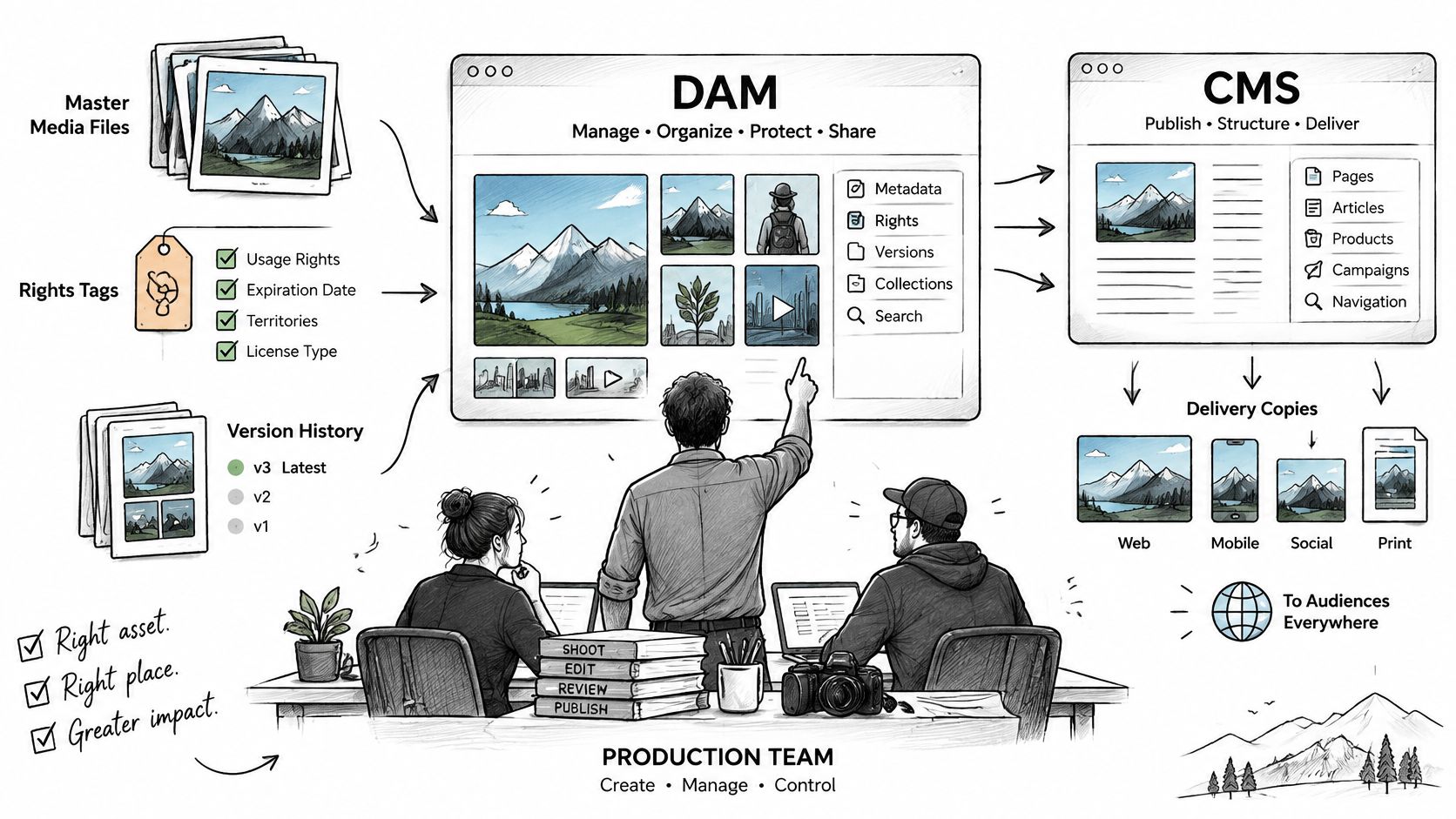
WebinOne brings the CMS and the client's website into one platform, but publishing remains a different job from managing production masters. Media asset management holds masters, rights, versions and delivery copies, while DAM generally serves brand libraries and a CMS publishes content.
Those categories overlap. A marketing library can contain video, and a production library can supply campaign photography. The useful distinction is which team controls the authoritative file and which system decides whether a particular copy can be distributed.
MAM, DAM and CMS by job
| System | Primary job | Typical assets | Usual owner |
|---|---|---|---|
| Media asset management (MAM) | Keep masters, rights, versions and delivery copies for production and distribution | Video, audio, high-resolution images, rich media | Production and broadcast teams |
| Digital asset management (DAM) | Store, tag and share brand and marketing files | Images, PDFs, presentations, video | Marketing and brand teams |
| Content management system (CMS) | Publish and manage pages, articles and content models | Pages, articles, forms, product content | Web and content teams |
The gap between production and publication
Consider a campaign with a master video, cut-downs, captions and a licensed still image. The CMS contains the embeds, while editors keep the exports on a shared drive. The page looks finished, but nobody can establish which cut was approved or when the still image's licence ends.
A client handling licensed media across brands needs MAM behaviour, even if the procurement document calls the system DAM. Buying a more capable repository won't fix an undefined handoff between production and publishing.
A library is authoritative only when the team can distinguish an available file from an approved, permitted version.
Before scoping the project, inventory asset types, brands and markets. Then ask the client's content owner to identify the approved version and expiry conditions for a live campaign. If that requires searching email or contacting a former supplier, the missing capability is governed reuse, not additional storage.
The Metadata Schema Every Asset Library Needs
We treat a media schema as a governed record of rights and provenance. The fields exist so the library can answer who may reuse an asset, in which market, until when, and with what evidence. In a WebinOne implementation, agree that schema with the client before the first upload. It needs distinct groups for identity, technical properties, description, rights, access, provenance and retention, each with a named owner.
The division between automatic extraction and editorial judgement matters. IEEE's media asset management guidance distinguishes extractable attributes such as codec, frame rate and resolution from editorial information such as scene descriptions, talent names and usage rights, which cataloguers enter or derive from production documents.
Metadata field groups for a media library
| Field group | Example fields | How it gets filled | Owner |
|---|---|---|---|
| Identifiers | Persistent asset ID, version ID, parent asset ID | Assigned by the system at ingest | Library administrator |
| Technical | Codec, container, dimensions, colour space, duration, file size | Extracted automatically on ingest | Automated, checked by the library administrator |
| Descriptive | Title, description, subject, campaign, language | Entered by a cataloguer from campaign documentation | Content or brand team |
| Rights | Licensor, usage territory, channels, start and expiry dates, model-training permission | Taken from the contract or production documents | Legal or rights team |
| Access | Roles allowed to view, edit, download or distribute | Set by administrator per role | Library administrator |
| Provenance | Creator, capture date, source system, AI involvement, transformations applied | Captured at ingest and by editors | Production lead |
| Retention | Retention period, archive trigger, deletion rule | Set from client policy | Compliance or client lead |
Make fields actionable
Searchability alone does not make a video usable. Codec and dimensions do not establish approval, territory or permission to include a contributor's likeness in another campaign.
Use controlled values for campaign, market, language and approval state. Free-text tags invite near-duplicates that fragment search and break filtering. Keep a human-readable description, but do not make automation interpret prose to decide whether publication is allowed.
Give rights their own structured fields and store the supporting agreement beside them. Those fields should record licensor, territory, channels, start and expiry dates, model-training permission and any restrictions on use. A note saying “see contract” gives publishing nothing to evaluate.
Start with the decisions the library must support
Say a product photograph remains live across client sites after its licence expires. Publishing had no expiry value to evaluate, so the asset stayed live.
Begin with fields required by the client's recurring workflows: finding an approved campaign asset, publishing a permitted rendition and withdrawing it correctly. Make required fields mandatory at the transition where they matter. Do not require every detail at initial upload.
Unknown must remain distinct from unrestricted. An empty territory field must not default to worldwide permission. A missing expiry date must not default to perpetual use. Extend the schema after launch when a real workflow needs more detail.
How an Asset Moves from Ingest to Publication
For a WebinOne delivery, the required sequence is validation, integrity checking, master preservation, enrichment, approval and controlled publication. These are implementation acceptance criteria, not assumptions that every uploaded file automatically passes them.
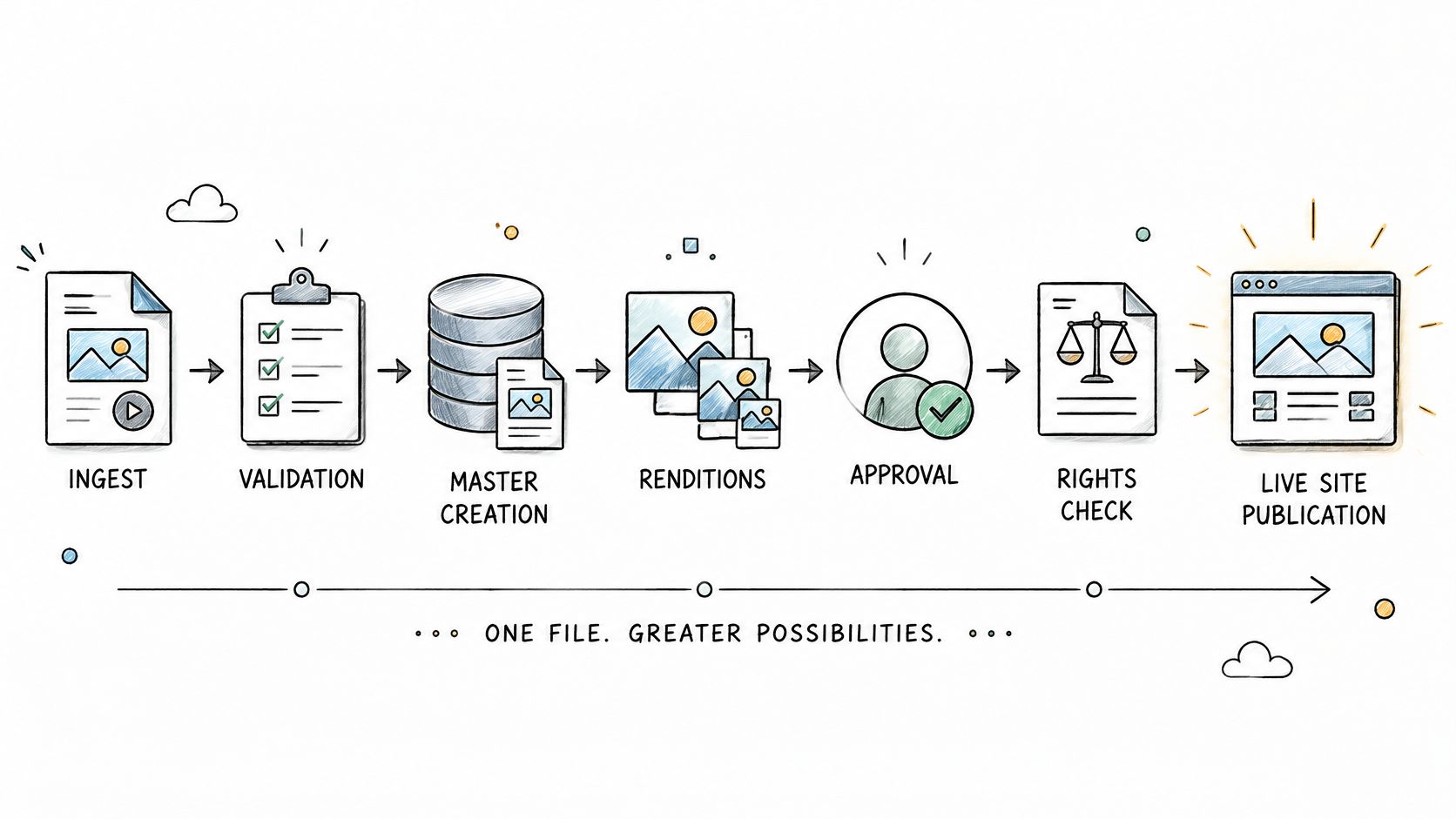
The Library of Congress digital preservation resources address format sustainability and packaging with machine-readable manifests. That preservation discipline translates into a practical production pipeline.
Apply gates before distribution
Validate the incoming file. Check its MIME type and container structure against an approved-format policy. Trusting the filename extension alone can admit an unsupported or malformed file.
Extract technical properties. Read codec, dimensions, duration and colour space from the file. Don't ask a producer to retype information the ingest process can obtain consistently.
Record a checksum against the version. Compare it with a trusted source checksum where available, then retain it for later verification. A newly calculated checksum alone doesn't prove the incoming file was already intact.
Separate the preservation master from derivatives. Keep the authoritative source unchanged and generate delivery copies for their intended channels. Replacing the master with an optimised web export removes future editing options.
Complete editorial and rights information. Capture the brief, campaign and permitted uses before the file becomes discoverable as approved. Upload completion isn't a publication decision.
Obtain a named approval. Record the approver, decision, date and exact version. An approval attached only to a conversation can't reliably distinguish an earlier cut from a revised export.
Publish a linked derivative. Preserve the master identifier in the delivery record. An independent download followed by an unrelated upload severs the relationship needed for later withdrawal.
Apply review and expiry actions. Define whether expiry blocks delivery, requests review or substitutes an approved replacement. A reminder without an accountable owner leaves the asset live.
Archive or delete under policy. Preserve required evidence before removing working files. Don't confuse clearing production storage with permission to destroy contractual records.
Put generated media through the same gates
If a production team uses the ShortGenius AI ad generator from ShortGenius to create ad variants, those exports still need source references, transformation records and client approval. Generating a usable file doesn't establish permission to distribute it.
For a damaged-video scenario, comparing the received file against its trusted source checksum can expose an incomplete transfer before publication. Without that comparison, a file may upload successfully yet fail during playback or transcoding.
The useful agency deliverable is a repeatable release process. Uploading remains easy; earning approval must be explicit.
Moving an Existing Library Without Losing Rights
The shared drive holding the licence PDFs is usually the first thing a migration leaves behind. Files queue up and copy at the click of a button; the signed usage terms, the shoot date, the photographer credit line and the "territory: UK and Ireland only" note sit in a folder nobody thought to include. Six months later a designer drops that image into a campaign aimed at a German market, and no one can say who approved the use or when it expires.
A transfer succeeds when each file arrives with its licence record attached. That single requirement changes the shape of the project: it becomes a data migration with a file copy hanging off it, which is a harder and more useful job than moving bytes between two storage systems.
Late changes are where the rest of the loss happens. Someone edits a spreadsheet of expiries the week after cutover, or replaces a hero image directly in the old CMS. Both edits vanish if the source goes read-only without reconciliation.
Establish the migration evidence
Inventory every source location. Include shared drives, existing repositories, CMS media folders, email attachments and licence documents. Group files by type, brand and market so hidden collections don't surface after cutover.
Map the old organisation into the new schema. Translate folders, tags and naming conventions into explicit fields. When a folder carries a meaningful restriction, give that restriction a field rather than discarding the context.
Compare source and destination checksums. Produce a transfer manifest and investigate mismatches before release. A completed upload queue isn't evidence that every destination object matches its source.
Preserve identifiers and resolve references. Retain the old identifier as a source reference, then build mappings or redirects for old links and embeds. A parent-reference field alone won't repair a public URL.
Pilot a representative brand or market. Publish, replace and expire test assets across the actual delivery paths. Testing only the administrator's preview misses failures on live pages.
Control cutover and retirement. Freeze the old share for an agreed period, reconcile late changes and retire it under policy. Two editable locations produce competing authoritative copies, and the losing copy is always the one someone embeds.
The website content migration process should carry these media dependencies in its release checklist.
Migration acceptance: if the files arrive but the licence spreadsheet does not, the library has not been migrated completely.
Connecting Your Library to CMS, Commerce and CRM
A product photo gets withdrawn at 09:00 because the finish it shows is discontinued. At 09:15 the SKU page still renders it, the cached rendition in the category grid is unchanged, and the campaign queued for Thursday still points at the file. Nothing in the library reports a failure. The withdrawal event never reached the surfaces that publish it.
Every seam between the library and the systems that display it needs a defined synchronisation contract covering replacement, withdrawal and failure handling. Bundling CMS, ecommerce and CRM into one managed system, as WebinOne does, removes some application handoffs. An external media library still crosses a boundary, and that boundary is where rights often break.
Integration seams to verify before go-live
| Seam | Check question | Failure to watch for |
|---|---|---|
| CMS embeds and renditions | Does replacing a master update every page that embeds it? | Stale renditions stay live after the master is replaced |
| Ecommerce product images | Is each image set mapped by SKU and rechecked on every product change? | Customers see the wrong product photo |
| CRM and member downloads | Do gated download permissions follow the same roles as the library? | Withdrawn or unlicensed files download from a member area |
| Email campaigns | Do images in sends point to approved, unexpired renditions? | A campaign send carries a file whose rights have lapsed |
In an international survey of 125 senior executives across 21 countries, 67% identified poor integration with existing broadcast systems as the most likely reason an implementation would fail to deliver expected benefits, according to the SVG Europe white paper summary.
Test the delivery path on each surface
- CMS replacement: know which pages follow the current master and which stay pinned to an approved historical version.
- Commerce mapping: revalidate product identifiers on every update pass. Imports that worked once drift as SKUs change.
- Member access: test with a restricted account and a direct download URL. Hiding a button does not block retrieval.
- Email delivery: withdraw a hosted image mid-campaign and accept that recipients who already downloaded or cached it keep their copy.
Publish a test asset to a page, a product and a campaign. Expire it in the library, then check each controlled endpoint: it should withdraw the asset or serve an approved replacement. Record cache behaviour and every exception, and treat distributed copies as permanent.
The synchronisation contract should specify the authoritative system for each field, event delivery, retries and reconciliation. Name who owns the mapping table and how a reconciliation report surfaces an asset that went missing between systems. A missed withdrawal event needs a recovery path someone can detect and run.
For omnichannel delivery, controlled change after publication counts as part of successful distribution. Agencies evaluating the commercial model can review the WebinOne reseller program alongside the integration scope.
Governance, Rights and Proof of Authorized Reuse
A campaign image's license expires mid-month while the ad set runs to the end of it. The file is still in the library, every rendition still resolves, and no alert fires. That gap between holding a file and being permitted to publish it is where agency liability accumulates.
Ownership terms settle only the outer boundary. WebinOne's terms keep Customer Content as the customer's exclusive property and claim no rights beyond those explicitly granted, which answers who owns the file. It says nothing about whether this crop, in this market, on this channel, today, is authorized.
Provenance and rights evidence answer that second question. Automated tagging cannot stand in for a contract, contributor consent or a named approver.
Require a minimum chain of custody
Every image, video, audio file and derivative should answer five questions before reuse:
- Origin: Who created the source, when was it captured and which source record supports that attribution?
- Transformation: Which edits, crops, transcodes or combinations produced this version, and which source assets contributed?
- AI involvement: Was the asset generated or altered with AI, and which client policy permitted that activity?
- Approval: Who approved this exact version, for which purpose, and where is the decision recorded?
- Permitted use: Which territories, channels, expiry conditions and model-training permissions apply?
AVP's whitepaper resources identify provenance records, audit trails, least-privilege access, human validation and explicit AI-use policies as controls for media-library governance. Those controls hold only when they attach to the asset and its derivatives. A policy document filed elsewhere governs nothing.
A cropped image inherits the source restrictions. Combining it with a newly generated background does not remove the original license conditions. Permission to publish a photograph does not establish permission to train a model on it.
Separate ownership from the service license
WebinOne's terms grant a non-exclusive, worldwide license to use Customer Content solely to the extent required to provide the services during the agreement. That service license sits apart from ownership, and apart from the customer's own rights in commissioned or licensed media.
Agencies should separate these contractual layers during procurement. A client can own an uploaded composition while holding only narrow rights to a photograph inside it.
A workable content governance framework assigns authority to resolve those distinctions. The production lead records transformations, the rights owner verifies permissions, and the publisher checks the intended use against the approved record.
An approved record that names the use, territory and expiry date is what an agency can produce on demand.
Rebuilding that record after a rights holder complains costs far more than maintaining it. A governance service with a defined scope and a named owner is a billable line. The same work done under deadline, with the campaign still live, is unplanned support.
Protecting the Library from Loss and Lockout
Sophos's 2025 ransomware report found a median recovery cost of $1.53 million, excluding ransom payments, while only 53% of affected organisations fully recovered within a week. Media sits outside that headline figure and carries the longer tail: rights evidence, approval history, expiry rules. A reachable library can still hold altered records, so recovery needs its own plan.
WebinOne runs on AWS across six global regions with 99.99% uptime over the last 12 months. That availability keeps the library open under heavy load. It says nothing about whether the records inside still mean what they said last month.
Restore a usable record
- Protected backups: Maintain immutable or separately protected copies that a compromised production administrator can't casually overwrite.
- Version history: Preserve earlier file and metadata states so unwanted edits can be reversed together.
- Granular permissions: Separate routine publishing from destructive administration and bulk rights changes.
- Complete exports: Include masters, derivatives, relationships, taxonomies, rights documents and activity evidence.
- Tested procedures: Define acceptable data loss and restoration time, then verify the procedure in a sandbox.
- Operational checks: Confirm that restored permissions, expiry rules and downstream delivery behave correctly.
A compromised administrator account that rewrites expiry fields across a campaign collection exposes the gap. Restoring the media binaries alone leaves publishers unable to establish licensed use. The recovery package needs the matching metadata state and enough history to determine when unauthorised changes began.
Read retention terms before an incident
WebinOne has no obligation to retain customer content. Customer content and End User Information may be irretrievably deleted if applicable fees are 30 days or more past due.
Document responsibility for billing continuity, exports and retention separately from hosting availability. A client's contractual preservation requirement doesn't disappear because the platform subscription ends.
Run a sandbox restore each quarter and include an expired asset, a restricted download, and a linked derivative. The test succeeds when the restored library supports trustworthy decisions and controlled delivery, not only when an administrator can open a file.
Choose a Platform Your Clients Will Not Outgrow
An agency arrives at a platform decision with a client who has outgrown a single site, a media library where half the files carry rights terms, and a procurement team asking who can export what when the relationship ends. The demonstration worth arranging is the one where that client adds a second brand and a regional site without a migration project. Upload speed is easy to show in a sales call. Year-three portfolio growth is the harder test, and it is the one that decides whether the platform stays.
Evaluate the whole operating model
- Schema: Establish how client-specific fields will be represented and maintained without duplicating fragile customisations.
- Workflow: Identify which approval, expiry and archiving requirements are configured, integrated or custom-scoped. A file manager does not supply production governance.
- Integration: Determine which records share a system and which require synchronisation.
- Ownership: Review content ownership and the service licence separately.
- Resilience: Specify full-library export requirements, restore responsibilities and exit arrangements.
- Scale: Match hosting regions, residency requirements and the published availability commitment to the client's procurement criteria.
- Pricing: Establish which resources count toward plan allowances and how additional capacity is purchased.
Score the candidates on those seven points against a real deadline, using a representative client library. A platform that answers six of them well and improvises on rights records will cost more in the second year than the licence does in the first.
WebinOne is one platform to put through that list. It is a white-label digital experience platform that gives web agencies one place to build, host and manage all client websites, and its Agency Portal manages templates, sites, development, staff, branding and billing from a single dashboard. Each Content Plan includes storage, bandwidth, admin users, items and CRM records, with extras added individually. Plans start at $10 per month per site, and ecommerce carries zero transaction fees.
What the client receives is continuity: approved assets stay usable after the campaign ends, restricted assets stay controlled when staff change, and a move to another supplier does not require rebuilding the record of what was licensed and when. Bring the library, its rights documents and its publishing requirements into the partnership discussion, and ask the platform to show how each of those survives the next brand launch.