How to Set Up 301 Redirects Without Losing Rankings
Most setup guides treat how to set up 301 redirects as a one-line server rule and then stop. That is the advice that loses rankings. A 301 is a permanent claim that one address has been replaced by another, and search systems treat it as a canonical signal only when the destination is the right page, reached in one hop, and still returning a successful response.
A redirect map is a governed migration asset. It has an owner, a status code chosen for the request type, a retirement date, and controls that stop a free-text destination from becoming a phishing path. Syntax comes after that map, not before it. WebinOne keeps those rules in platform settings you can import, test, and roll back, rather than in scattered snippets nobody owns after launch.
Table of Contents
- Pick the Right Redirect Status Code
- Build the Redirect Map and Test Every URL
- Apache, Nginx and IIS Syntax Side by Side
- Set Redirects in Your CMS, CDN or Hosting Platform
- Fix Redirect Chains, Loops and Stale Rules
- Lock Down Redirect Rules Against Open Redirects
- Confirm Your Redirect Map With the WebinOne Team
Pick the Right Redirect Status Code
A 301 tells crawlers the old URL is gone for good, so pick it only when that is true. The status code is part of the migration asset itself: it carries the permanence claim the rest of the map depends on, and the wrong choice sends the wrong signal before a single rule is tested.
301 Moved Permanently fits a URL that is retired for good. RFC 9110 defines 301 as the response that a resource has a new permanent URI, supplied in the Location header. Clients have historically been allowed to change a POST into a GET after a 301. MDN's redirection guide draws the same line, which is why forms, checkout endpoints, and API calls that must keep the method and body belong on 308 Permanent Redirect.
Temporary moves stay on 302 or 307. A temporary code on a permanent site move tells crawlers the old URL may come back, which delays the canonical switch and keeps the old address in the index longer than it should be.
Decision rule: if the old address should permanently give way to the new one, use 301 or 308.
| Code | Meaning | Preserves request method | Use it when |
|---|---|---|---|
| 301 | Moved Permanently | No, a POST may change to GET | The old URL is retired for good |
| 302 | Found (temporary) | No | The move is temporary, such as a test or maintenance page |
| 307 | Temporary Redirect | Yes | The move is temporary and POST requests must stay POST |
| 308 | Permanent Redirect | Yes | The move is permanent and the method and body must be preserved |
List what the old URL receives before deciding: page views, form posts, API calls. If any of those are non-GET, shortlist 308. Record the chosen code against each row of the map so the permanence claim, the destination, and the retirement date travel together. In WebinOne, URL redirects are included on every plan, so the status code sits inside the same governed list as the rules themselves.
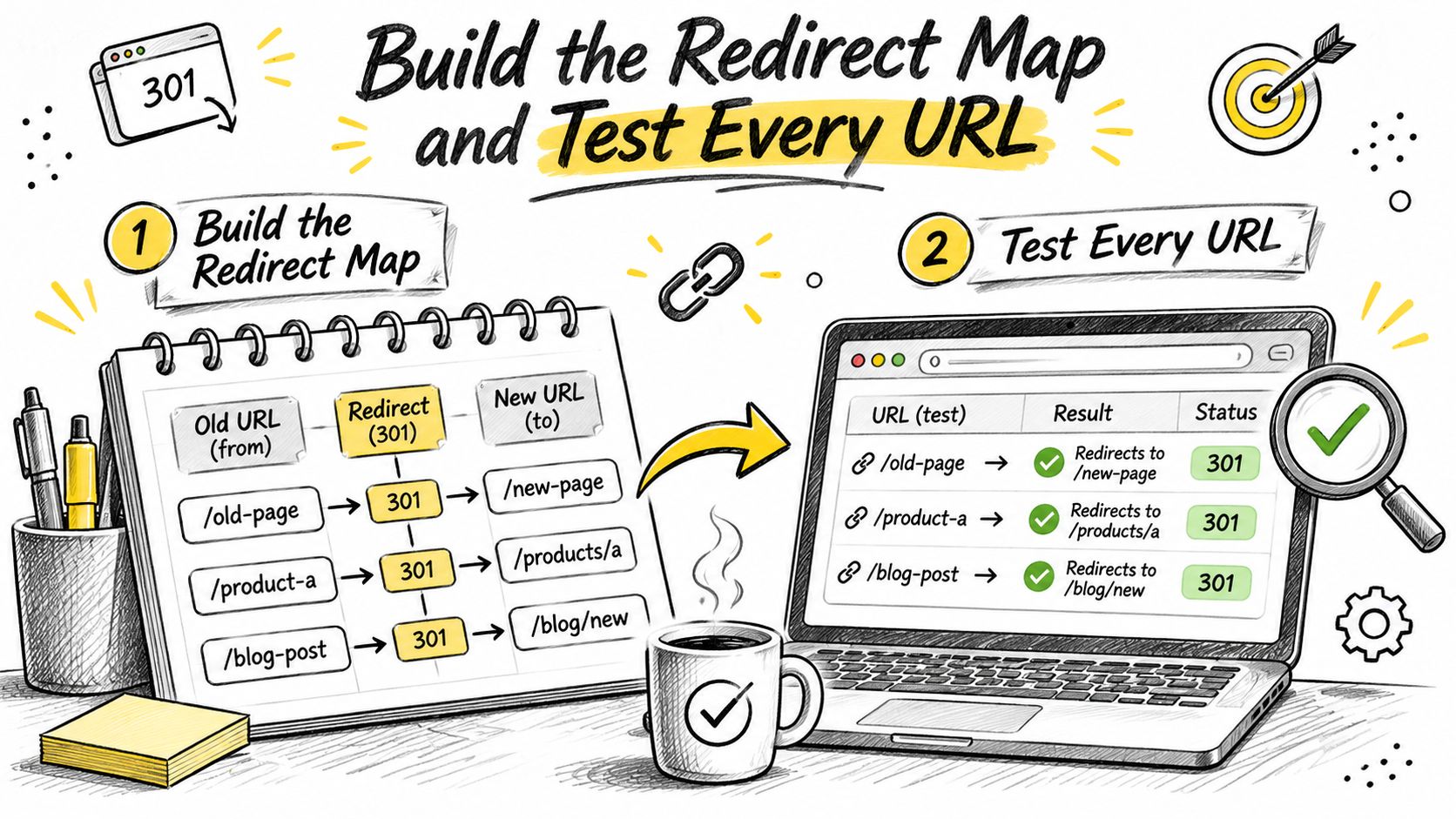
Build the Redirect Map and Test Every URL
Every old URL gets one destination and one named owner before any rule is written. The map is the governed record of the move: what stays, what retires, and who signs off. A row with no owner is a URL nobody will defend when traffic falls.
Google's redirect documentation states that the crawler follows permanent redirects and that indexing systems use them as a signal that the destination should become canonical, with ranking signals passed appropriately. That signal only holds when the map is one-to-one. Sending unrelated URLs to the homepage weakens relevance and gives visitors a dead end.
Six steps before cutover
- Build the inventory from every source that still has traffic. Pull crawl data, analytics, server logs, XML sitemaps, backlinks, and the legacy CMS export. Forgotten URLs are usually the ones with links.
- Map each valuable old URL to its closest equivalent final URL. Never default to the homepage. Flag anything without a match and hand it to the content owner. A missing page is a retirement decision, not a rewrite decision. Record the owner on the row.
- Write the rule at the web server or edge, not in a page script or a meta refresh. Only a server response sends the permanent signal, with a complete destination URL and no dependency on the page loading first. Destinations stay on the map. A rule that accepts any host from a query string is outside that record.
- Point each rule straight at the final URL. Include the full scheme and host when the domain changes. One hop, not a chain of near-matches.
- Deploy to staging and crawl the whole old URL list. The pass condition is exactly one 301 followed by a 200 at the destination. Use
curl -Ion single URLs to read the status line andLocationheader. Build the sample from top pages by traffic, pages with the most backlinks, and a random long-tail set. - Repoint everything that still names the old URL. Update internal links, canonical tags, and the XML sitemap, submit the sitemap, then crawl again after launch.
After launch, set alerts for new 404s and 5xx responses on old paths. Flag soft 404s, where a missing page still returns 200, and mixed HTTP and HTTPS targets. Watch search console for old URLs dropping out of the index while the new ones fail to appear. The site migration SEO checklist is the companion list for canonicals, sitemaps, and internal links that must change with the map.
Pass condition: one 301, then a 200, on every URL you still care about. Anything else is unfinished.
Apache, Nginx and IIS Syntax Side by Side
The same permanent redirect takes three different forms depending on the server. Until the site is on WebinOne, that server rule is the migration map: one old path, one final URL, status 301.
| Server | Example rule | Where it lives |
|---|---|---|
| Apache (virtual host) | Redirect 301 /old-pricing-page /pricing | Dedicated virtual host where you control the main config |
| Apache (.htaccess) | RewriteRule ^old-pricing-page$ /pricing [R=301,L] | Needs mod_rewrite; use when you cannot edit the main config |
| Nginx | location = /old-pricing-page { return 301 /pricing; } | Inside the server block; exact match stops it catching other paths |
| IIS | URL Rewrite rule, Redirect Action, Redirect Type set to Permanent (301) | web.config or IIS Manager |
The HTTPS rule that loops
Apache's remapping documentation prefers the Redirect directive in a dedicated virtual host, for example an HTTP host that permanently sends / to the HTTPS site. When only .htaccess is available, mod_rewrite is the documented path. A typical rule turns rewriting on, checks that %{HTTPS} is not on, and returns R=301 with the L flag so processing stops. %{HTTPS} reflects whether the SSL module sees the connection as encrypted.
That check fails in a repeatable way behind a load balancer or TLS terminator. The browser used HTTPS, but the origin still receives plain HTTP because the terminator already decrypted the request. The condition fires on every hit, sends the browser back to HTTPS, and the terminator forwards HTTP again. The loop never ends. The opposite mistake, trusting %{HTTPS} when the forwarded protocol never arrives, leaves the site on HTTP. Read that protocol at the origin, often X-Forwarded-Proto, before the condition is trusted.
On Nginx, return 301 inside an exact-match location keeps a one-URL rule from swallowing other paths. Drop the = and /old-pricing-page-archive redirects too, an unplanned second map entry. On IIS, set the URL Rewrite action's redirect type to Permanent (301) in web.config or IIS Manager. Left on Temporary (302), the same rule tells caches and crawlers the move might reverse.
Paste each rule into staging and read the status code with a request tool before it reaches production. A rule that looks right in a config file and returns 200, or a second hop, is not done.
Set Redirects in Your CMS, CDN or Hosting Platform
A platform redirect list earns its keep at import time. Export the existing rules first, mark each row with source, destination, owner and review date, then load the replacement set into staging before production.
All plans include URL (301) redirects. Destination URLs may contain query parameters, whether the rule is added by hand or imported by XLSX. If the web server is outside your control, use the redirect layer the CMS or CDN exposes and confirm the answer is a true 301, not a 200 page or a meta refresh.
Variants and bulk import
Treat trailing slashes, www and non-www, and HTTP and HTTPS as different URLs. List every variant of each old path and map each one to the same final page in a single hop.
- Export before you import. Download the current rules, look for two rules on one path, and resolve the conflict on paper.
- Import into a staging copy. Production is the wrong place to discover that a broader pattern won.
- Clear the cache, then request the old URL from a clean session. A cached page can override a rule you just saved.
- Move what the platform cannot express. A wildcard that must return 301 for a whole section belongs at the edge, with an owner and a date written next to it.
The same map and the same pass condition apply here as on a raw server. A CMS with SEO controls still needs those redirects pointed at indexable, canonical URLs; the status code cannot rescue a target the rest of the site undoes.
Fix Redirect Chains, Loops and Stale Rules
A chain of three redirects can fail for some clients and adds latency to every visit. Chains form over time: old URL A points at B, and B was later moved to C. Each hop is another request, another point of failure, another reason a client on a slow connection gives up.
Google's site-move guidance warns against chained redirects and notes that Googlebot can follow up to 10 hops on a URL. Ten hops is a failure boundary, so the working ceiling sits much lower. As a rule of thumb, keep any chain under three hops and aim for one. Point every old URL at the final destination.
Rule lists grow for the wrong reason: nobody deletes anything. Every extra rule is one more chance of a loop, a stale destination, or a redirect to a page that no longer matches the query it was mapped for.
What the symptom usually means
| Symptom | Likely cause | Fix |
|---|---|---|
| Browser shows too many redirects | HTTPS rule runs behind a load balancer that never sees TLS | Check the forwarded protocol header before relying on the HTTPS condition |
| Two or more hops before the final page | Old URL points to an intermediate URL that later moved again | Point the old URL straight at the final destination |
| Old URL returns 200 instead of 301 | Cache or CMS still serves the old slug | Purge the cache and confirm the rule loads before the CMS handles the request |
| Many old URLs land on the homepage | Bulk mapping defaulted every URL to / | Remap each URL to its closest equivalent page |
| Rankings drop after launch | Redirects point to unrelated pages or to 404 destinations | Audit each destination for relevance and a 200 status |
Loops usually trace back to two rules fighting each other, such as an edge HTTPS rule and a CMS rule sending traffic back and forth until the browser gives up. Stale destinations fail quietly: rules still pointing at pages later deleted, or at landing pages that were never the equivalent content. Both surface when you request every source URL in the map and record each hop.
A rule earns its place only while the old URL still receives requests, crawl errors, or links. Remove it after logs and search console show it is quiet.
Retirement is an edit, not a redeploy. On WebinOne the rule set sits in platform redirect settings, so removing a quiet rule takes the same effort as adding it. Store the map as a versioned file with an owner and a date on each rule, so a bulk import or a retirement can be reviewed instead of guessed. Agencies running portfolios, and teams consolidating several sites onto one stack, live or die on that discipline. A website migration to AWS still fails in search if the old paths resolve through three hops to the wrong page.
Lock Down Redirect Rules Against Open Redirects
A redirect field that accepts any host is an open redirect waiting for a phishing link.
OWASP describes an open redirect as a flaw where an application accepts an unvalidated, user-supplied destination and sends the user to an attacker-controlled URL. Phishing is the obvious abuse. The same hole can be chained into authentication checks and other controls that trust the next URL.
Fixed migration rules, with a known source and a known destination, are the low-risk set. Dynamic features raise the risk: user-editable redirect fields, wildcards, and destinations taken from a query parameter need validation before a request ever reaches them.
Checks before production
- Reject external destinations by default. An allowlist is the exception, and it lists full hostnames, never suffixes a lookalike domain can satisfy.
- Parse URLs with a platform library. String matching on
httpor on a slash misses encoded hosts and backslash tricks. - Limit who can create a rule. On a multi-site system, keep rules isolated per tenant so one brand cannot redirect another.
- Log every change and make rollback one step. An unaudited redirect is an unaudited outbound link.
- Test phishing-style URLs, hostname checks, loops, and cross-tenant behaviour on staging, with a clean session.
A convenient wildcard on a shared system can expose every site in that system. Government teams and multi-brand operators should assume that field will be abused if it accepts arbitrary hosts. On WebinOne, URL (301) redirects are included on all plans, so the governance decision is who can edit them and how each change is reviewed. Enterprises running many sites from one system can review those boundaries in a conversation about an enterprise deployment.
Confirm Your Redirect Map With the WebinOne Team
A redirect map holds up in review when three artifacts are complete: the URL inventory, an export of the current redirect rules, and the destination page for every old URL that still matters. Gaps surface fast. An old URL with no destination is a 404 you chose.
On WebinOne, destination URLs can carry query parameters, and rules can be entered manually or imported as an XLSX file, so a large inventory does not have to be keyed in by hand. The WebinOne team helps set up the white-label portal and migrate existing sites where that work is needed, and TeamOne handles moves from WordPress, Wix, Squarespace, Shopify, and other CMS platforms.
Bring the map with the messy parts marked. Resolve the orphaned URLs before cutover day, while the old site is still live enough to check what each one used to serve.