CMS for Ecommerce: Combined or Headless
The most popular advice about a CMS for ecommerce is to choose between an all-in-one platform and a headless stack by comparing feature lists. That misses the buying decision. The key question is who owns the catalog, checkout rules, performance, and AI-driven changes after launch. If splitting content from commerce creates more handoffs without solving a delivery requirement, the split is the wrong buy.
For most agency stores and multi-brand portfolios, WebinOne recommends one managed system for content and commerce. A headless front end makes sense when an app or custom storefront needs to consume the same catalog, not as a default architecture.
Table of Contents
- When One Platform Beats a Split Stack
- Catalog Product Pages and Checkout That Convert
- Performance and SEO Budgets Before Launch
- Security Without a Plugin Patch Chain
- Migration That Keeps Orders and Knowledge
- AI on the Catalog With an Audit Trail
- Choose the Platform and Book the Next Conversation
When One Platform Beats a Split Stack
The architecture decision is about ownership after launch. WebinOne combines content and commerce in one managed system, with a headless API available when a channel needs a custom front end. That lets teams choose how customers access the catalog without automatically separating catalog management from commerce operations.
Ecommerce is operational infrastructure, not just a website feature. UN Trade and Development reported nearly $28 trillion in business ecommerce sales during 2024 across 46 developed and developing economies, including domestic and cross-border business sales rather than online retail alone (UN Trade and Development's ecommerce overview). For a CMS decision, the practical implications include structured product data, localization, workflow, integrations, and regional performance.
Choose architecture by the job
| Situation | Architecture | Why this and not a split |
|---|---|---|
| Single brand selling from its own site | Combined CMS and commerce | Product content, promotions, and checkout rules stay with one team. |
| Agency or multi-brand portfolio | Combined, governed from one console | Redirects, members, catalog, and branding don't fork per site. |
| Wholesale or B2B catalog | Combined, with quoting and account pricing | Buyers need prices and terms before checkout, not a second storefront. |
| App or highly custom storefront | Headless front end on the same CMS and commerce | The API serves the catalog; content and orders don't move to another system. |
| Public sector or customer-owned AWS | Licensed deployment in the SI or customer AWS account, including GovCloud by agreement | Account ownership and deployment requirements change; content and commerce can stay together. |
A split stack earns its handoffs when a channel, integration, or organizational boundary requires a separate system. Otherwise, each additional system creates another ownership question: who keeps product details, promotional content, shipping messages, and checkout behavior consistent?
For government projects and qualifying systems integrators, deployment in the integrator's or customer's AWS account may be the relevant architectural choice. Work beyond standard ecommerce scope is handled as a TeamOne project. Choose the row that describes the operating job before comparing feature lists.
Catalog Product Pages and Checkout That Convert
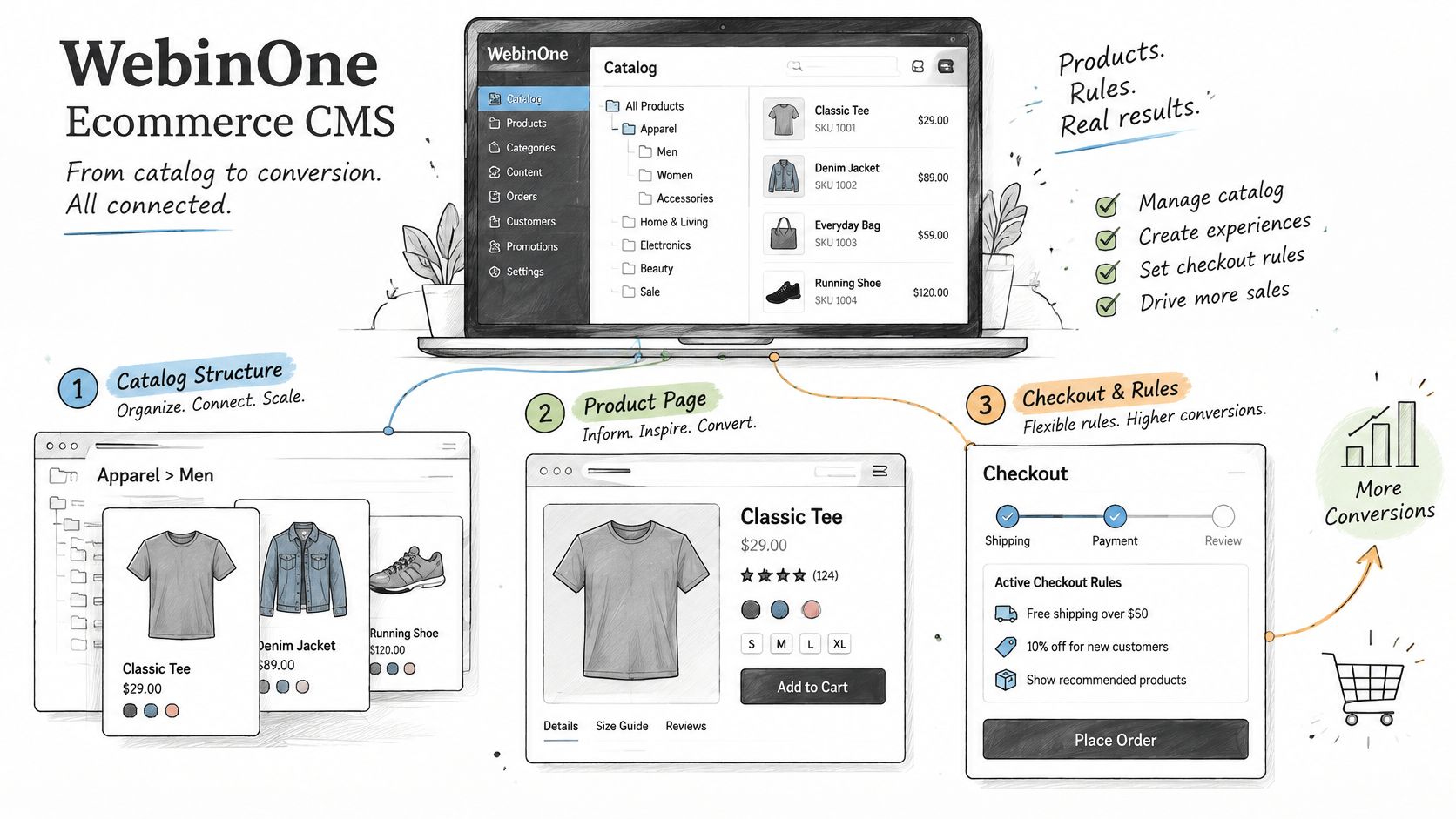
WebinOne's ecommerce approach keeps catalog structure, product pages, and checkout rules connected because a persuasive product page can still lose an order when costs or delivery terms appear too late. The useful test isn't whether a demo can publish a product. It's whether the team can explain the whole purchase clearly and complete it reliably.
Start with the catalog model. A store may need configurable variants, related products, or grouped products; then discount codes and gift vouchers; then shipping integrations and, for wholesale, volume pricing or quoting. Content staff should be able to update the customer-facing explanation of these rules without an engineering ticket, while the underlying transaction logic remains controlled.
Make checkout an acceptance test
Checkout is where a CMS and commerce layer prove whether they work as one customer journey. Baymard's research puts average global cart abandonment at 70.19% across 50 studies; its checkout research found that 17% of US online shoppers abandoned an order because checkout was too long or complicated. The research identified an ideal flow with as few as 12 form elements, compared with 23.48 elements on the average US checkout, including 14.88 form fields (Baymard's checkout usability report and benchmark).
These figures point to requirements buyers can test. Let shoppers check out as guests. Show shipping and tax estimates before the final payment step. Make delivery timing visible and editable by the team responsible for storefront content. Keep optional account creation from blocking an order.
Reliability belongs in the same acceptance test. A failed request can interrupt cart persistence, payment return, or order creation, so the demo shouldn't stop at a polished product page. Ask for a product template, a guest checkout that shows costs early, and an order that survives a refresh. For a closer look at product-page structure, see our guide to building a product detail page.
Performance and SEO Budgets Before Launch
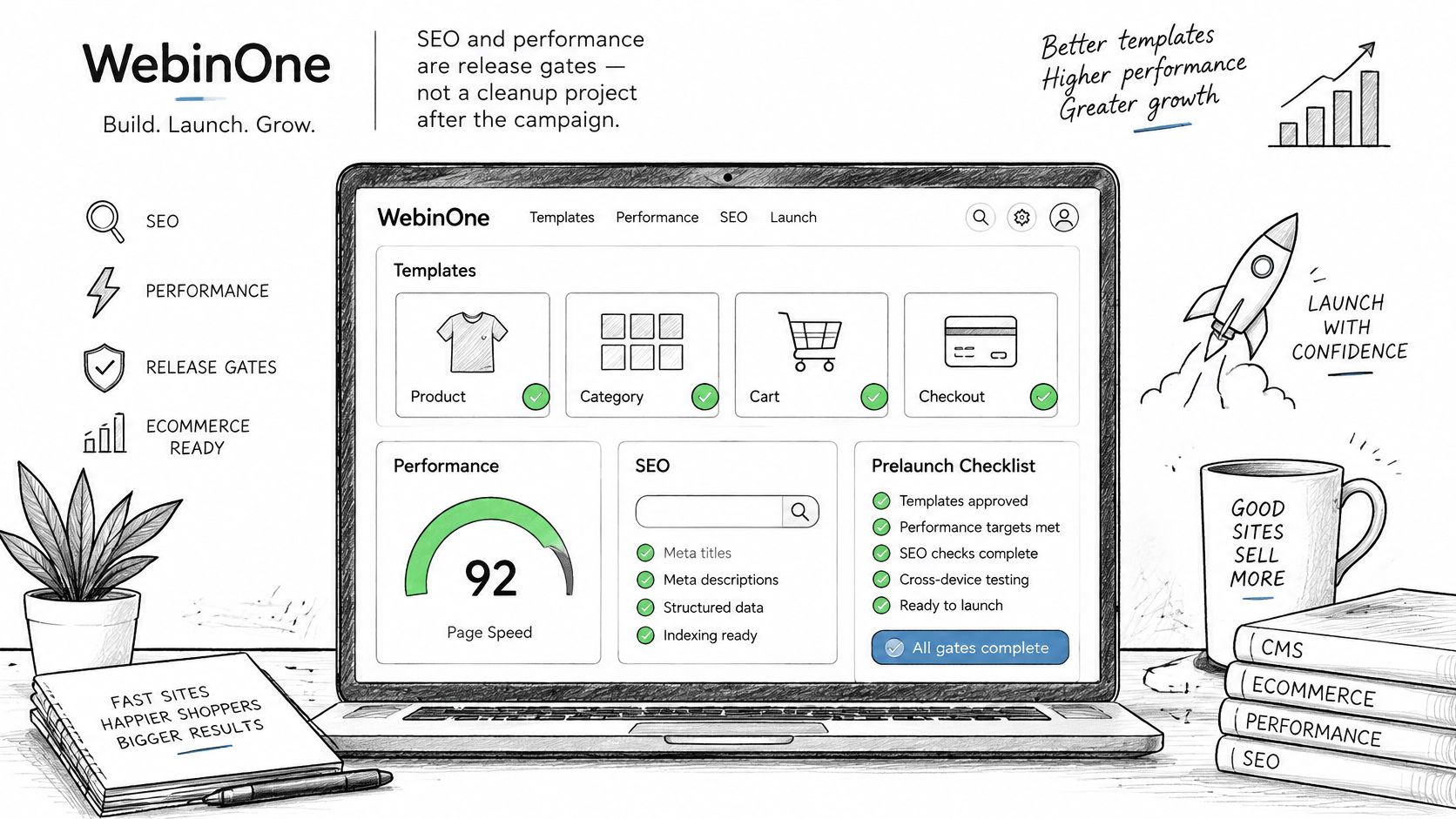
On WebinOne, SEO and performance for a CMS for ecommerce should be release gates on product, category, cart, and checkout templates, not cleanup work after a campaign goes live. Set the pass criteria before approving a template or integration, then measure real-user results on the pages customers use.
Google classifies a page as good when the 75th-percentile real-user experience meets all three Core Web Vitals thresholds: Largest Contentful Paint (LCP) of 2.5 seconds or less, Interaction to Next Paint (INP) of 200 milliseconds or less, and Cumulative Layout Shift (CLS) of 0.1 or less (Google's Core Web Vitals guidance).
Turn the thresholds into build choices
- Protect LCP: Use responsive image delivery and cacheable page fragments so the main product content doesn't wait on oversized assets or repeated requests.
- Protect INP: Limit JavaScript from visual editors, analytics, personalization, and checkout widgets. Load only the components a template needs.
- Protect CLS: Reserve space for product images, banners, recommendations, and promotional modules before those assets load.
Page weight matters because commerce templates commonly combine content, media, search, personalization, and transactional scripts. In HTTP Archive's ecommerce benchmark, the median desktop ecommerce page made 108 requests and transferred 2.7 MB (HTTP Archive's ecommerce benchmark). Each extra app, tag, or independently loaded module can add parsing and main-thread work before product information or the add-to-cart control is ready.
Headless delivery doesn't solve that automatically. A custom front end can still become slow if it calls too many services or ships excessive JavaScript. Agencies should record request count, transferred bytes, LCP, INP, and conversion by template, device, and region before and after integrations. Lazy-load below-the-fold media and defer scripts that aren't needed for the initial interaction.
Search readiness also requires practical controls: editable titles, structured product data, stable URLs, and redirects that the content team can manage. A fast page with a broken canonical or a lost product URL still creates a search problem. WebinOne's guide to CMS capabilities for SEO offers a useful checklist. Put the pass-fail rule in the statement of work: test real-user results by template and device, and don't release a change that breaches the agreed budget.
Security Without a Plugin Patch Chain
WebinOne keeps a CMS for ecommerce on a managed stack with governed releases, role permissions, and logs, so agencies don't have to patch a different extension set for every client store. That matters most to teams already carrying the workload: plugin and module upkeep, post-update checks, scaling work before campaigns, and incident response when something breaks.
Verizon's 2025 Data Breach Investigations Report executive summary says system intrusion, social engineering, and basic web-application attacks together represented 93% of breaches in its reporting dataset (Verizon's 2025 DBIR executive summary). Editors can't serve as the security program, and occasional updates alone aren't a complete control. A platform and its delivery partner need clear ownership for access, patching, application protection, logging, backups, and incident response.
Measure the work your team carries
For self-hosted or managed open-source stacks, assess the workload using your own operational record. Count the recurring maintenance tasks, review the incidents your team has handled, and identify who knows how each custom integration behaves. A console that merely lists separate installations doesn't remove the variation in updates, permissions, and recovery procedures.
Security also protects completed orders. The cart must retain its state, payment handoffs must return correctly, and order creation must work under expected demand. WebinOne reports 99.99% uptime, with a 99.95% availability commitment in its published SLA, and runs on AWS across six AWS regions. For qualifying systems integrators, a licensed deployment in the SI's or customer's AWS account, including GovCloud by agreement, is available.
WebinOne is an AWS Partner, has passed the AWS Foundational Technical Review, holds the AWS Qualified Software designation, is enrolled in the AWS Software and Services Paths, and is available on AWS Marketplace. Those credentials help frame a buyer's technical review, but the operating questions still matter: Who patches? Who can see the change log? Who joins the incident call?
Operating rule: A managed platform only reduces risk when responsibility for releases, access, and recovery is documented and testable.
Migration That Keeps Orders and Knowledge
A migration is complete when orders, redirects, permissions, and business rules still work after cutover. Recreating the old templates is only one part of the job. WebinOne supports migrations from other CMS platforms, including complex catalogs that need a staged transition.
A replacement platform can preserve old problems if the team carries brittle integrations and undocumented rules across without understanding their purpose. Project costs and timelines depend on the system's scope and complexity, so assess the catalog, integrations, data, and approval process before setting a budget or schedule. One industry article reports that about 64% of data migrations overrun budget, but the figure is not based on a primary independent study and should be treated cautiously. Teams can also compare CMS migration services to see how providers describe delivery and accountability.
Prove the operation before cutover
Inventory the live system. Record products, customers, orders, redirects, payment and shipping integrations, permissions, and the people who know the unwritten rules. Flag behavior that exists only in custom code or someone's memory.
Rebuild and validate. Move the catalog and templates to the new platform, then check product data before changing traffic routing. Verify required fields, variants, prices, media, and product relationships.
Test the purchase path. Check product discovery, cart persistence, checkout validation, payment return, error states, and order creation. A page preview cannot prove a transaction will complete.
Prepare cutover and rollback. Assign a release owner, confirm redirects, and keep a tested rollback path ready. After launch, monitor search visibility, redirects, and incoming orders.
Document ownership. Record how integrations work, who approves content and configuration changes, and how to recover the service. Keep that knowledge with the organization as roles change.
Agencies can apply the same validation process across client portfolios rather than relying on a separate undocumented method for each site. WebinOne's ecommerce platform migration guidance helps teams define the technical work; complex custom rescues can be scoped as a TeamOne project.
AI on the Catalog With an Audit Trail
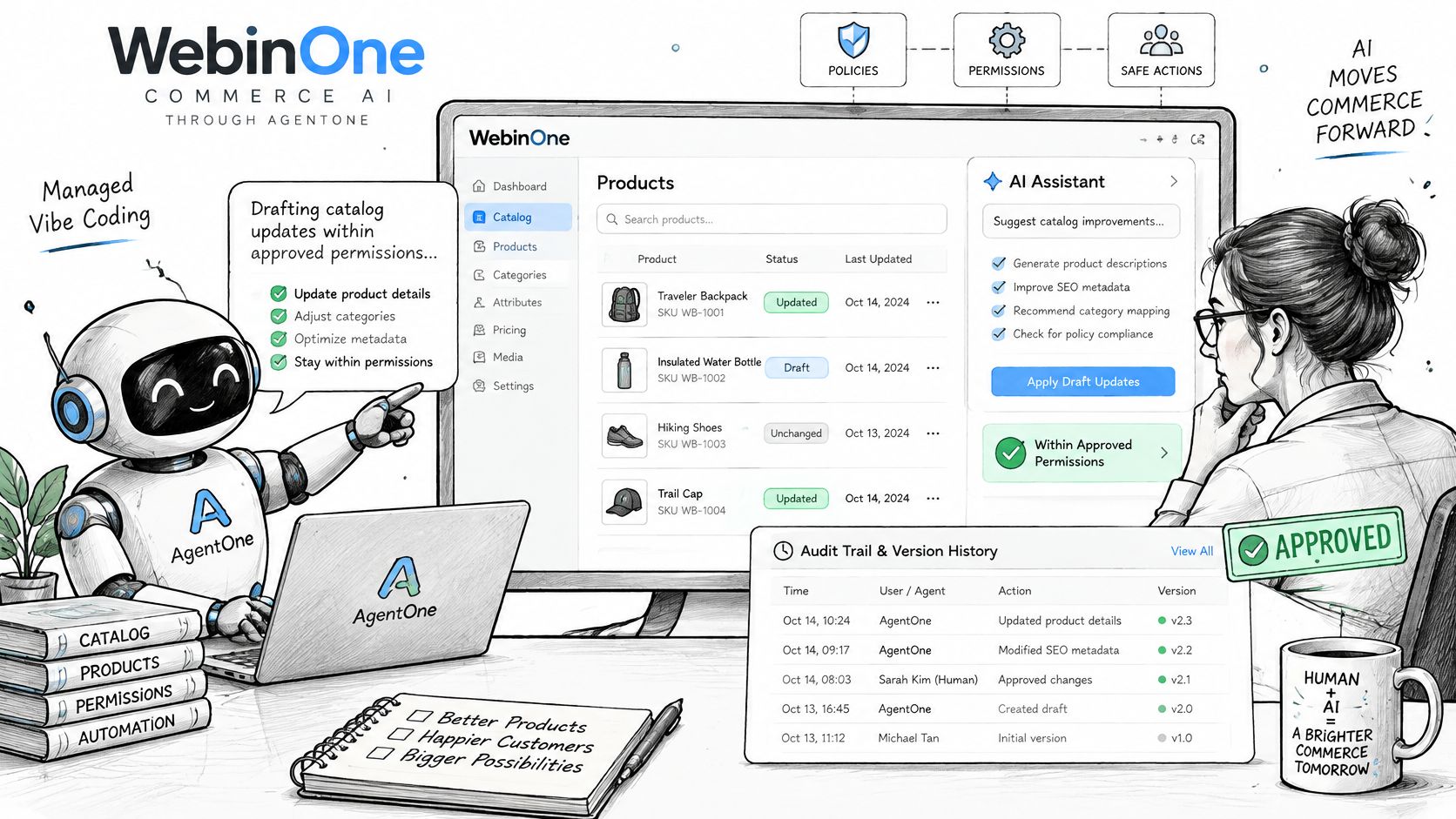
The buying decision extends beyond whether a CMS has an AI feature. Teams need to know who can change catalog data, who approves those changes, and how to reverse them if something goes wrong. WebinOne runs commerce AI through AgentOne, Managed Vibe Coding, with agents operating inside the managed platform under reviewable permissions.
AI is already part of commerce operations. DHL's 2025 ecommerce trends report surveyed 4,050 ecommerce businesses across 19 markets and found that nearly half had integrated AI into operations, with adoption reaching 61% among B2B e-tailers. Adobe's 2025 retail research reports generative AI use for product descriptions at 45%, marketing copy at 42%, and audience-specific content variations at 40%. As teams apply AI to catalogs serving multiple brands, clear editing controls matter.
Set the boundaries before an agent edits
Define what an agent may read and change, which edits need human approval, and how to test and reverse a release. Product-data checks should catch unsupported claims and inconsistent specifications before publication.
For example, an agent can draft a product description from approved product facts while a merchandiser reviews the copy. Keep price, stock, and shipping rules outside the agent's write permissions. The audit trail should record what changed, which person or agent made the change, and who approved it.
AgentOne handles development, content updates, optimizations, and automations inside the managed platform. Its transparent code can be extended by a partner's team, and native and custom agents run with scoped permissions and audit logs. Set a firm boundary: no autonomous publishing without attribution.
The useful comparison is whether the operating model makes actions reviewable and recoverable, particularly when an automated change could affect several sites. Ask any platform, including WebinOne: Who is accountable after an agent ships a change, and how can the team undo it?
Choose the Platform and Book the Next Conversation
Choose a platform by assigning clear ownership for fees, plans, migration, delivery, and post-launch operations. A short checklist can expose gaps before procurement begins.
| Check | What to confirm |
|---|---|
| Commerce fees | Whether the provider charges transaction fees and whether sales volume is limited |
| Plan shape | Which content plan is required, when ecommerce is added, and what the monthly price covers |
| Migration | What the migration package includes, what it costs, and how custom work is scoped |
| Delivery model | Whether the system supports your operating model, such as white-label delivery or a licensed AWS deployment |
| After launch | Who manages hosting and support, and how ongoing requirements are handled |
For WebinOne, pricing starts at $10 per month per site. Ecommerce is an optional add-on to a content plan, costs $20 per month for Basic to $120 per month for Max, and is required to accept payments. Ecommerce plans have zero transaction fees and unlimited sales volume.
Before choosing a plan, define the catalog and checkout requirements, migration scope, and the team responsible for operating the platform after launch. Migration packages and custom work are priced separately from the platform.
Agencies planning to deliver sites under their own brand can review the WebinOne reseller program. Systems integrators, AWS partners, and enterprise teams can contact the WebinOne team about a partnership or migration.