AI Website Builder: What Happens After Launch
The advice you'll find almost everywhere is to judge an AI website builder on its first ten minutes. Type the prompt, watch the preview appear, compare the screenshots, pick the prettiest one. That test measures the part of the job that has become cheap, and it ignores the part that decides whether the engagement makes money: what the site asks of your team in month nine, after the person who wrote the prompt has moved to another project.
We build WebinOne for that second question. Generated pages land on a managed platform where they get reviewed, rolled back, secured and hosted under a published SLA, so the agency or integrator keeps the client instead of inheriting the cleanup. Everything below assumes you already ship client sites and are deciding what to standardise on.
Table of Contents
- What an AI Website Builder Owes You After Launch
- How a Prompt Becomes a Site on WebinOne
- Why a Working Preview Is Not a Safe Handover
- Who Answers When the Site Breaks
- Running Client Sites Without the Patch Pile
- What You Can Take With You If You Leave
- Put the Next Client Site on a Platform You Keep
What an AI Website Builder Owes You After Launch
An AI website builder finishes its job at the preview. Everything after that point, the edits, the forms, the rollbacks, the audit questions, lands on whoever keeps the client. WebinOne is the managed platform generated pages should land in when the agency or integrator intends to keep the client, because the true test of any builder is whether your team can still review, reverse and secure the site long after the demo.
| Job after launch | One-off generation | Managed on WebinOne |
|---|---|---|
| Content changes | A new prompt, often with no record of the last edit | On-Site Editor or the Admin, with a list of every change and rollback from backups |
| Forms and transactions | Custom generated logic sitting beside the page | Forms, catalog, orders and CRM in the same platform |
| Accessibility on later edits | A one-time prompt to be compliant | A person reviews headings, labels, focus and errors before publish |
| Secrets and custom logic | Keys and queries can land in delivered code | Sensitive work stays behind platform-managed services |
| Rollback | Regenerate and hope the preview matches | Platform backups and page rollback |
| Change history | The prompt thread, if it still exists | Platform activity logs on the live system |
| Many client sites | A separate builder account per site | Agency Portal for sites, staff, branding and billing |
Read the left column as your support queue
Every row on the left opens a ticket eventually. A client wants one paragraph changed and nobody can tell which prompt produced the current version. A form needs a new field and the validation logic lives in code nobody on your team wrote. A reviewer asks who approved last week's heading change and the honest answer is a shared chat thread that has since been deleted.
The right column is what stays inside WebinOne: CMS, ecommerce, CRM, forms and hosting in one system with no plugin stack to maintain, running on AWS across six regions with 99.99% uptime over the last 12 months and a 99.95% availability commitment in our published SLA. Those are operating conditions, and they decide whether a client site stays a two-week build or becomes a permanent line in your week.
The last row matters most when you run a portfolio. A builder account per site turns each new client into another login, another billing relationship and another estate you can't see from one screen. The portal row is the difference between a portfolio and a pile, and the platform scales with it, so there is no forced migration waiting at the next growth stage.
Rule of thumb: if a platform's own documentation can't answer a row on the right, assume your team absorbs that row after launch.
Client demand for generated sites keeps growing whether your process is ready or not. The next prospect will walk in with a generated site in hand, and the agency that can answer every row on the right gets the rebuild, the hosting contract and the maintenance retainer.
Score every option against the right-hand column before you compare design output. Prompt-to-preview speed is the cheapest thing on the list and the easiest thing to demo.
How a Prompt Becomes a Site on WebinOne
A prompt on WebinOne becomes a trial site built from the platform's own pages, modules and forms. A person decides when that site goes live, and AgentOne lists everything it changed along the way.
Starting from a generator is already ordinary. 38% of new web projects began with an AI app generator, according to a survey of 303 software professionals across 33 countries. What separates a portfolio that scales from one that produces incidents is the routine wrapped around the generator.
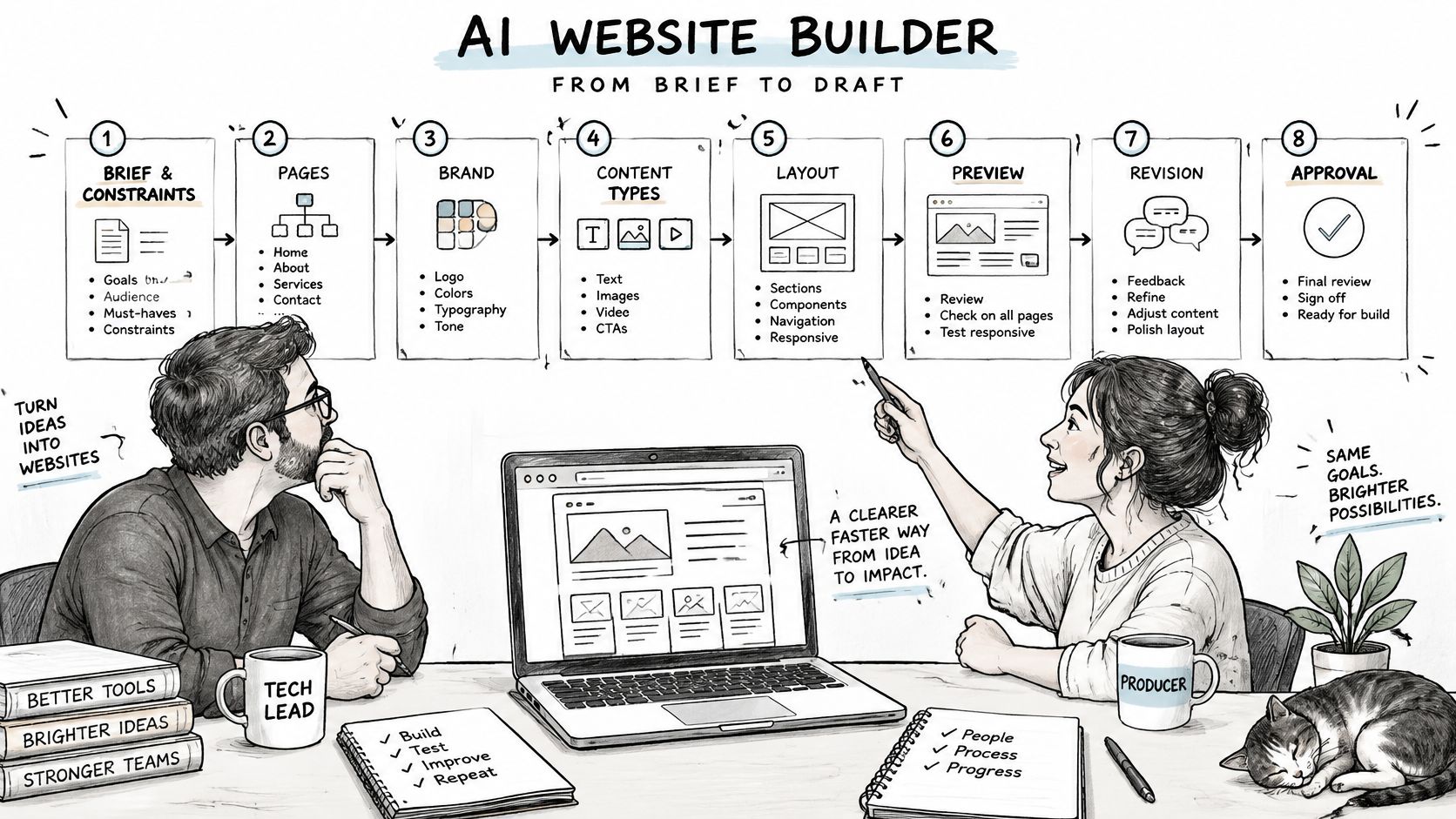
- Write the brief as constraints. Pages, brand assets, content types, integrations, and what must not be invented. Add the data rule: which client records, credentials and unpublished figures must never be pasted into a prompt. A brief that lists constraints produces a draft you can accept or reject. A brief that says "make it modern" produces an argument.
- Ask for structure, copy and layout as a draft. Not a launch. The first pass earns its keep with the page skeleton, the navigation model and working copy a producer can edit faster than they can write from scratch.
- Generate inside the platform, not beside it. On WebinOne, AgentOne designs and builds inside the platform from the first prompt, with no separate deploy step, so the work is already in the system rather than in a sandbox someone has to migrate later.
- Review it the way a technical lead reviews contributed code. Navigation order, form field labels, member area gating, redirect chains, semantic headings. Change lists, backups and rollback are WebinOne platform features that turn this review into a comparison instead of a guess.
- Let a person publish. The publish action is the moment the site becomes the client's problem and yours. A named person owns that click, and that is the only point in the pipeline where accountability attaches to an individual rather than a process.
A generator can lay out twelve pages before lunch. It will never own the domain, the client relationship or the SLA. Agencies that get this right put their hours into review rather than prompting.
When you need more than the draft, extend it properly. Liquid templates, custom modules and the API carry the result into bespoke layouts, client portals and connected systems. WebinOne's headless support means the same site that ships fast can later feed an app or another front end without a second codebase bolted on beside it.
Before that publish click, walk the inspection list one more time. Navigation labels, form labels and error text, focus order through the member area, redirect chains after any URL change, and heading hierarchy across every template the draft touched. The list takes minutes. The site it protects has to run for years.
Why a Working Preview Is Not a Safe Handover
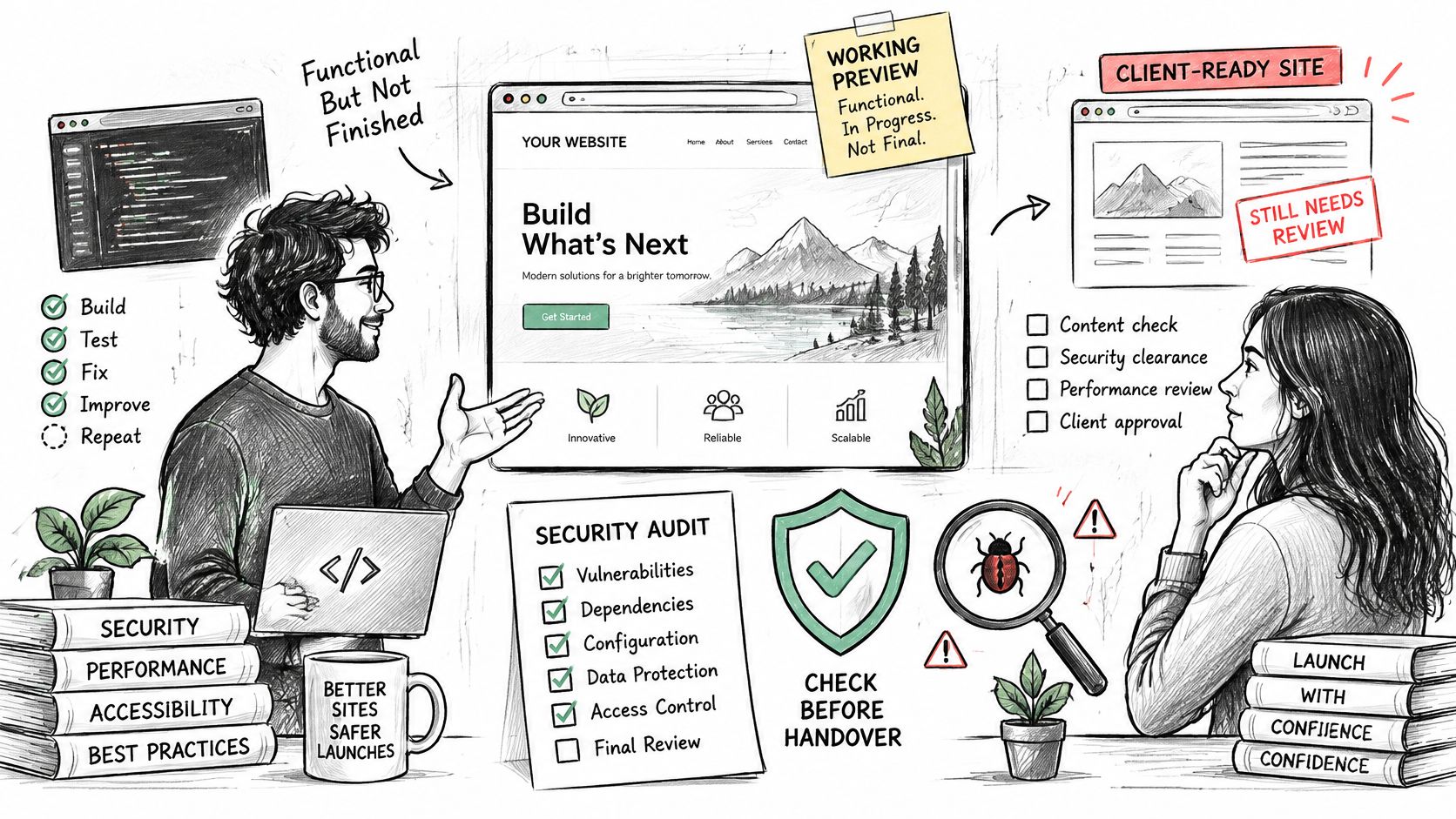
A page that loads, a form that submits and a login that appears to work prove nothing about input validation, authorization or secrets handling. WebinOne treats a generated site as an engineering artifact that enters a governed system, and a governed system is what a client can take over.
A 2025 Veracode analysis of AI-generated code covering more than 100 large language models and 80 coding tasks reported security flaws in 45% of AI-generated coding tests. Read that number precisely: the functional test and the safe implementation are separate results, and only one of them shows up in a preview.
What scans of live AI-built sites found
The aiSiteCheck study of AI-built websites, a 2026 scan of 332 AI-built sites, found 31% carried at least one critical owner-attributable problem, against 7.8% of a 448-site control group. In that sample, 22.6% exposed a project address and anonymous key in browser-delivered JavaScript, and 12.3% referenced open API endpoints in client code. The failures cluster where generated code meets infrastructure: keys in client-side JavaScript, endpoints that answer anyone who asks, database rules nobody reviewed.
Accessibility fails the same way, more slowly
An ACM study of accessibility in AI-generated websites found 84% of 88 generated sites had accessibility problems, and the model fixed roughly 70% of the violations in its own code once it received remediation feedback. That is a working feedback loop, and it still leaves three gaps: violations outside the model's own output, regressions introduced by later edits, and edits made by a different person six months after launch. Prompt-to-preview speed was never the variable that mattered here.
So name one reviewer for headings, labels, focus order, error text and captions on every later edit, including edits an agent proposes. Then give that reviewer controls that live in the platform itself. Agency-set boundaries, backups, rollback and a history of every change are WebinOne platform features, and AgentOne, the managed AI that designs, builds and manages sites inside the platform, works within them. The publish decision still sits with a named person on your team.
A preview answers "does it render". A handover answers "who can change this, who can see it, and how does it come back".
Those three questions are the difference between a demo you show a client and a system you sell them.
Who Answers When the Site Breaks
The operating model answers, and on WebinOne that model is a managed platform with a named escalation path rather than a prompt thread and a hopeful email. An AI-built site is only as good as the people and controls behind it at the moment it goes down.
Plan for that moment with evidence from outside web design. Security incidents such as ransomware and viruses were the leading cause of outages for 22% of organizations in a 451 Research study summarized in Hyperping's downtime research. Outages are a business-continuity problem with a security trigger, not an infrastructure footnote.
Four questions belong in the contract conversation, not the discovery call:
- Who monitors production, and on what schedule, including weekends and the client's launch week?
- Who applies patches, and how do they test compatibility before the change reaches a live site?
- How do incidents escalate, to whom, in what order, and with what response expectation written down?
- What rollback exists for every change, not just the deploys your team made?
WebinOne answers a good share of that by construction. The platform runs on AWS across six regions, with 99.99% uptime over the last 12 months and a 99.95% availability commitment in the published SLA, and paid partner support is the escalation path partners use when something breaks in front of a client. One-click rollback from backups lets a reviewer reverse a bad edit without rebuilding the site. The managed services support model we document for partners covers how that sits alongside your own first line.
The agency still owns the client relationship and the decision about what to escalate, so write a response matrix into the handover pack. For each class of incident name the owner, the severity level, who notifies the client and what the rollback target is. That page gets read at 2am and it decides whether the client remembers the outage or remembers how you handled it.
Running Client Sites Without the Patch Pile
Prompt-to-preview speed is the easy part. The buying decision is whether your agency can review, secure and keep running the site after the person who wrote the prompt has moved on. WebinOne is built for the agency or integrator that wants larger projects without a larger patch queue, because the constraint on growth is rarely design capacity. It is the maintenance surface underneath every site.
Count that surface. A 2024 analysis reported that 86% of examined codebases contained open-source vulnerabilities and 81% contained high- or critical-risk vulnerabilities, while the average application grew from about 5,300 open-source files in 2020 to more than 16,000 in 2024 (Security Magazine's summary of the analysis). Every module, library and integration in that inventory needs a person to track it, test it and own the change.
Where the hours go when the stack is assembled by hand
Your week is already shaped by this. An emergency upgrade lands on a Friday because a dependency shipped a fix. A compatibility check runs long because two extensions disagree about the same hook. A scaling question arrives during a campaign and the answer depends on settings only one engineer understands. None of it bills as project work, and all of it competes with the work that does.
The maintenance load scales faster than the sites do. Each added component is separately governed, and the plugin maintenance load that pulls a team off project work grows with every client you take on, whether the site is self-hosted or sitting on a managed host. Moving a client to a bigger project does not shrink that queue. It multiplies it.
WebinOne keeps CMS, ecommerce, CRM, forms and hosting in one managed system, with no plugins required, so the partner keeps the client relationship and the build without carrying the hosting stack. The Agency Portal gives one dashboard for templates, sites, development, staff, branding and billing, and agencies can register under the WebinOne reseller program and start creating sites under their own brand.
For AWS consulting partners, ISV partners and systems integrators the fit is closer still. WebinOne is an AWS Partner, has passed the AWS Foundational Technical Review, holds AWS Qualified Software designation and is available on AWS Marketplace, running across six AWS regions. Qualifying integrators can run a licensed version in their own or the customer's AWS account by agreement, including AWS GovCloud for government projects.
Where a client still runs automations outside the website, automation maintenance and support belongs in the same scope conversation. Two maintenance contracts with two owners is how handover gaps start.
What You Can Take With You If You Leave
A prompt can produce a preview quickly. The buying decision is whether a later team can review the templates, reverse a release, secure the forms and keep the site running after the person who wrote the prompt has moved on.
That is the margin question for an agency. A client can own copy, images and the domain while the repository, hosting configuration, database and deployment path remain inside a closed account. If the only way to reproduce the site is to keep paying that account, you are reselling dependence.
| Asset | Owning the files is not enough | Test before you commit |
|---|---|---|
| Templates and markup | A preview can exist without runnable templates | Export and have your team read the markup |
| Content and media | Copy can be yours while the layout cannot leave | Export text and files separately from the design |
| Domain and DNS | The name can be yours while the registrar is not | Confirm the registrar and transfer path |
| Contacts and orders | A screen in the admin is not a data export | Export a sample of records and transactions |
| Account after cancellation | Closing the account can remove the runtime | Read what backups and data survive cancellation |
Run that table against any shortlist in an afternoon. Ask for a sample export rather than a promise, and read the cancellation clause for what stops existing on the last day. If a row comes back unknown, fail the option and move on, because you will be answering that question with a client on the phone instead.
On WebinOne the practical version of the test is a site your team already builds in Liquid, with content and commerce available through the API. Because the platform replaces the usual stack of CMS, ecommerce, CRM, forms and hosting with a single system and no plugins, there are fewer outside pieces to reconstruct during a handover. Change lists and rollback from backups give the agency a way to review and reverse changes while the site stays under its control. When a client is already elsewhere, migration transfers that website to WebinOne, and for a legacy CMS exit the same export test applies before DNS moves: leaving a legacy CMS without inheriting a codebase.
Put the Next Client Site on a Platform You Keep
WebinOne's recommendation is to stop piloting an AI website builder as a separate product and put the next client site on a platform you already intend to resell and support. If a site already came out of a one-off builder, TeamOne audits the code and rebuilds it properly on WebinOne, and we audit and rebuild sites from any AI builder that produced them.
| Package | Site size | Rebuild price |
|---|---|---|
| Small | 1 to 5 pages | 500 dollars |
| Medium | 6 to 15 pages | 1,000 dollars |
| Large | more than 15 pages | 1,500 dollars |
Pricing for the platform itself starts at 10 dollars a month per site, with zero transaction fees on ecommerce, and any ecommerce work beyond the product scope is scoped as a TeamOne project. When the engagement includes it, the WebinOne team also sets up the white-label portal and migrates existing sites. Paid partner support is how partners escalate, not a self-serve signup, so the path from a broken client site to a named human is already open.
Split the next step by how you make money. Agencies join the reseller program and build, brand and bill under their own name. Systems integrators, AWS partners and enterprise teams should book a conversation with our team about a partnership or migration, including a licensed deployment in your own or the customer's AWS account and GovCloud projects. Bring one live client site to that call and the operating model gets tested against something real instead of a demo.