File Integrity Monitoring: How It Works and What to Buy
Installing a checksum tool and scheduling a weekly scan isn't a complete file integrity monitoring strategy. It leaves the harder questions unanswered: who approved the change, which identity made it, and whether the affected service can be restored to a verified state.
For agencies and systems integrators, that's the buying decision. Buy an operating model that produces usable evidence, not another console full of unexplained file changes. A managed platform changes who performs the work, but it doesn't remove the need to define ownership, monitoring scope and incident response.
Table of Contents
- What File Integrity Monitoring Is and How the Baseline Works
- Which Files to Put on the Watch List
- Separating Authorized Changes From Real Tampering
- Deployment Patterns for Hosts, Containers and Serverless
- Compliance Minimums Versus Production Cadence
- Key Features and the Questions to Ask Before You Buy FIM
- Confirm Your Monitoring Scope With the WebinOne Team
What File Integrity Monitoring Is and How the Baseline Works
File integrity monitoring is a change-detection control that records a trusted baseline for designated files and compares their current checksums against it. WebinOne-hosted sites should be evaluated against that same test, with clear responsibility for the baseline and the evidence produced.
Think of a warehouse stock count. Staff count the shelves at closing, then count again in the morning. A missing or swapped box becomes apparent even when the warehouse looks undisturbed. File integrity monitoring applies that principle to digital assets, using cryptographic checksums rather than visual inspection.
The comparison follows a defined sequence.
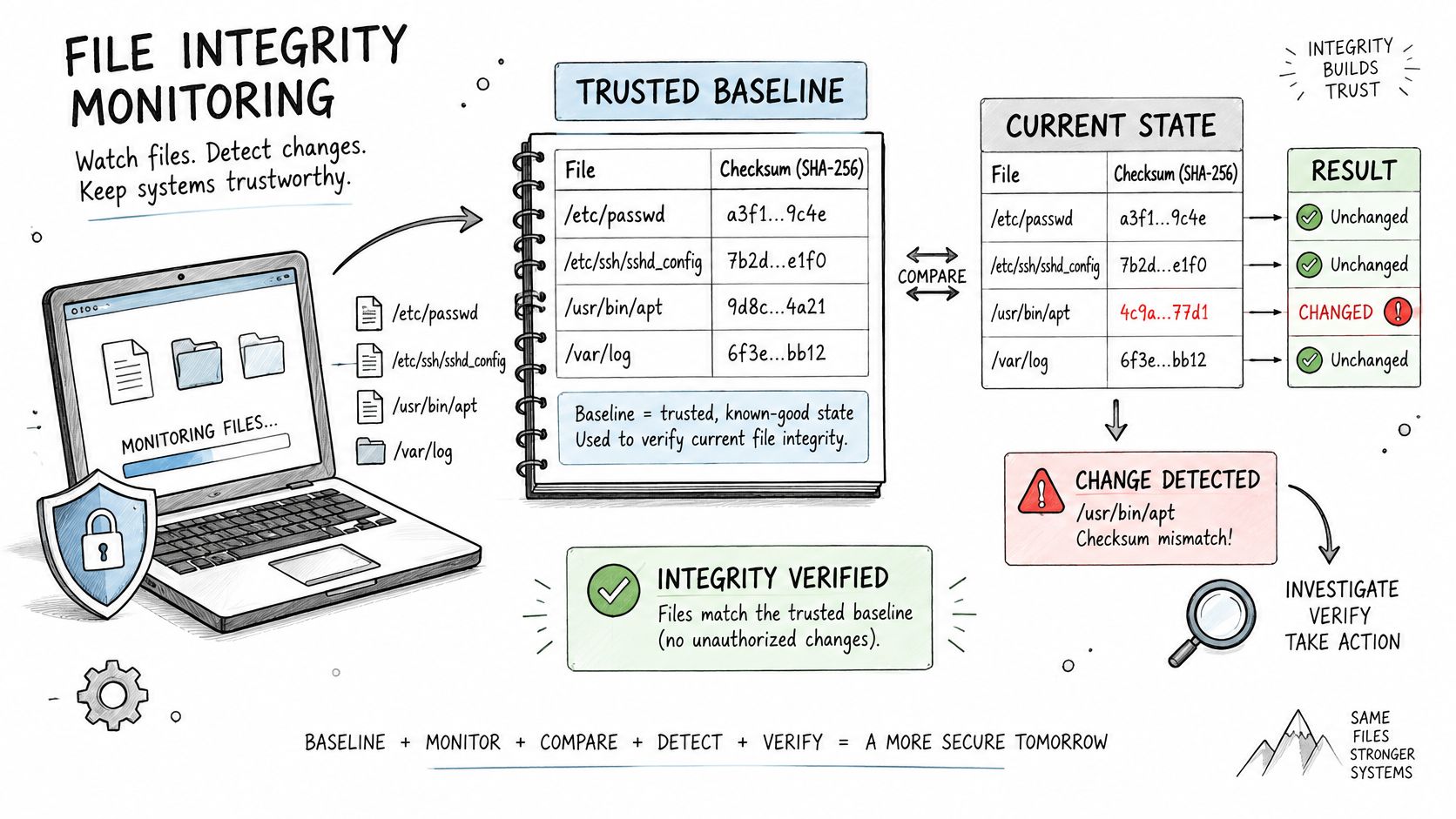
Establish the known-good state
- Capture the baseline after a verified deployment. Validate the release before accepting its files as trustworthy. Taking a baseline from an unverified production server can normalize an existing compromise.
- Record a cryptographic checksum and relevant metadata for each monitored file, including its path, owner and permissions.
- Compare the current state on a schedule or when filesystem events fire. Directory inventory also matters because a hash comparison alone doesn't describe files that have appeared or disappeared.
- Create an investigation record. Log what changed and when, then attach the responsible identity where supporting telemetry permits attribution.
The usual targets include operating-system files, application binaries, scripts, configuration files and security logs. The NIST Computer Security Incident Handling Guide explains that altering a file has an extremely high probability of producing a different recalculated checksum and identifies file-integrity-checking software as an incident-response capability.
That makes the hash useful evidence. Detection doesn't depend on a broken page, an error message or somebody noticing unusual behavior. A configuration file can remain syntactically valid while directing an application toward an unauthorized destination.
Baseline test: A useful reference needs a defined file list, a protected reference copy and a record of every approved change.
For a multi-site estate, retain the relationship between the baseline, environment and release. A checksum without that context proves a difference, but not whether production contains the version that was approved.
Which Files to Put on the Watch List
The watch list decides whether file integrity monitoring produces meaningful coverage or noise. WebinOne-hosted sites need the same per-site definition of critical assets as any other managed estate, even when the platform team performs the underlying monitoring.
A generic operating-system policy is a starting point, not a finished application policy. The PCI DSS implementation guide makes the merchant or service provider responsible for evaluating and defining custom application files that need monitoring.
A practical watch list connects each asset to a reason and a detection method.
| Asset | Why it matters | Monitoring mode |
|---|---|---|
| Web root and served content | A changed page or injected script reaches visitors immediately | Near-real-time events plus a scheduled full comparison |
| Deployment manifests and build artifacts | Establishes what was released and supports change reconciliation | Hash at release, compare on schedule |
| CMS and application configuration | Controls routing, modules, plugins and database access | Event-driven, reconciled against approved changes |
| Authentication and authorization settings | Altered access rules can let an attacker retain control | Event-driven, alert on any change without a ticket |
| Payment-related code | Critical within payment-system scope and high impact if altered | Near-real-time for high-risk paths, with the applicable compliance comparison schedule |
| Scheduled-task definitions | Altered tasks can provide persistence | Scheduled comparison plus events |
| Security and audit logs | Tampering can hide other evidence | Detect changes to existing entries while allowing new entries |
PCI change-detection reporting guidance describes coverage for unauthorized modifications, additions and deletions, while emphasizing records that support investigation. Coverage must therefore include object lifecycle events, not just changed contents.
Build the inventory before enabling alerts
- List each site's web roots and deployment artifacts. Include shared components and paths outside the served directory that affect application behavior.
- Assign each path an owner and a response procedure. A platform-level owner isn't a substitute for someone who understands the application's expected changes.
- Document why the category is critical. Tie the decision to access, execution, payment processing, persistence or evidence preservation.
- Exclude disposable output deliberately. Caches, temporary files and reproducible intermediate build files usually need different handling from deployed artifacts.
Don't exclude an entire upload directory just because it changes frequently. Separate expected content uploads from executable files, permission changes and unexpected file types.
Multi-site management multiplies the inventory problem. Sites can have different deployment paths, extension sets and release owners even when they share infrastructure. Build the watch list per site, then group common policies by platform and risk. That keeps exceptions visible rather than hiding them inside a broad estate-wide exclusion.
Separating Authorized Changes From Real Tampering
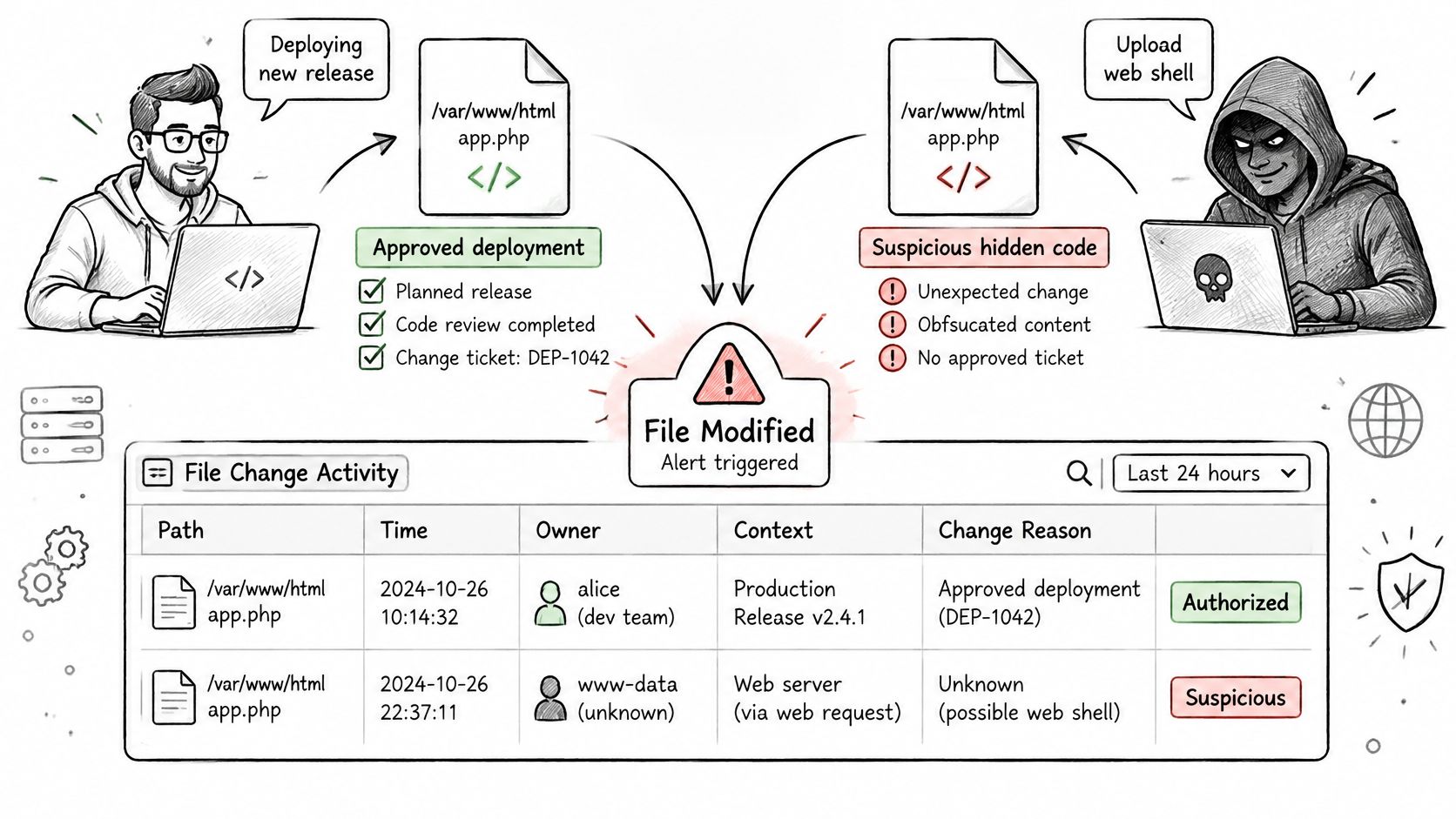
A file change is an alert, not a verdict. Its significance depends on whether it matches an approved deployment, a known identity and a documented operational reason. A legitimate release and a malicious web-shell upload can both register as modifications, so responders need the customer's own deployment and ticketing records to distinguish them.
CIS control guidance calls for reporting that accounts for routine changes, highlights unexpected alterations, shows configuration history and identifies the original logged-in account when someone switches identity through su or sudo. Relevant events include changes to ownership, permissions and alternate data streams, as well as unexpected files, not only changes to content hashes.
Investigate in an order that preserves evidence
- Match the event to an approved ticket or deployment manifest. Check whether the recorded paths and resulting versions match, rather than relying on timing alone.
- If no approved change matches, inspect the administrator identity and session. A familiar service account can still be misused.
- Review related telemetry from the same window, including authentication, process activity and configuration changes. Together, these records can show whether the file event fits an expected release or points to unauthorized activity.
- Preserve the changed file and its metadata before rollback. Restrict access to potentially malicious material and retain the event record centrally.
- Restore a verified version when remediation is appropriate, then address the cause indicated by the investigation.
The WebinOne incident response plan can inform escalation arrangements so customer, integrator and platform responsibilities are clear.
| Alert pattern | Likely cause | Action |
|---|---|---|
| Change matches an approved release | Routine deployment | Confirm the recorded paths and versions against the release record |
| Bulk change in an upload or cache folder | Expected content activity | Validate file types and paths, then apply a documented suppression rule if appropriate |
| Web root file changed with no ticket | Unauthorized edit or web shell | Preserve the file, isolate the site and investigate |
| Owner or permission change on a config file | Misconfiguration or privilege change | Check the identity and compare against an approved configuration |
| New unexpected file in a web root | Upload or injected script | Escalate through incident response |
| Existing log entry altered, new entries added normally | Possible audit tampering | Escalate and check the forwarded log copy |
Use each pattern to guide investigation, not to close it automatically. An emergency repair may be legitimate but undocumented; malicious activity can also occur during a scheduled maintenance window. A maintenance window is context, not blanket authorization.
After an approved release, relate alerts to the customer's deployment records and confirm which changes were authorized. Integrity-verification guidance aligned with NIST SI-7 covers protected, release-aware baselines and defined action on unauthorized changes. A monitoring host should not approve its own new state without notice.
Deployment Patterns for Hosts, Containers and Serverless
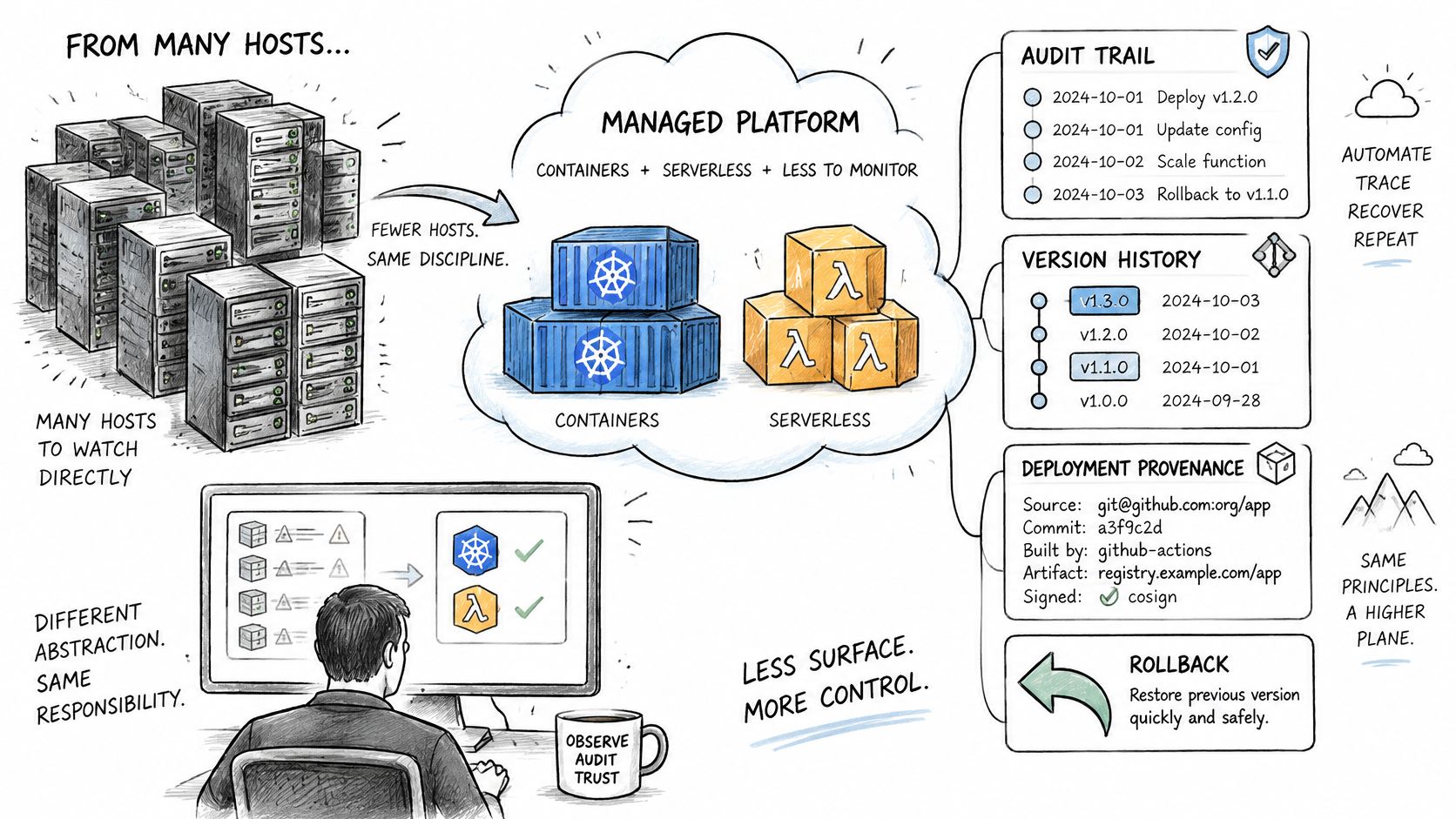
A managed platform reduces the hosts a customer watches directly, but it doesn't remove the need for configuration history, deployment provenance and rollback evidence. WebinOne is hosted on AWS across 6 AWS regions, so deployment placement and responsibility form part of the monitoring design.
Long-lived servers make the reference point relatively straightforward: approved files on a known host. Containers, Kubernetes workloads, serverless functions and infrastructure-as-code require a different question. What represents the authoritative state when replacement is intentional and the original workload may disappear before investigation?
Cloud-native FIM analysis describes the limitations of traditional monitoring in ephemeral and immutable environments. The practical response is to separate release integrity from runtime integrity rather than applying a static server policy everywhere.
Separate release approval from runtime detection
Before deployment, verify image provenance, dependency integrity, secret references and deployment manifests. Don't place plaintext secrets in broadly accessible integrity reports. Retain identifiers that establish which approved artifact and configuration reached each environment.
After deployment, monitor unexpected writes, privileged changes, runtime drift and unusual process execution. An approved image doesn't guarantee that every subsequent action is authorized.
| Pattern | Best fit | Blind spot |
|---|---|---|
| Host agent with file baseline | Long-lived virtual machines and static web servers | Adds noise on short-lived workloads |
| Scheduled snapshot comparison | Stateful servers with a stable file layout | Misses changes made and reverted between scans |
| Pipeline and admission control | Kubernetes and containers verified before deployment | Doesn't see changes made after admission |
| Runtime eBPF or API-based sensing | Containers and short-lived processes | Requires suitable kernel or API support in the environment |
| Cloud configuration audit | Infrastructure-as-code and control-plane drift | Doesn't hash file contents on the host |
A host agent offers local context but creates its own deployment and maintenance obligations. Agentless collection can simplify access arrangements, but polling may leave gaps and provide less detail about the process responsible.
For serverless workloads, focus on deployment packages, version identifiers, execution roles and configuration changes. Don't promise host-level visibility where the execution environment doesn't expose it.
The architectural shift is from checking a permanent machine to verifying approved state across deployment boundaries.
Preserve evidence beyond workload termination
Forward relevant events before the workload disappears. Retain enough deployment context to associate the event with an image, application release, environment and responsible identity.
For agencies, that distinction matters commercially. Moving a client onto managed infrastructure should reduce direct infrastructure maintenance, not replace it with uncertainty about who can investigate a production change. For integrators, the WebinOne enterprise partnership and migration conversation is the place to establish that responsibility boundary.
Immutable infrastructure doesn't eliminate FIM. It shifts the control point toward images, pipelines, manifests, runtime behavior, and platform configuration. Define the baseline where authoritative state resides.
Compliance Minimums Versus Production Cadence
A weekly comparison can satisfy a documented control floor while leaving a long detection gap in production. For a payment site, a changed file could affect visitors before the next scheduled scan, or be restored before that scan runs. Set cadence around how quickly a change can cause harm, then use scheduled comparisons to catch missed events and sensor failures.
The PCI DSS change-detection white paper describes Requirement 11.5, including critical-file comparisons at least weekly and protection for audit trails that detects unauthorized changes to existing log data while allowing new entries. Treat this as version-specific guidance: map the applicable control to the standard version and scope governing the environment.
Measure the exposure between checks
Consider a site that runs a full comparison weekly but receives filesystem events every 15 minutes. The weekly run provides a broad comparison of the monitored state; the event path can surface a change sooner, though its value depends on coverage, delivery and response. For high-risk served paths, use near-real-time events or short-interval polling alongside scheduled full comparisons.
Production rule: Choose detection cadence according to how quickly an unauthorized change can affect a visitor, account or transaction.
An alert is useful only when it can be matched to an approved change. Retain coverage records, protected baseline references, alert details and documented dispositions so reviewers can connect an event to its outcome. For teams aligning controls across obligations, compliance framework guidance for security leaders offers a starting point for structuring that work.
Recovery planning is a separate part of the operating model. Use WebinOne website backup guidance to inform backup decisions, and ensure the team can identify which recovery point is appropriate for the incident.
Test the actual control
- Does the scheduled check meet the applicable floor? Record the governing requirement and evidence of completed comparisons.
- Can a changed web file be served before detection? Review event coverage, alert delivery and response ownership against the chosen cadence.
- Are existing log entries protected against alteration? Confirm that new entries remain possible while changes to historical records trigger investigation.
Keep the payment scope diagram, monitoring policy and evidence owner aligned. That makes it easier to show which application paths are covered and who handles an alert.
Key Features and the Questions to Ask Before You Buy FIM
Before relying on any FIM tool or managed platform, WebinOne included, confirm both investigation capability and contractual responsibility. Feature coverage establishes what can be detected; contract terms establish what happens when prevention fails.
The required capabilities are specific: baseline storage the monitored host can't overwrite, event-driven web-root monitoring alongside full comparisons, release reconciliation, original-account attribution and coverage of ownership, permissions and alternate data streams. Add protected event retention and routing into the ticketing system or SIEM.
Make the demonstration answer operational questions
- Where is the baseline stored, and who can write to it? Request the access model, including administrative exceptions.
- How are approved changes matched to alerts? Demonstrate a deployment and an unexplained edit, not just a dashboard.
- Is coverage defined by path, event or both? Test creation, deletion, replacement and permission changes.
- How long are event records retained, and can administrators delete them? Establish protection for existing records and the export process.
- How will unauthorized access affecting services be communicated? Identify notification conditions, investigation dependencies and escalation contacts.
The WebinOne zero-trust and CMS guidance provides context for evaluating monitoring alongside identity and access controls. FIM doesn't replace either.
Read the security terms literally
WebinOne maintains commercially reasonable technical and operational measures designed to protect its internal networks from malicious activity. That language describes an obligation to apply measures, not a guarantee that incidents can't occur.
If WebinOne finds unauthorized access affecting a customer's Services, WebinOne notifies the customer as soon as reasonably practicable after investigating and fulfilling its legal obligations, in accordance with its Incident Response Plan. WebinOne is not responsible for any loss or harm a customer suffers from a security incident.
Take those terms into procurement explicitly. Clarify evidence access, customer-side duties, insurance and response ownership in writing rather than assuming the platform carries every consequence. A capable monitoring system still needs a funded response process and a tested recovery decision.
Confirm Your Monitoring Scope With the WebinOne Team
A monitoring alert is useful only when the team can match it to an approved change, identify who owns the affected layer, and decide how to preserve evidence and restore service. Bring a site inventory, environment boundaries, deployment paths, approval process and log-retention requirements. The goal is a clear responsibility map, not a wider alert queue.
Bring a scope that supports a decision
- Estate inventory: Production, staging, shared services and customer-specific components.
- Change evidence: Release manifests, approval records and administrator identity sources.
- Recovery requirements: Acceptable restoration points, validation procedures and evidence-retention needs.
Use the inventory to assign monitoring ownership at each layer. For every unexplained change, name who receives the alert, who can preserve relevant evidence and who authorizes restoration. A weekly check may establish that a file changed, but without an approved-change record and a responsible owner, it cannot explain whether the change was expected or what to do next.
For qualifying systems integrators, a licensed version of WebinOne can run in the integrator's or customer's AWS account by agreement, including AWS GovCloud. Confirm the deployment model and applicable compliance requirements for the specific project. WebinOne is preparing for upcoming compliance certifications through platform-wide security improvements, so assess current status against the intended use case rather than treating hosting location as proof of compliance.
Keep the scope practical: it should connect monitored components to change approvals, evidence access and recovery authority. That gives the teams operating the platform a defined path from alert to decision.